

I’ve been implementing warehouse management systems for years, and I still remember the first time I stood on a warehouse floor the morning after a go-live and watched everything grind to a halt. Trucks waiting. Workers standing around with scanners in their hands. Boxes piling up in the shipping zone with nowhere to go.
Not because the software was bad – but because the preparation wasn’t good enough.
I’ve since been part of dozens of warehouse system implementations – including a post-go-live stabilization project for an international life sciences company in the Netherlands, where a team of 50+ (!) consultants spent months untangling a botched go-live. That experience, more than any other, sharpened my thinking about what actually makes these projects succeed or fail.
The recommendations below apply to any warehouse management system implementation. I’ll use SAP Extended Warehouse Management (SAP EWM) as my primary example, since that’s where I spend most of my time – but the underlying principles are the same whether you’re rolling out SAP EWM, Increff, Blue Yonder, or anything else.
Why warehouse implementations are uniquely high-stakes
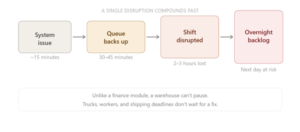
A warehouse doesn’t stop. When a system goes down, there’s no “we’ll sort this tomorrow” – there are trucks at the dock right now, forklifts waiting for task assignments, shipments that need to leave today. A 15-minute disruption doesn’t cost you 15 minutes – usually, it costs you the rest of the shift.
The five phases where things go wrong – and what to do instead
1. Solution design: map the exceptions, not just the happy path
Every implementation starts with process design. And almost every team spends too much time designing the happy path (what happens when everything goes right) – and not enough time on exceptions.
But real warehouses are messy! Goods arrive damaged, deliveries come on the wrong pallet type, customers change their order after picking has already started. These aren’t edge cases; they happen every day – and below are my recommendations for addressing them.
In my practice, we often use BPMN diagrams to map out how processes should flow. When we have the flow, we go back through every decision point asking what could possibly go wrong there. But honestly, the most useful step is bringing those diagrams to the business users. From my experience, every single time, they’ll point out something I hadn’t thought of.
The other thing I’ve learned: resist the urge to put everything in the system. Sometimes a clear operational procedure is just better than clever configuration. Damaged goods, for example – you can build an elaborate rerouting workflow, or you can create a “damaged goods” zone and let the warehouse team take it from there. Simpler systems break less often, and when they do, they’re easier to fix.
2. Testing: the phase most often cut short
If there’s one thing I’d tell every project sponsor, it’s this: don’t cut the testing phase.
In the Netherlands project, around 30% of the functionality hadn’t been fully tested before go-live. That 30% caused a disproportionate share of the post-launch problems. Months of stabilization work, on-site consultants across multiple countries, hundreds of blocked handling units to manually clear – all of it traceable back to compressed testing.
A thorough testing cycle for a complex warehouse system takes two to three months. That includes the implementation team’s own testing, followed by training, followed by UAT (User Acceptance Testing). Each phase builds on the previous one.
UAT alone typically takes four to six weeks – and it’s demanding. Plan for business users to dedicate 30–50% of their working time to it, or roughly 12–20 hours a week.
Who should be in the room for testing?
| Responsible department | Testing phase | Role | Testing focus |
| IT department | Unit Test | SAP consultants/ ABAP developers | Technical check of the implemented process/code |
| Integration Testing 1 | SAP consultants (EWM, MM, QM, PP, SD) | Cross-process happy-flow check
|
|
| Integration Testing 2 | SAP consultants (EWM, MM, QM, PP, SD) | A deep cross-process check, including negative scenarios | |
| Business users | UAT | Process leads
managers/owners |
End-to-end process validation; sign-off authority |
| Line supervisors
floor-level leads |
Operational realism; exception and edge-case scenarios | ||
| Selected end-users
sharp operators |
Usability; daily workflow tasks; catches gaps the others miss |
You don’t need every warehouse worker involved. You need a focused group: process leads who own each area, line supervisors who know the floor, and a handful of operationally sharp end users. Enough to cover real scenarios – including the ones that go wrong.
And don’t ignore writing test scripts – especially for exceptions. If testers don’t have clear instructions for negative scenarios, they won’t find them – and you’ll find them on go-live day instead.
3. User training: practical beats theoretical, every time
I’ve seen the same pattern many times: training gets squeezed into one session close to go-live, people sit through a demo, and then everyone walks out feeling reasonably confident. But after go-live, a small mismatch can paralyze the whole system – and it takes time and effort to fix it.
Real case example: in the system, storage locations were set up using hyphens (01-01-01), but the physical bin labels were printed with underscores (01_01_01). Since UAT covered only the system side, everything looked fine. However, after the go-live, the warehouse staff couldn’t put goods away or pick them up because, due to a “small” mismatch, the scanned barcodes didn’t match anything in the system. Luckily, it only affected one pallet storage zone, but the root cause is a classic one: a gap between what’s tested on screen and what exists in the real world.
Warehouse workers learn by doing – they need to actually work through scenarios in the system, not watch someone else do it. And training (same as testing) has to include the exceptions, not just the clean flows. Who do you call when a task can’t be completed? What’s the process when a delivery is wrong? These are basic questions that should have clear answers before day one.
The other thing teams consistently underestimate: warehouse users are busy. They have their current jobs to do. If participation in training isn’t protected time – formally scheduled and prioritized – it gets squeezed out. And everyone acts surprised when the go-live is rocky.
One more thing on training: when people are moving from a system they know to something new, some resistance is normal. The most effective way I’ve found to deal with it isn’t to push harder — it’s to be specific about what’s actually better for them. Not “this is more efficient” in the abstract, but “this task that currently takes you four steps takes two.” That tends to land.
4. Cutover planning: sequence is everything
The cutover – an actual switch from the old system to the new – is its own project within the project. It needs a detailed, sequenced plan with time estimates for every step.
Why does sequence matter so much? Because warehouse systems have hard dependencies. In SAP EWM, for example, you can’t set up bin sorting until the warehouse structure is loaded. So if you get the order wrong, you block yourself – and you’re doing this overnight, under time pressure.
Before the technical switch, the business also has work to do: close open deliveries, clear the goods receipt area, confirm or cancel pending shipments, run an inventory count, and verify that stock in the WMS matches the ERP. These are business tasks, not IT tasks – and they need to be on the cutover plan with the same rigor as the technical steps.
Cutover checklist:
| IT/implementation team | Business/operations team |
| Enter/load warehouse-specific master data (Business partners, Supply Chain Unit, storage bins and sorting the materials (product) master data, etc.) | Complete all open deliveries |
| Set up user accounts and their parameters, roles, printers | Clear the goods receipt area |
| Set up local warehouse-specific data (packaging specification, EWM resources, Work Centers, etc.) | Confirm or cancel pending shipments |
| Set up warehouse-independent data (Condition records, Wave Templates, etc.) | Run full inventory count |
| Migrate and verify stock data | Verify WMS stock matches ERP |
| Verify system integrations (ERP, etc.) | Brief warehouse staff on go-live day
|
Note: Sequence matters – each step has dependencies.
5. Hypercare: go-live is the beginning, not the end
Go-live day is not the finish line; it’s the start of hypercare – a period of intensive support while operations and the system settle in together.
During this phase, issues will surface. The important skill is categorizing them correctly, because the right response depends on the category:
- System bug or configuration gap → fix it
- User error or training gap → retrain, clarify responsibilities
- Out-of-scope scenario → handle as a change request, with a separate timeline and budget (and provide a workaround until the change request is resolved)
Skip this step, and every post-go-live issue becomes a conversation about who’s responsible and who’s paying. I’ve seen that dynamic damage relationships between clients and implementation partners – and in most cases, a bit of upfront clarity would have prevented it entirely.
For larger operations, it’s worth having someone in-house who knows the WMS well enough to sit between the warehouse team and the implementation partner. Not necessarily a developer or IT specialist – just someone who knows the system inside out and can triage issues, ask the right questions, and make sure nothing gets lost in translation.
The real cost of cutting corners
The Netherlands project I mentioned was fixable. The team stabilized operations, cleared the backlog, identified root causes, and retrained users. By the end of the stabilization phase, the warehouse was running well.
But it took months, dozens of consultants, and significant disruption to an international distribution hub. Not to mention the costs, of course!
All of it was preventable. Thorough testing, practical training, a realistic cutover plan – none of these are optional extras. They’re the difference between a go-live that works and a go-live that becomes a stabilization project.
The most expensive part of a WMS implementation is often the part that wasn’t planned.

Subscribe