

A customer places an order, but instead of a quick process, there is a lot of back-and-forth between departments. Sales checks that products are a are in stock, Purchasing checks that delivery date will be met, Manufacturing needs components, the Warehouse waits for confirmation that production is done, and Logistics doesn’t know when to schedule the shipment. When employees exchange emails, make phone calls, and send Excel files, there are more chances for orders to be completed more slowly, to cost more, and to have more errors.
SAP Supply Chain Management (SAP SCM) solves exactly these kinds of problems. The system puts sales, procurement, production, warehousing, logistics, and finance together as one digital process, where each action automatically starts the next. In this article, we’ll show how SAP SCM helps companies manage the entire supply chain. We’ll use the Order-to-Delivery scenario to explain how.
What is SAP Supply Chain Management?
SAP Supply Chain Management (SAP SCM) is a suite of integrated solutions that helps organizations plan, execute, and optimize every stage of the supply chain.
SAP SCM covers a wide range of processes, from sourcing and transforming raw materials to managing complex production operations, warehousing, transportation, and delivering products to customers. The processes can vary depending on the industry. For example, they may include traditional manufacturing, as well as specialized operations such as cheese aging, pharmaceutical chemical reactions, batch processing, or other production and transformation activities. Its goal is to improve efficiency, quality, productivity, and customer satisfaction. SAP SCM connects every business function within a single digital workflow.
Core capabilities of SAP SCM
- Planning: Forecast demand, optimize inventory, and plan supply networks
- Procurement management: Control vendor relationships, automate strategic sourcing, and manage purchase orders
- Manufacturing: Execute production plans, manage shop floor operations, track material consumption, and strengthen quality control.
- Shipping and distribution: Plan and track shipments, manage transportation, and ensure on-time delivery.
End-to-end supply chain process in SAP SCM
This article outlines an end-to-end integrated supply chain cycle initiated by customer demand. The process is as follows:
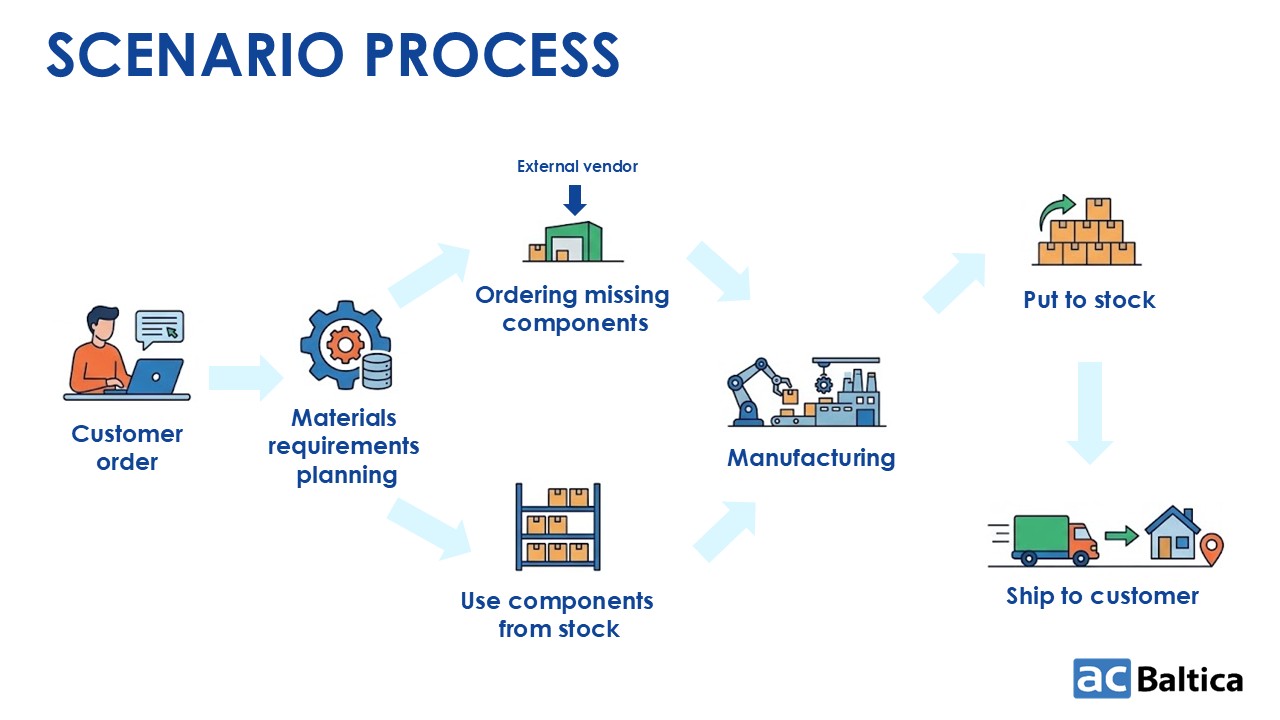
When a customer places an order, SAP checks inventory, identifies missing materials, initiates procurement as needed, coordinates warehouse operations, supports manufacturing, prepares outbound delivery with corresponding warehouse activities, and generates billing documents after shipment.
SAP SCM user workspace
Users access SAP SCM via web browser, SAP GUI, or mobile devices, depending on their role and business needs.
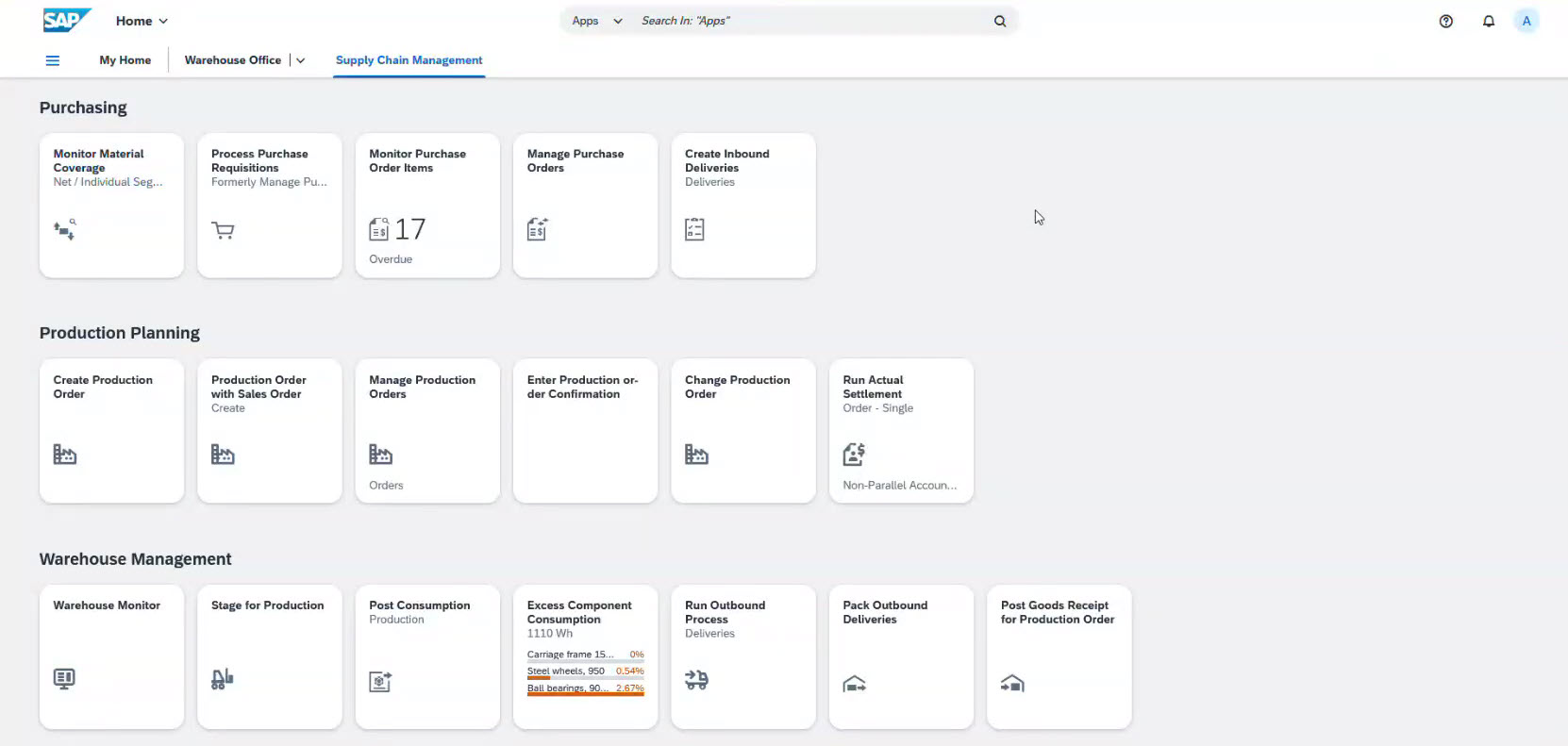
The tiles are distributed by roles and can be adapted according to employees’ roles.
The whole process in SAP SCM is divided by the departments and might involve Purchasing, Production planning, Warehouse management, Sales and Distribution, Financial accounting, and so on.
Note: Each specialist has access only to the areas relevant to their responsibilities.
Step 1. Customer order initiates the supply chain
The process starts with the creation of a Sales Order.
When a customer places an order, SAP creates a Sales Order that contains customer information, ordered products, quantities, pricing and discount conditions, the requested delivery date, and the order status.
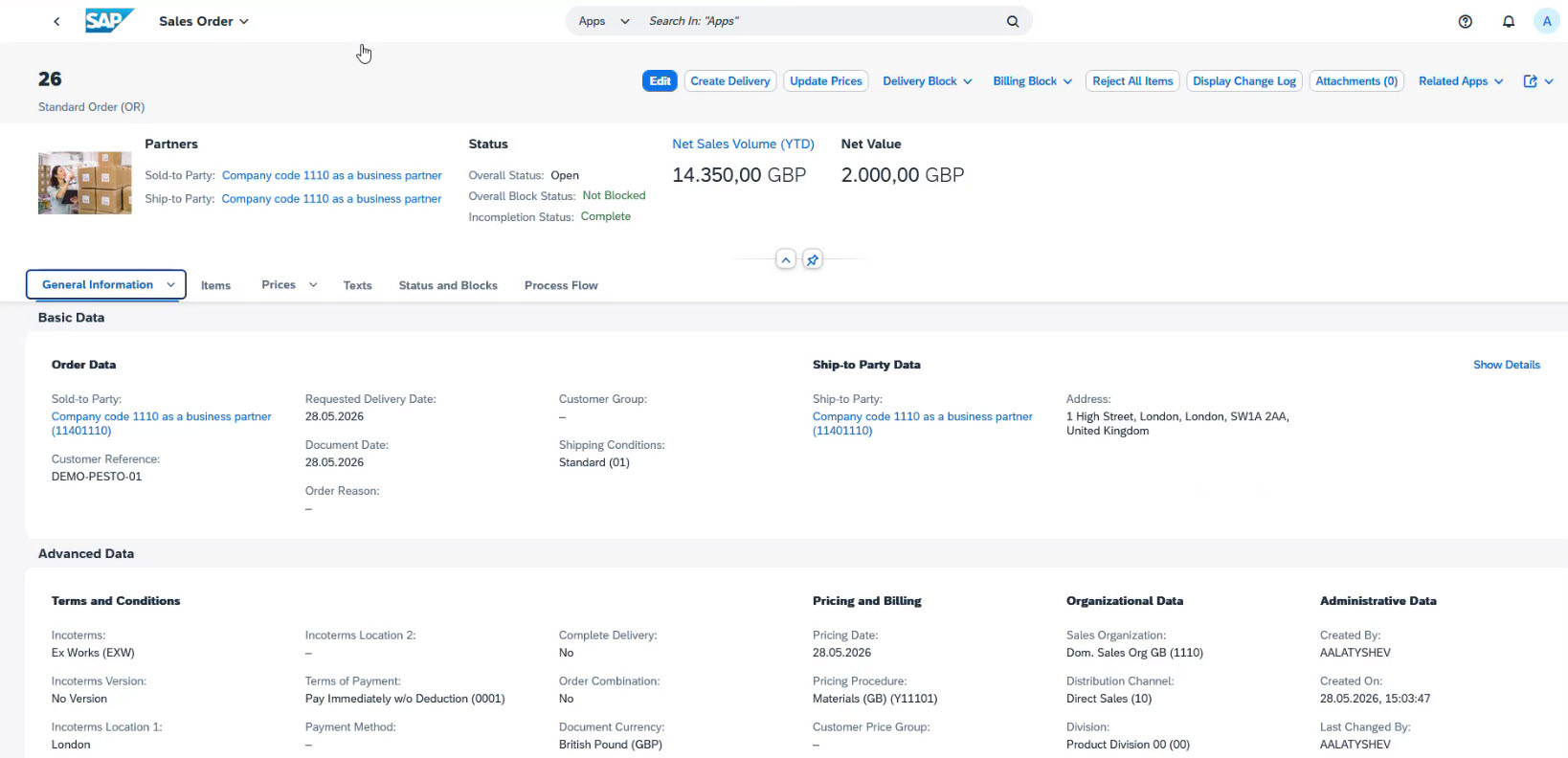
At this stage, SAP determines which products require manufacturing and their delivery dates.
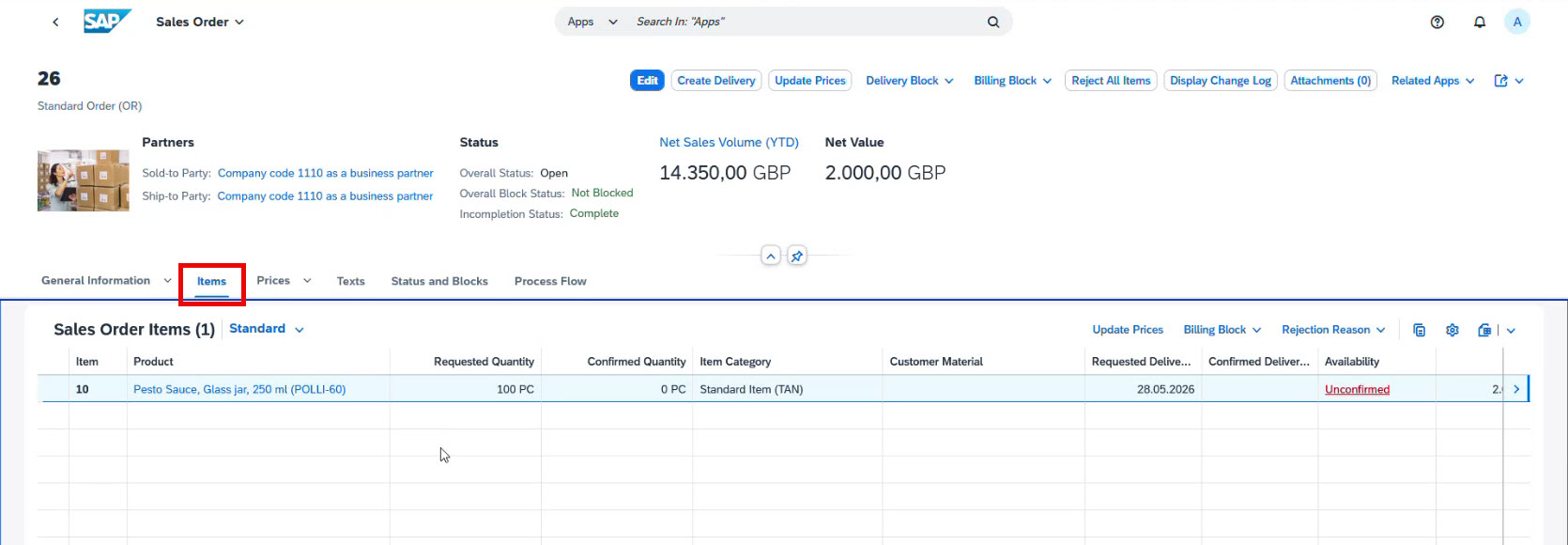
Note: The solution can be extended with custom fields and custom logic to fulfill specific business needs.
The Sales Order serves as the trigger for production planning, procurement, warehouse execution, logistics, and customer billing.
Step 2. Production planning
Once the Sales Order is received, the system automatically generates a Production Order.
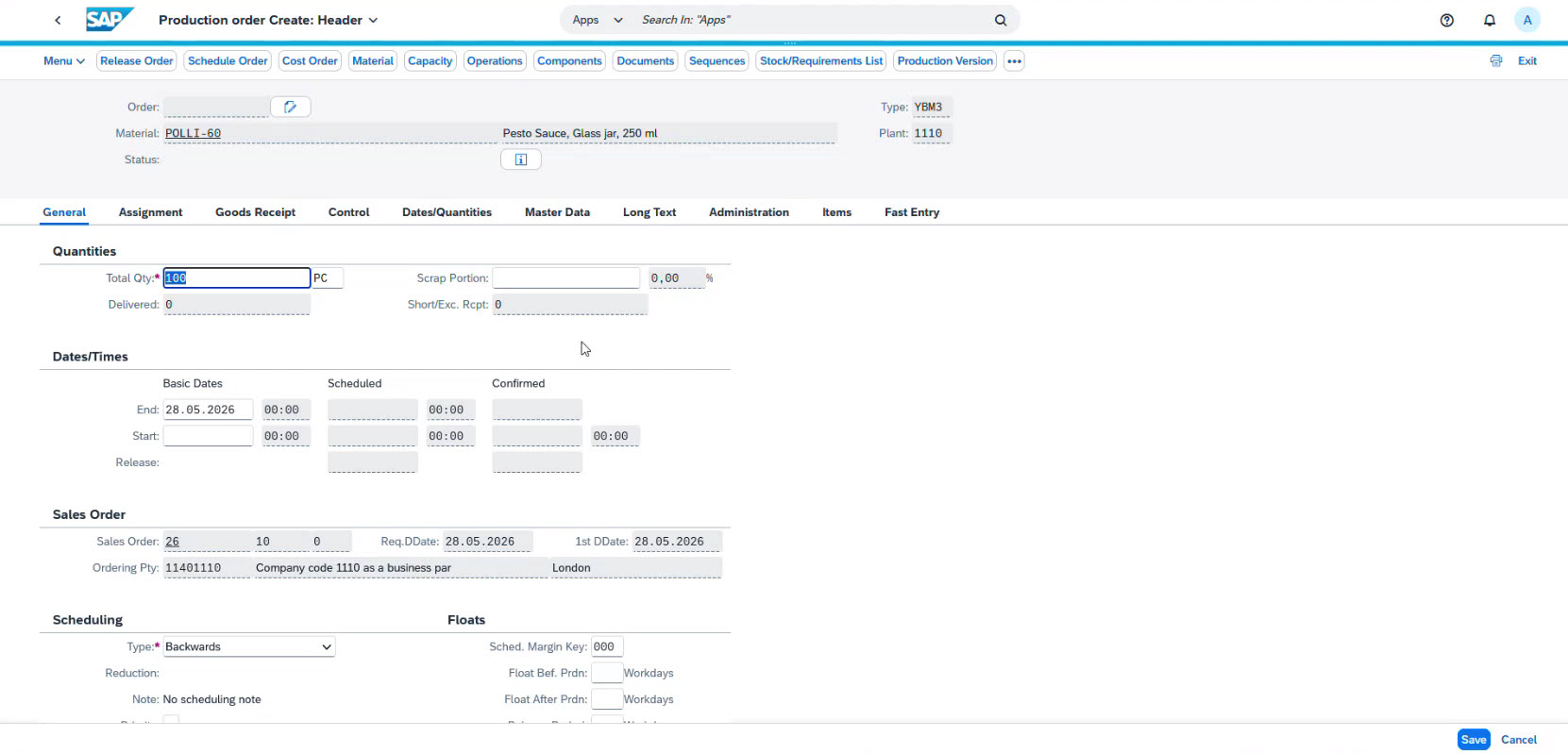
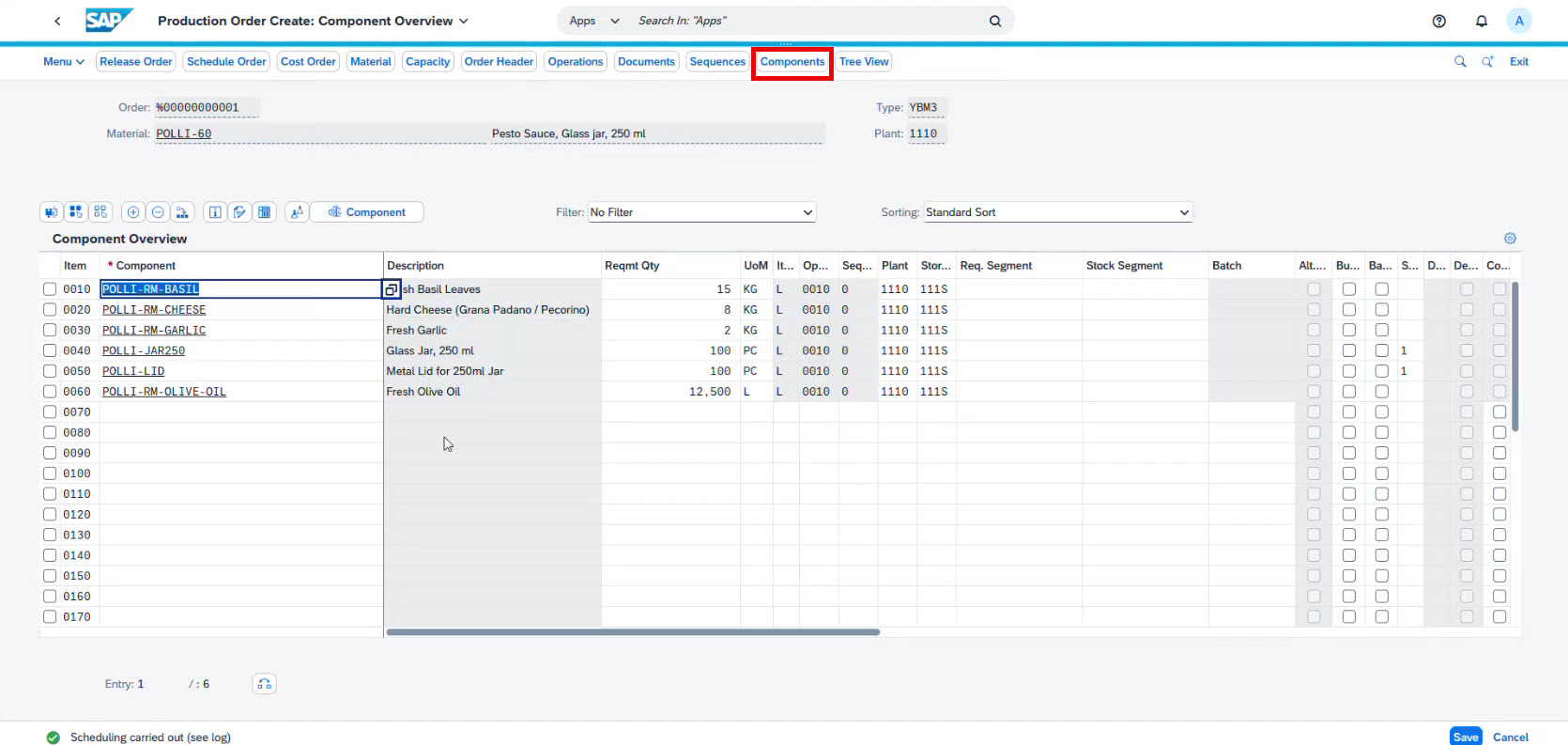
The Production Order lists the components required for the production and order fulfillment. It includes:
- The finished products
- Required production quantity
- Bill of Materials (BOM)
- Required components
- Planned production start and finish dates
- Production order status (showing the current production progress)
The planned dates are used to coordinate component procurement and product shipments.
SAP distinguishes between in-house production and external procurement.
Step 3. Material Requirements Planning (MRP)
Once the Production Order has been created, SAP evaluates whether all required components are available to start manufacturing.
Production planners use the Manage Material Coverage tab in SAP SCM to check inventory, eliminating manual checks.
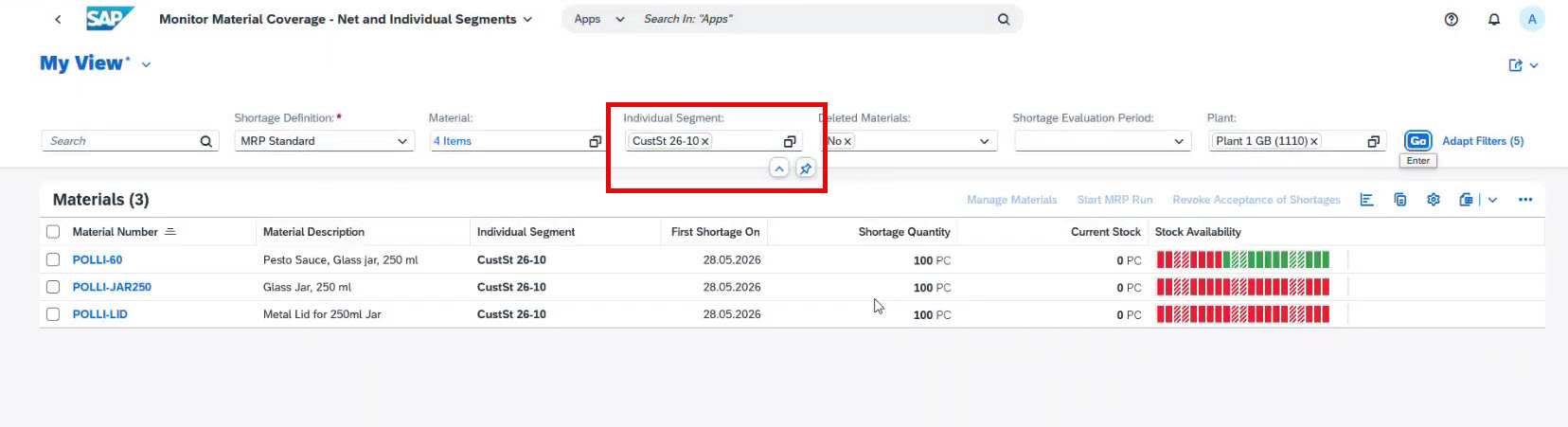
SAP automatically checks:
- materials in stock
- missing components
- items that need to be ordered
In the screenshot, the system detects a shortage of cans and lids.
Rather than creating supplier orders immediately, SAP first determines procurement requirements through Material Requirements Planning (MRP).
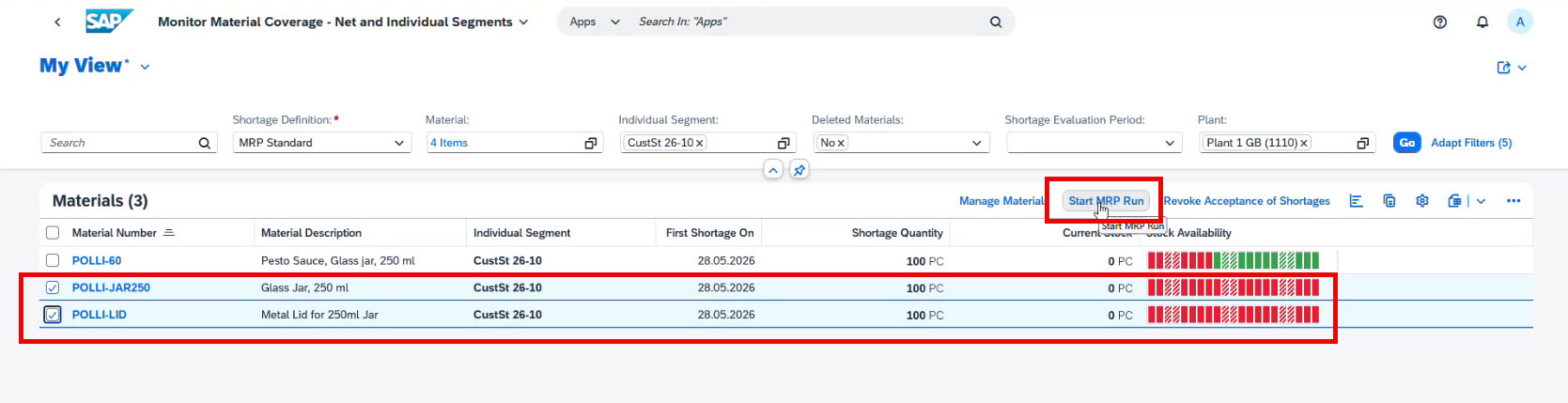
When the planner starts the MRP Run, SAP calculates material demand and automatically generates Purchase Requisitions for components not available in inventory.
This helps prevent both material shortages and excess inventory.
Step 4. Procurement of missing components
Based on Purchase Requisitions (an internal document that reflects the company’s need for specific components, materials, or services required for business operations), the procurement team creates a Purchase Order.
SAP automatically suggests suitable vendors based on predefined sourcing rules, purchasing contracts, pricing agreements, or approved supplier lists, eliminating the need to create supplier documents from scratch.
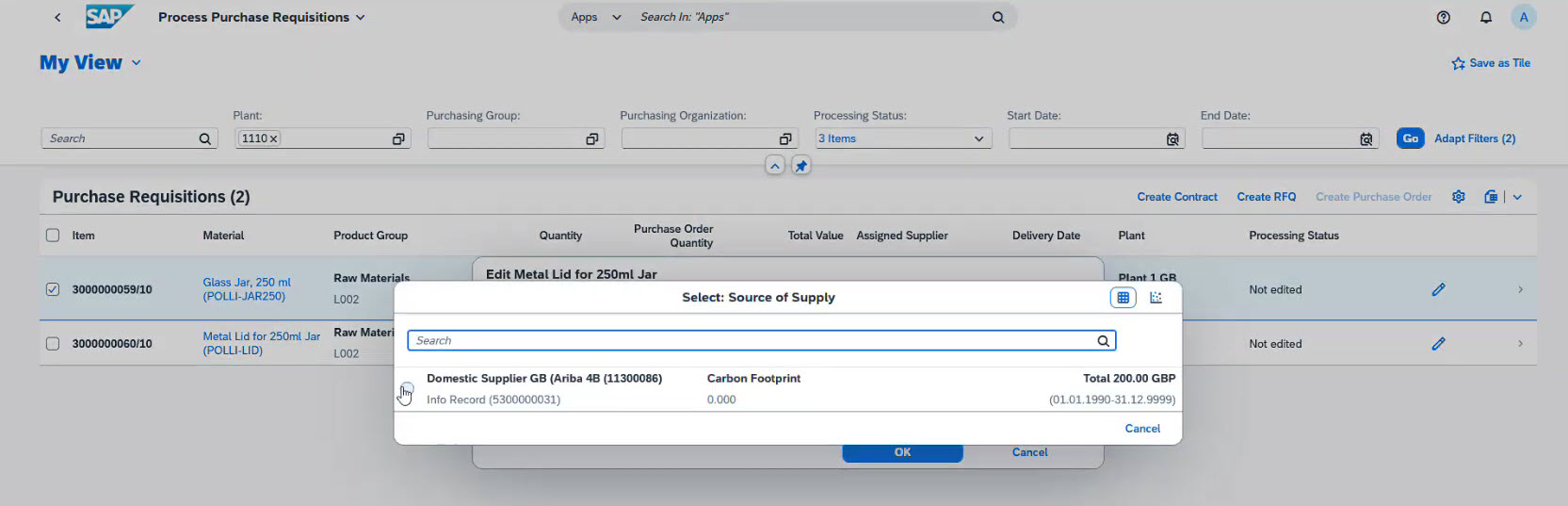
After selecting a supplier, the purchaser creates a Purchase Order.
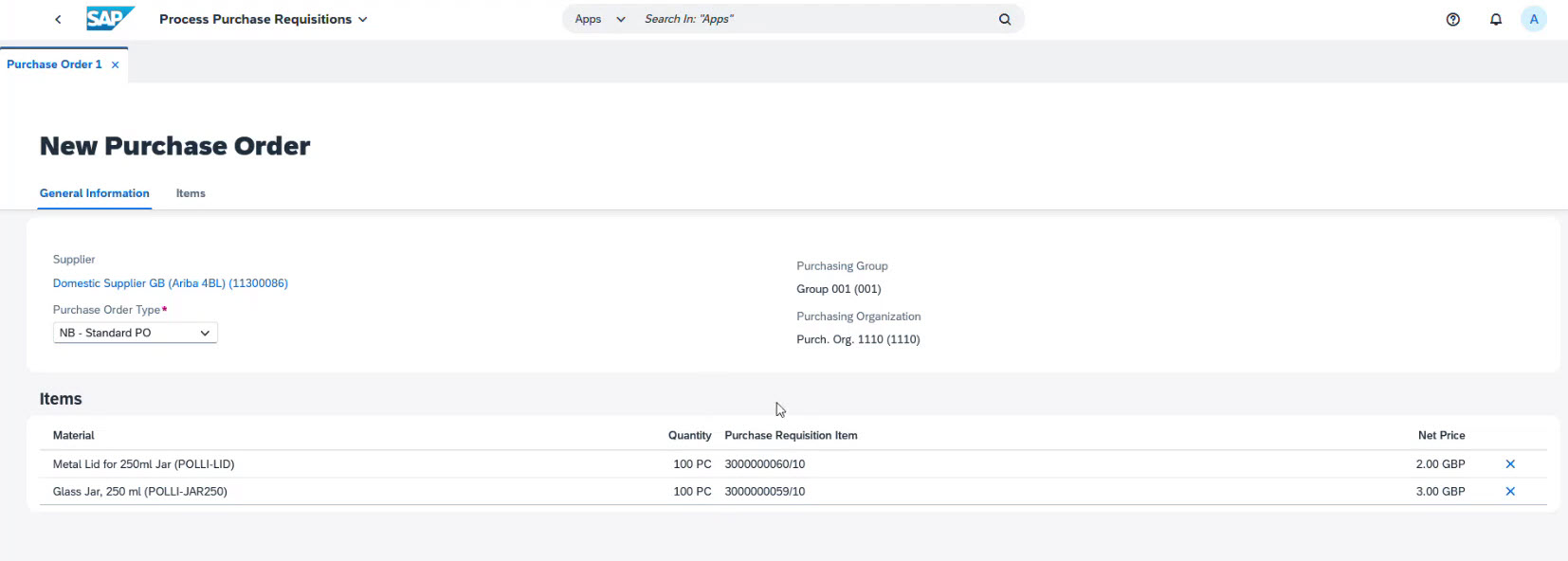
The Purchase Order is the official business document sent to the supplier to request delivery of the required materials.
Once the supplier confirms the shipment, SAP creates an Inbound Delivery, allowing warehouse operations to prepare for receipt of goods before they physically arrive.
Step 5. Goods Receipt and Warehouse Putaway
When materials arrive, warehouse operations begin.
With SAP Extended Warehouse Management (EWM), warehouse operators perform receiving activities directly on mobile devices, eliminating the need for dedicated desktop software.
The warehouse receiving process normally includes the following activities:
- Identifying the inbound delivery
- Scanning shipping labels or barcodes
- Verifying received quantities
- Confirming Goods Receipt
- Creating warehouse tasks
- Moving materials to their assigned storage bins
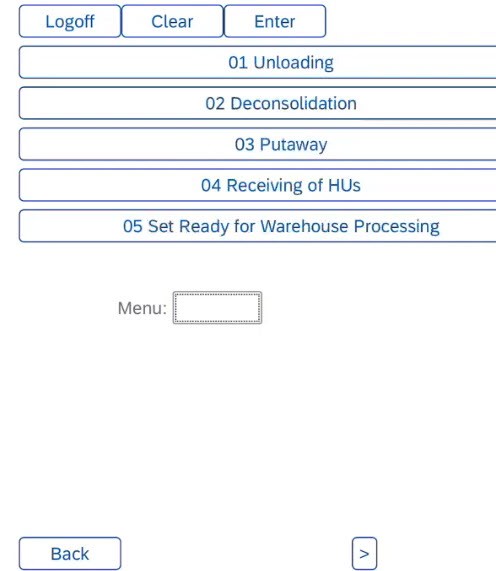
Instead of entering information manually, warehouse employees scan barcodes on pallets, boxes or containers. SAP then retrieves the delivery document and displays important details, such as supplier, product description, quantities, packaging, and delivery status.
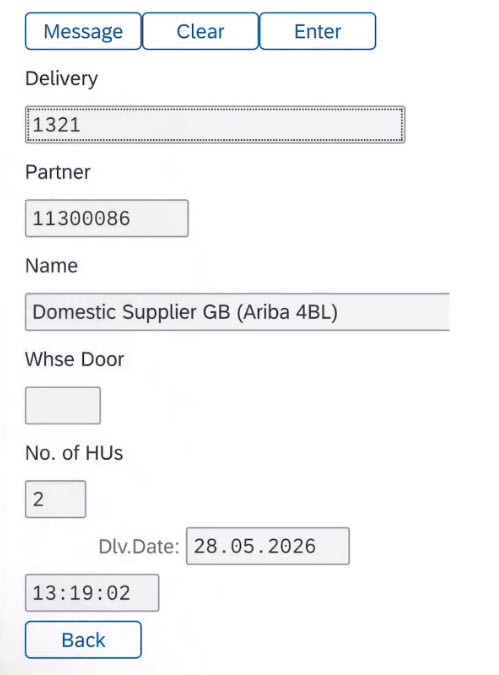
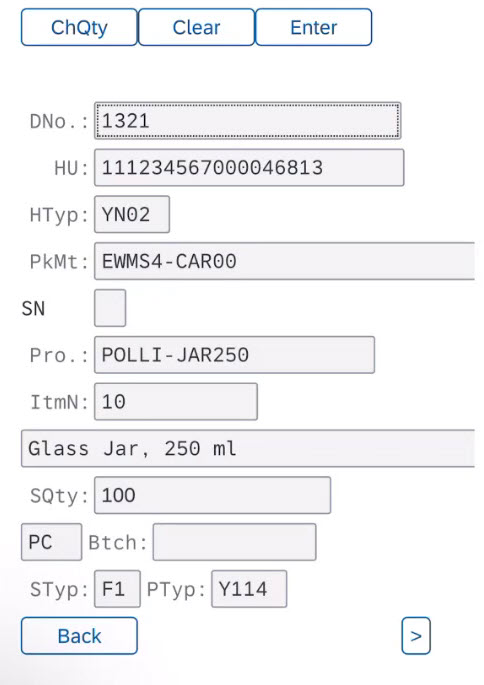
After unloading the shipment, the operator confirms the Goods Receipt.
This transaction records that the materials have entered the warehouse and updates inventory in real time.
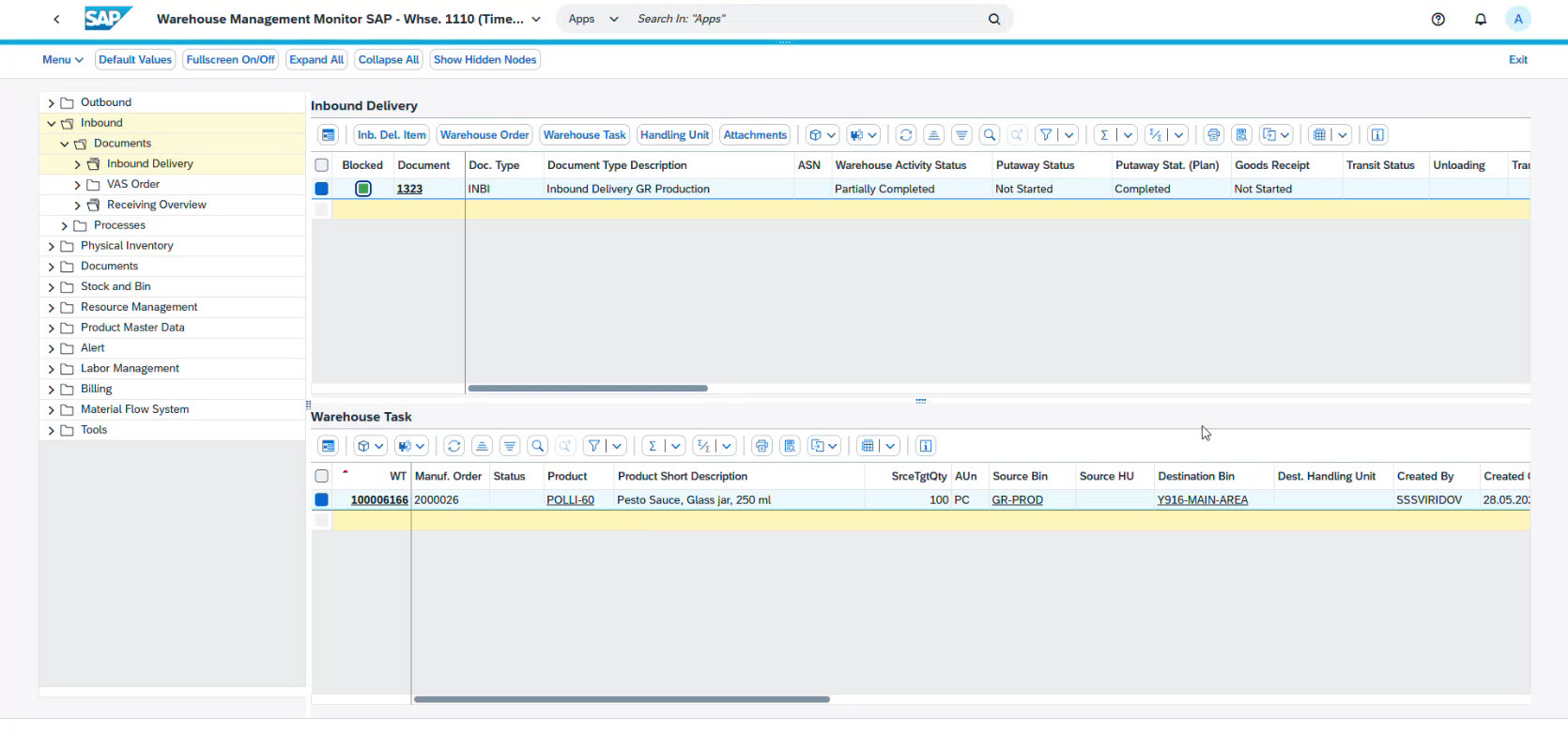
Next, SAP automatically generates a Warehouse Task that instructs the operator where the materials should be stored.
Once the warehouse task is confirmed, inventory becomes available for production processes.
All actions are displayed in the system in real time.
Step 6. Material Staging to Production
When all components are available, SAP creates tasks to move them to the Production Supply Area.
SAP accomplishes this through the Production Staging process.
Before warehouse execution begins, the Production Order is released for manufacturing.
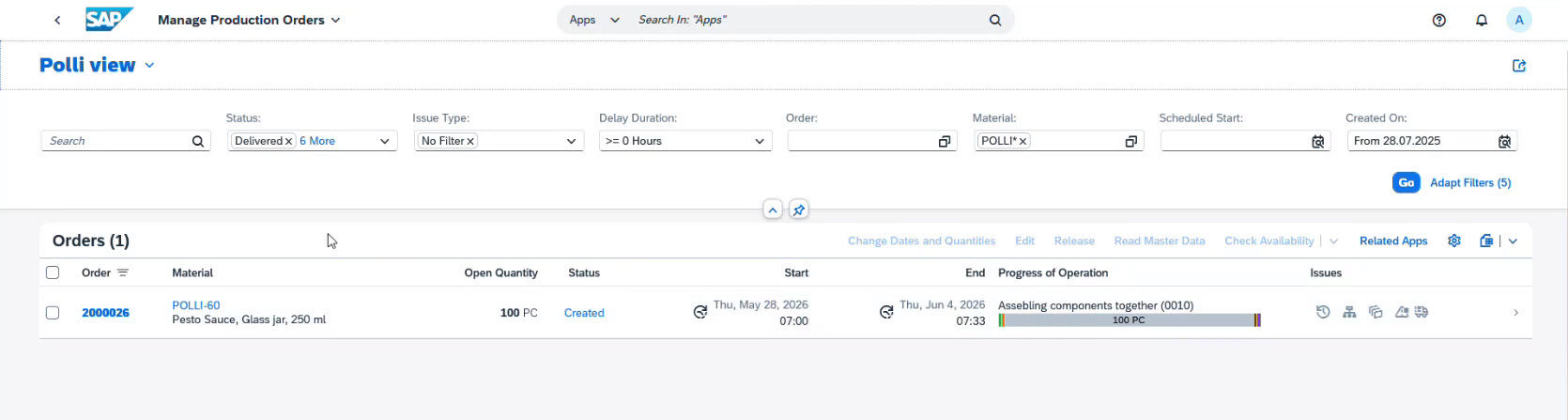
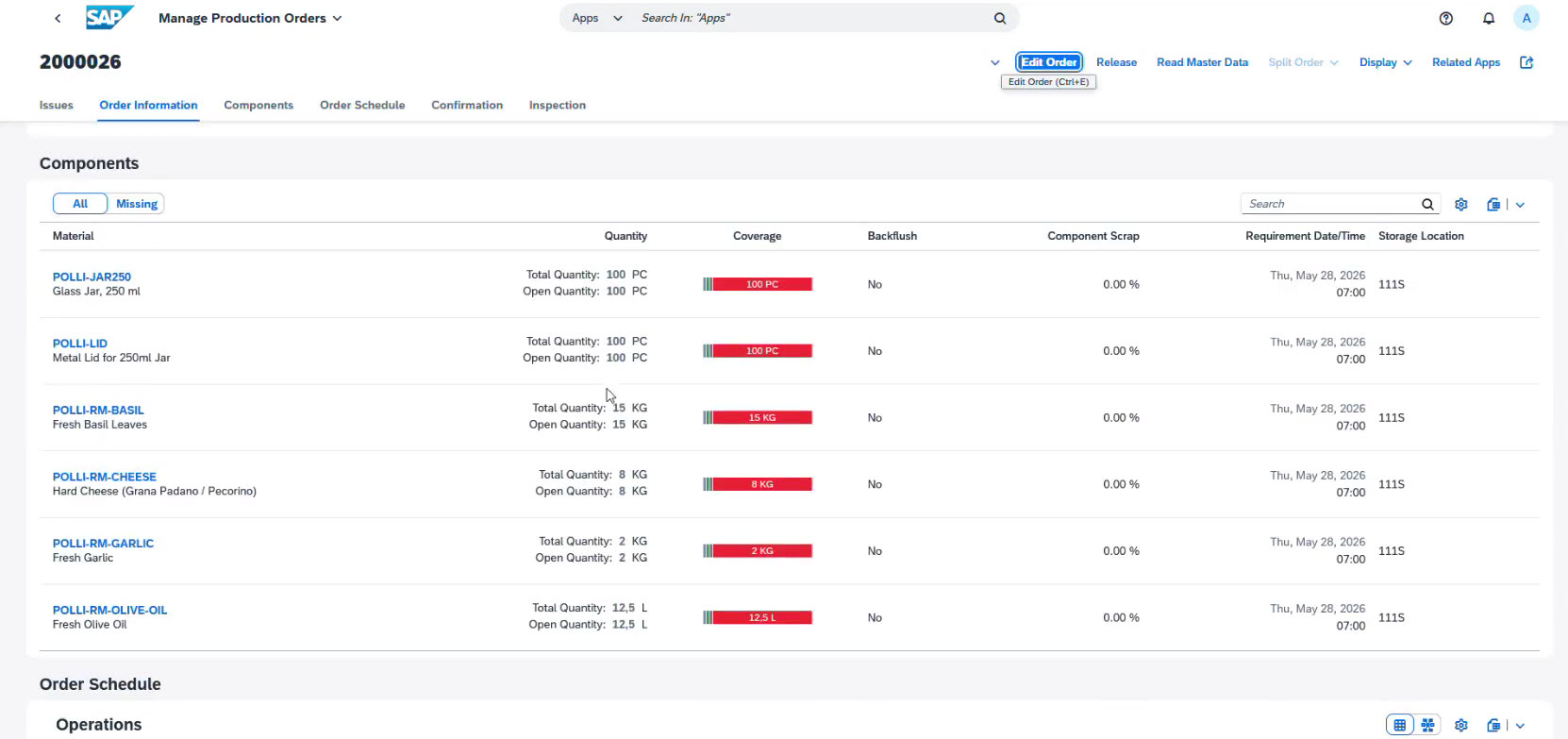
Releasing the order authorizes warehouse workers to begin supplying materials to production.
The Stage Materials for Production application identifies every component required for the manufacturing order and calculates the exact quantities to be transferred.
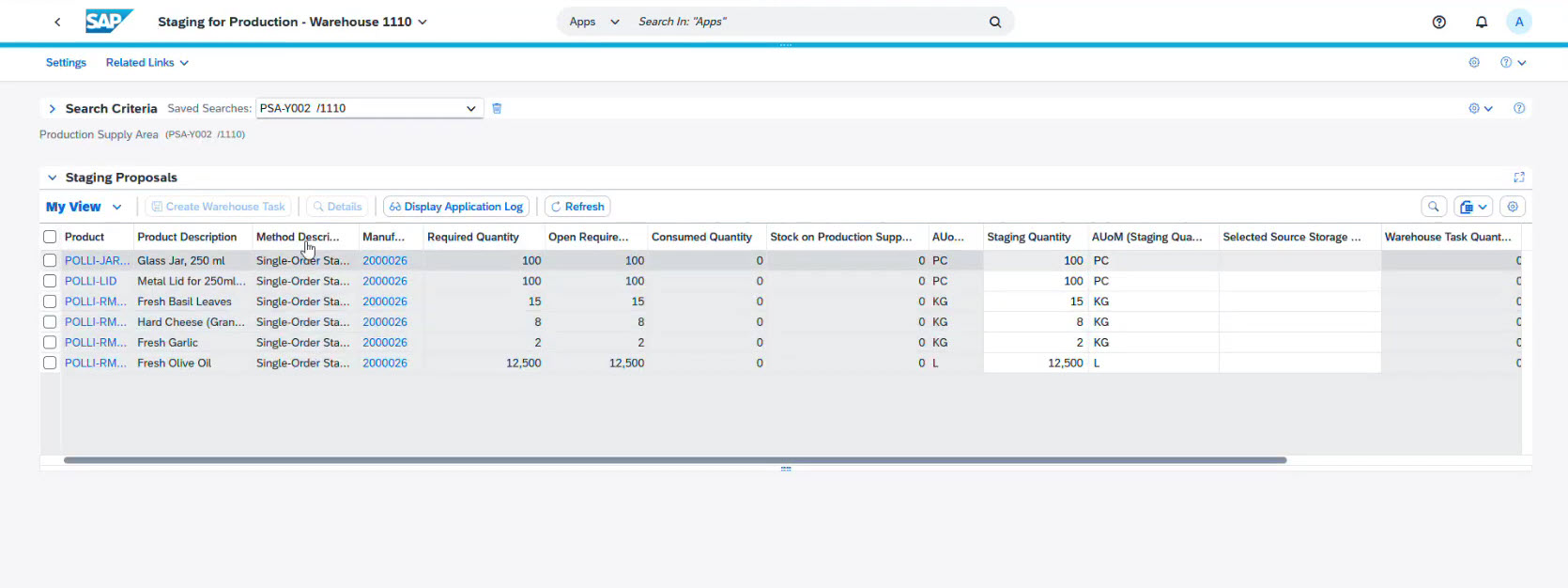
Instead of manually creating warehouse movements, SAP automatically generates Warehouse Tasks for each required component.
These tasks instruct warehouse operators to move materials from storage bins to the Production Supply Area (PSA).
Supervisors monitor warehouse execution using Warehouse Monitor, a central analytical application in SAP EWM.
Warehouse Monitor provides real-time visibility into warehouse tasks, inventory movements, inbound and outbound deliveries, production material requests, warehouse workload, task execution status and many more other warehouse activities.
Once the transfer is confirmed, the production department receives all needed components.
Step 7. Product Manufacturing
SAP tracks the consumption of each component used in manufacturing.
Production operators confirm material consumption through the Post Consumption application.
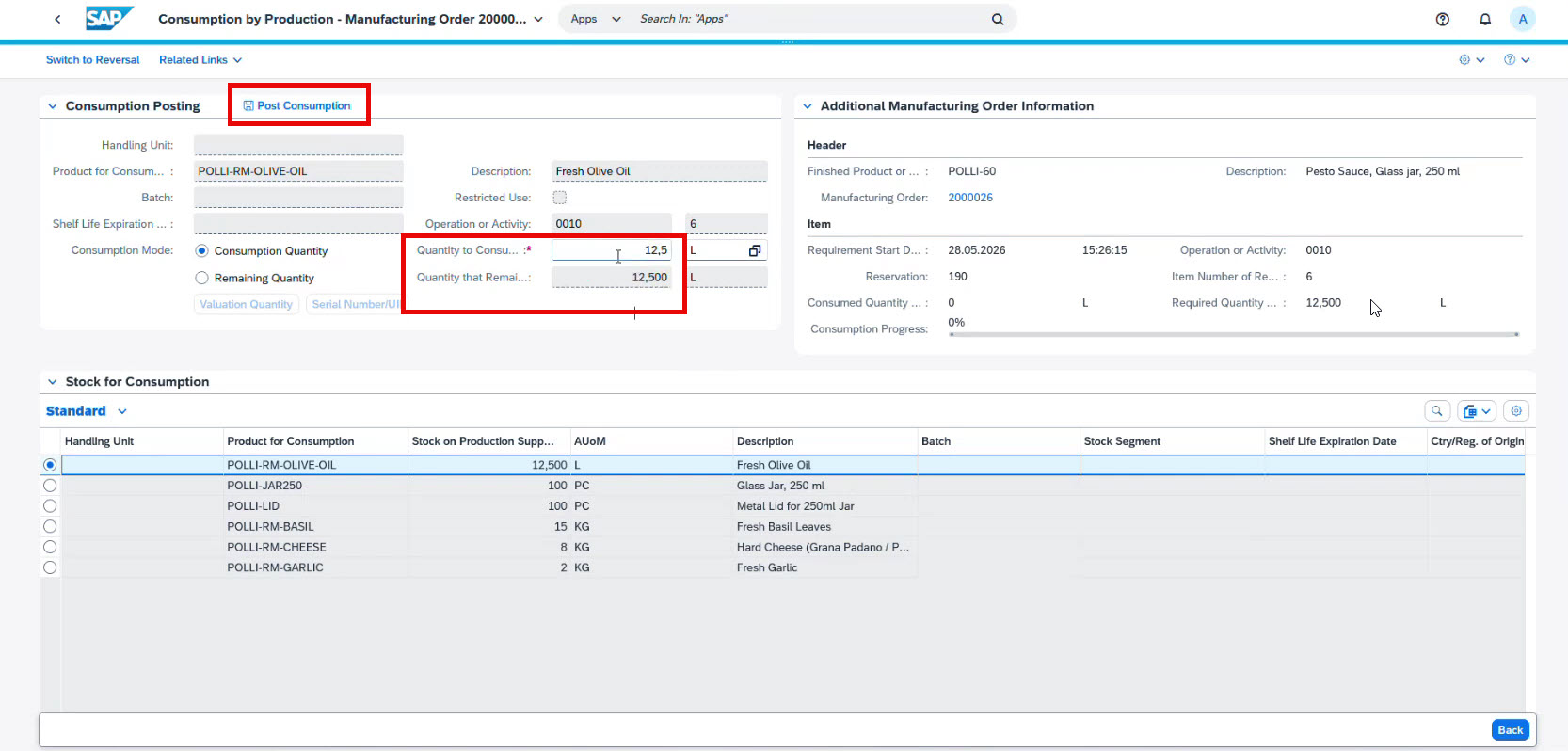
If an incorrect quantity is entered, SAP allows the transaction to be reversed, providing full auditability and inventory control.
After production is complete, the system:
- confirms that the order has been fulfilled
- records the release of finished goods
- automatically creates a warehouse receipt
In highly automated manufacturing environments, these confirmations are typically not entered manually.
Instead, SAP is integrated with a Manufacturing Execution System (MES), which automatically sends production confirmations, material consumption data, and production status updates as manufacturing progresses.
After production is finished, the Production Order receives its final confirmation.
This indicates that manufacturing is complete and automatically triggers the next stage of the supply chain: receiving finished goods into the warehouse.
Step 8. Receiving finished goods into the warehouse
Next, the finished products need to be returned to the warehouse.
To do this, SAP posts a Goods Receipt for the Production Order, confirming completion of production and the availability of finished goods in inventory.
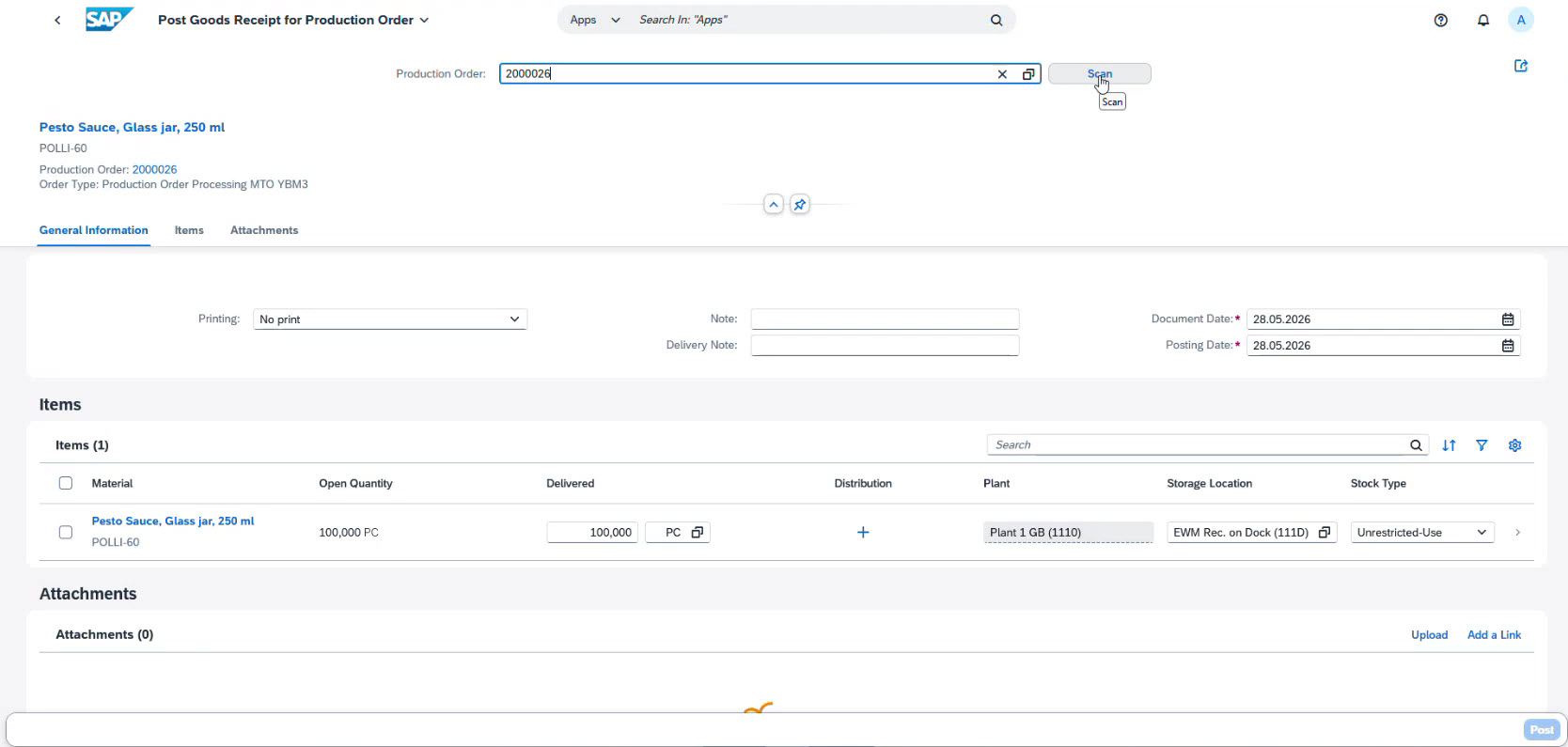
This transaction automatically updates inventory and generates the warehouse documents required for storage operations.
As with incoming supplier deliveries, finished products must be stored in designated warehouse locations before becoming available for customer fulfillment.
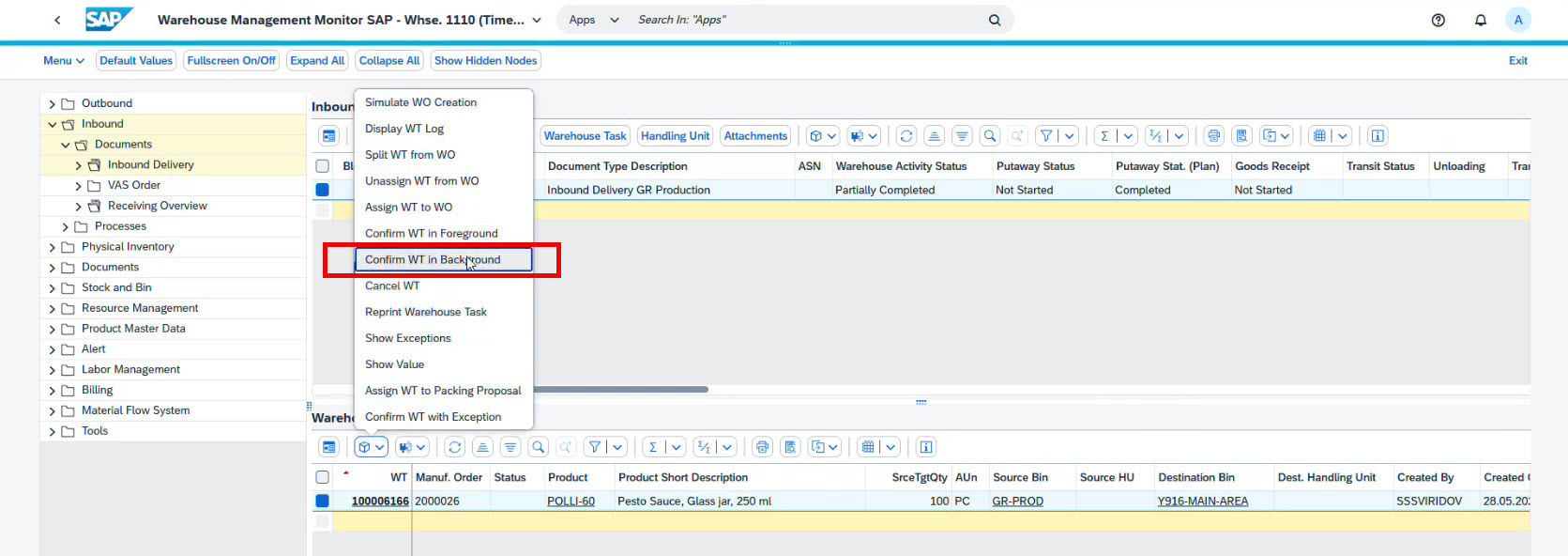
SAP EWM automatically creates Putaway Warehouse Tasks, determining the optimal storage bin according to predefined warehouse rules.
The finished goods are then available for sale and for outbound logistics.
Step 9. Preparation for shipment
Sales managers verify product availability in the SAP SCM system.
For this, SAP performs an Availability Check (ATP) on the chosen Sales Order to confirm that the needed quantity is in stock.
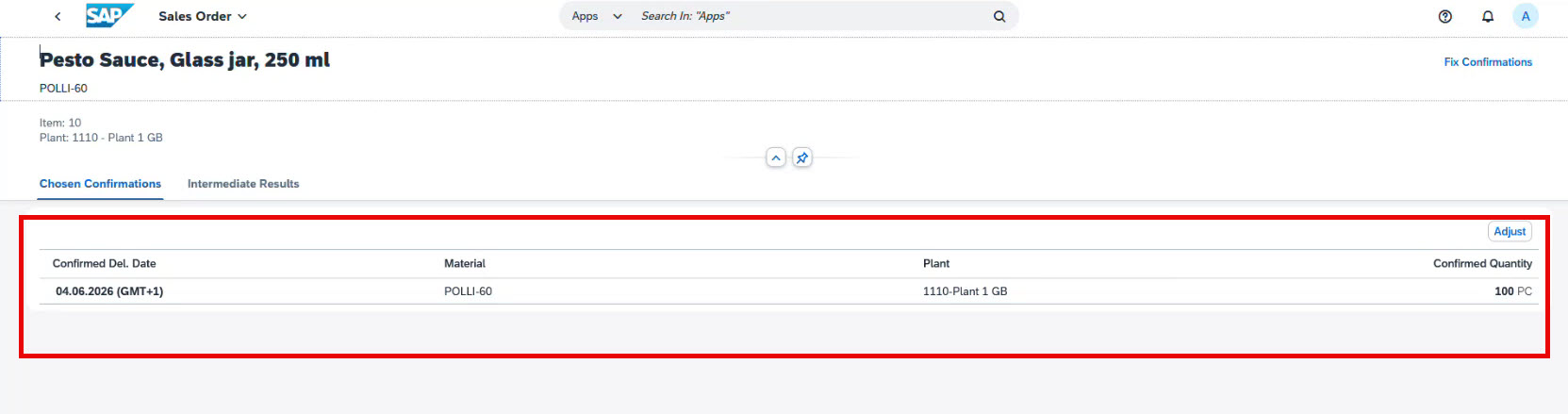
Once availability is confirmed, SAP generates an Outbound Delivery.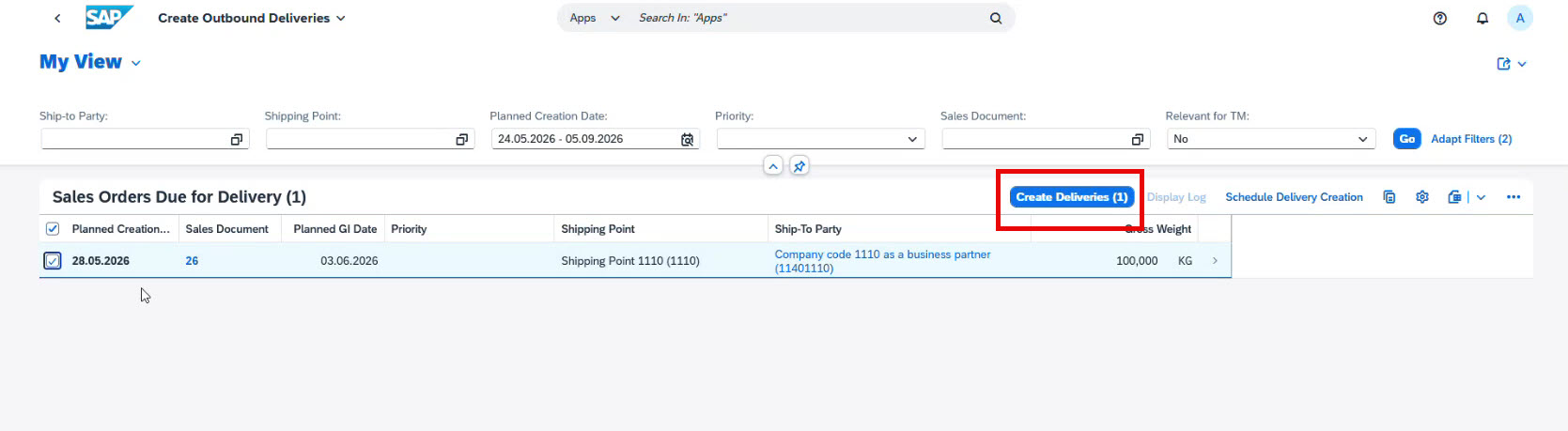
The Outbound Delivery is the central document for warehouse execution during shipping. It instructs the warehouse to prepare the customer’s order for dispatch.
The warehouse process commonly includes:
- Picking the finished products
- Propper packing, labelling and performing any other value-added activities
- Moving goods to the shipping area
- Staging pallets for loading
- Preparing shipping documentation
Warehouse supervisors monitor these activities through Warehouse Monitor, which provides real-time visibility into all warehouse tasks and delivery statuses.
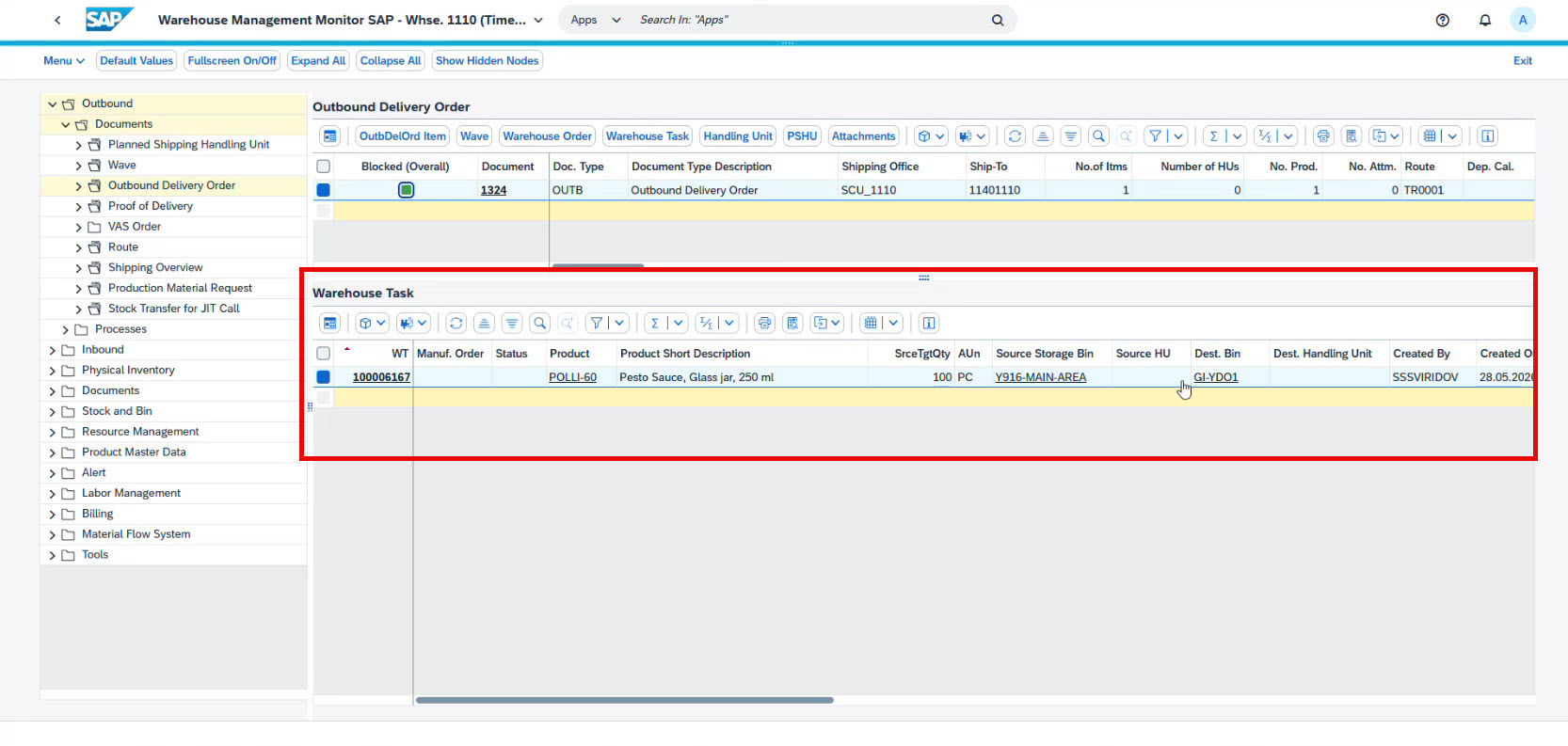
Because warehouse execution is fully integrated with sales and logistics, every completed warehouse activity automatically updates the delivery status.
Step 10. Shipment to the customer
Once picking is complete, a Lading (optional) and Goods Issue is performed.
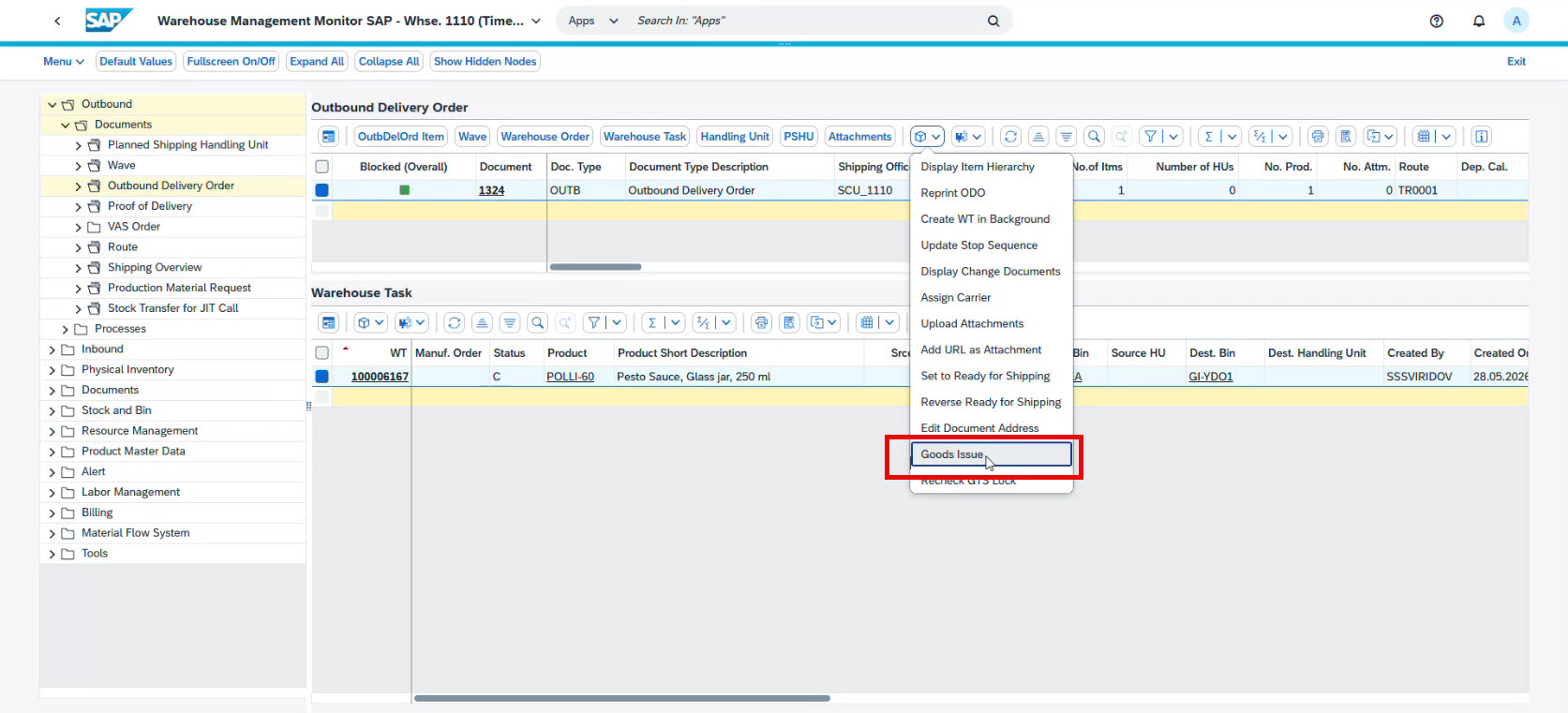
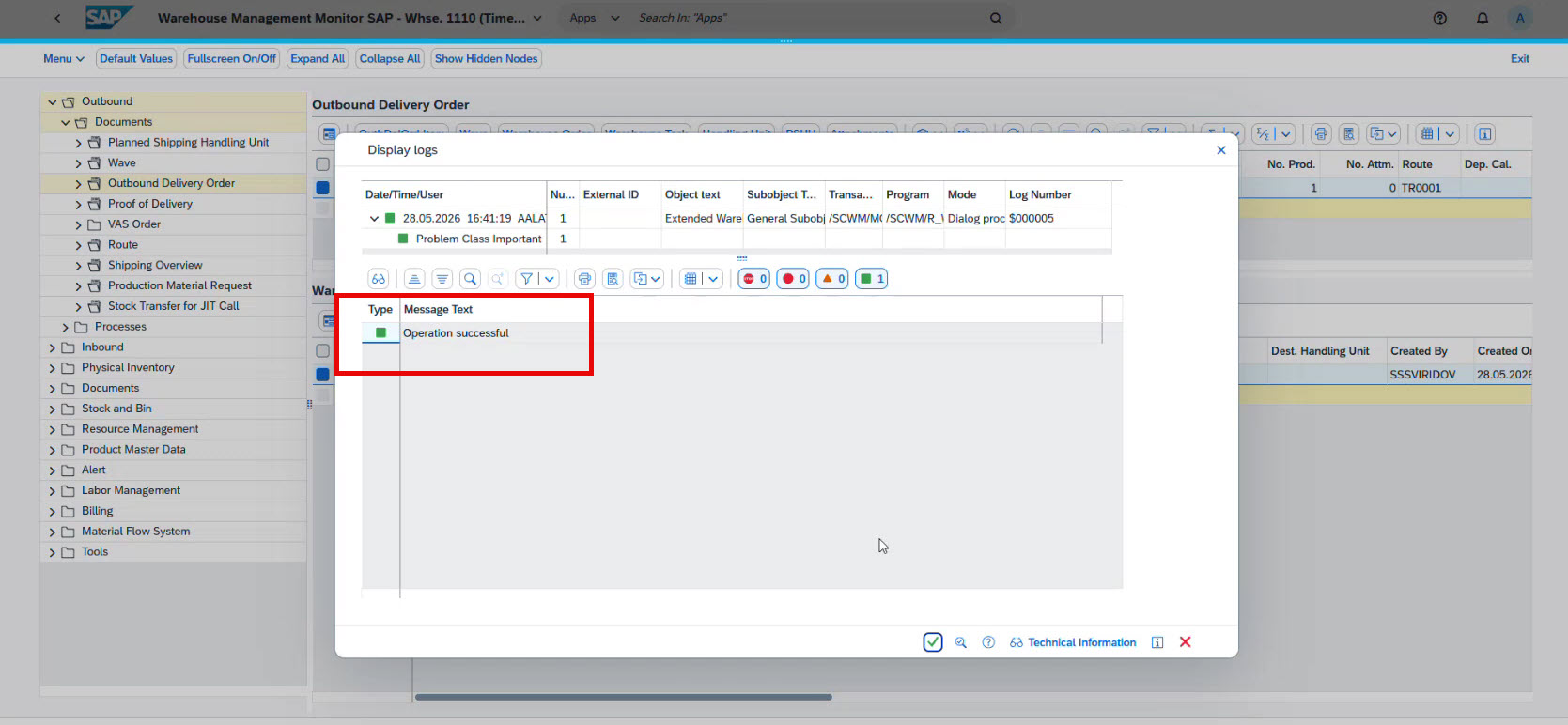
At this point, SAP removes the goods from inventory, records the shipment, updates inventory levels, and completes the logistics phase of the order.
The goods are considered shipped to the customer.
Step 11. Customer billing
The final step is to create a Billing Document.
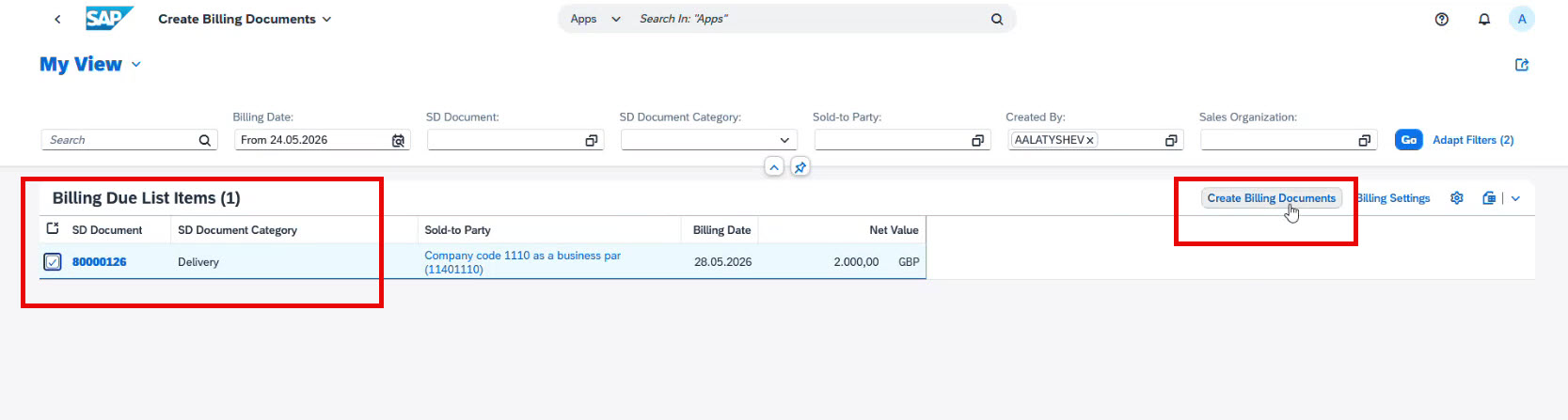
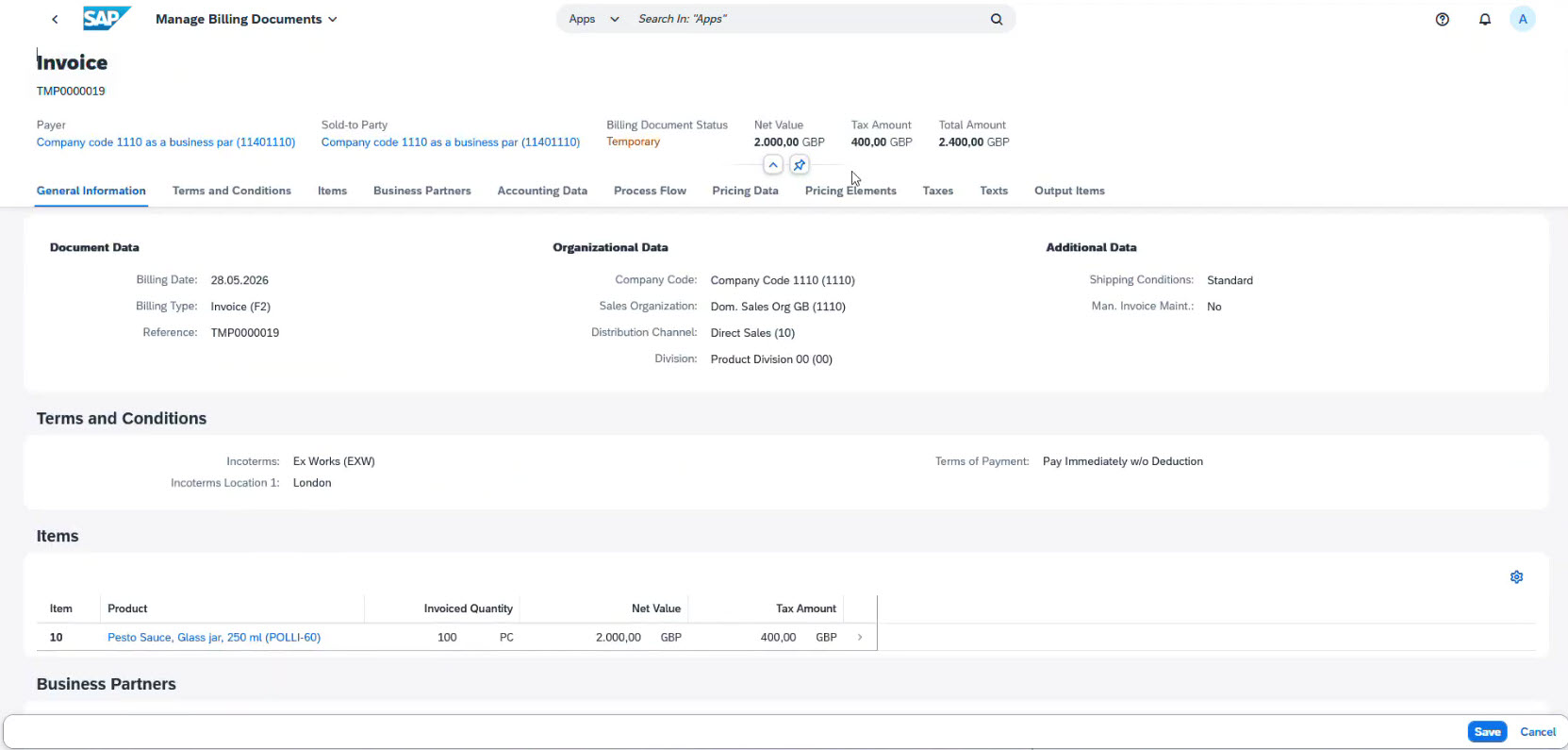
The system automatically generates:
- Customer pricing
- Taxes
- Discounts
- Document flow
- Accounting information
Once the billing document is posted, the Order-to-Delivery cycle is complete.
Key strategic trends of SAP SCM
Today, the goal of SCM has shifted from basic process operation to dynamic orchestration. According to SAP, the future of SCM is defined by several major transformations:
- From firefighting to true orchestration: Rather than reacting to issues in isolated departments, SAP unifies procurement, planning, manufacturing, and logistics on a single, real-time data layer. This enables continuous planning and allows planners to simulate the effects of disruptions, such as port closures or supplier delays, before taking action.
- AI agents as digital colleagues: AI has evolved from passive dashboards to Agentic AI, which are embedded, role-specific assistants (such as material planning or demand sensing agents) integrated into core business processes. These agents collaborate to autonomously flag risks, propose workarounds, and trigger corrective actions, shifting the human role from manual execution toward strategic exception management.
- Bridging the tech-to-floor gap: Another massive trend is the intersection of IT and Operational Technology. Factories are getting smarter, so it’s impossible to look at corporate Information Systems and shop-floor operations as separate worlds. The integration is now at the very heart of digital transformation.
Ultimately, modern supply chain excellence relies on Cloud ERP as a centralized control tower, balancing cost discipline with structural resilience.
Key benefits of SAP SCM
- Increased productivity: The system highlights bottlenecks and provides tools to address them. It improves workflows and boosts productivity. Automated processes and responsive data analysis also enable faster shipping and delivery times.
- Reduced supply chain costs: The system helps eliminate costly guesswork, reducing wasteful stockpiles and risky shortages. It also provides more accurate forecasting to minimize half-full delivery trucks, uncoordinated delivery routes, and inefficient fleet management.
- Greater supply chain agility and resiliency: Trends and market shifts can occur suddenly. Resilient SCM systems adapt quickly to changing conditions. Real-time data and insights help supply chain managers reallocate machines and staff to optimize workflows.
- Greater transparency and sustainability: SCM provides full transparency from design and manufacturing through last-mile logistics, delivery, and returns.
- Mobile Execution (RFUI): SAP offers an out-of-the-box solution for warehouse mobile devices. It guides warehouse employees through tasks and provides real-time reporting for supervisors.
Conclusion
SAP Supply Chain Management is an integrated solution that links all stages of the supply chain into a single, seamless process. When sales, procurement, manufacturing, warehousing, logistics, and finance all work with the same real-time data, companies can fulfill orders faster, use resources more efficiently, and respond quickly to changes. This is precisely the approach we set out in our article. It transforms the supply chain from a series of separate operations into a coordinated and transparent business management system.
Frequently asked questions about SAP SCM
What business processes are included in SAP SCM?
SAP Supply Chain Management supports procurement, demand planning, production planning, manufacturing, warehouse management, logistics, sales, and distribution. The exact scope depends on your business requirements and supply chain complexity. Additional functionality, such as Quality Management (QM), Global Trade Services (GTS), Transportation Management (TM) or Human Resources (HR) integration, can also be included in the solution.
Can SAP SCM be integrated with Quality Management and other SAP modules?
Yes. SAP SCM can be integrated with other SAP solutions, such as Quality Management (QM), Global Trade Services (GTS), Transportation Management (TM), Human Resources (HR), Finance, and Manufacturing Execution Systems (MES).
Can SAP SCM work without SAP ERP?
Yes. SAP SCM can be integrated with third-party ERP systems if your organization does not use SAP ERP or SAP S/4HANA. Standard integration technologies allow SAP SCM applications to exchange data with external systems.
Can SAP SCM be integrated with Manufacturing Execution Systems (MES)?
Yes. SAP SCM can integrate with MES solutions to automate production reporting and synchronization.
Why do companies choose an integrated SAP SCM solution?
Many organizations choose SAP SCM as part of a unified SAP landscape because it connects procurement, production, warehouse management, logistics, and finance within a single platform. This approach improves process transparency, eliminates duplicate data entry, supports real-time decision-making, and increases overall supply chain efficiency.
Can SAP SCM be customized for specific business requirements?
Yes. SAP SCM is a highly configurable solution that can be tailored to different industries and business processes. Companies can implement only the modules they need and customize workflows.

Subscribe