

Sergey Prokopov, Head SAP CX Department at ACBaltica
Digital sales transformation starts with choosing the right CRM platform. When it comes to enterprise CRM solutions, professionals often mention two market leaders: SAP Sales Cloud V2 and Salesforce Sales Cloud. Both systems are among the global leaders in the CRM market, but they are built around different architectural approaches.
In this article, we will compare the two based on the following key criteria: architecture, out-of-the-box functionality, integrations, total cost of ownership, user experience, and strategic positioning.
Note: This comparison focuses specifically on SAP Sales Cloud V2, SAP’s next-generation CRM architecture replacing SAP Cloud for Customer (C4C). For simplicity, it will be referred to as SAP Sales Cloud throughout this article.
Quick verdict: SAP Sales Cloud V2 vs Salesforce Sales Cloud at a glance
SAP Sales Cloud is usually the better option for organisations using SAP ERP systems, where in-depth process integration, transactional consistency, and native alignment with enterprise operations are essential.
In contrast, Salesforce Sales Cloud excels in flexible, multi-system environments that prioritise rapid innovation and platform extensibility across diverse digital tools.
|
Aspect |
SAP Sales Cloud |
Salesforce Sales Cloud |
|
CRM philosophy |
Process-driven CRM |
Platform-driven CRM |
|
Architecture center |
Enterprise processes |
Digital platform |
|
Integration model |
Native ERP coupling |
Integration ecosystem |
|
Customer 360 |
Transaction-based |
Data-harmonized |
|
OOTB functionality |
Enterprise processes ready |
Platform extensibility |
|
UX model |
Role & process workspace |
User productivity workspace |
|
Target organizations |
Complex B2B enterprises |
Digital & fast-scaling companies |
|
TCO model |
Higher upfront, predictable |
Lower entry, variable long-term |
|
AI strategy |
Process-embedded AI (SAP Business AI, Joule Copilot, guided selling intelligence, ERP-context recommendations) |
Autonomous platform AI (Agentforce agents, Einstein Copilot, Data Cloud AI, predictive and generative automation) |
Now, let’s take a closer look at these differences and see how they actually matter in the real world.
1. SAP vs Salesforce: The difference between CRM philosophies
At first glance, both systems appear to offer lead and pipeline management, sales forecasting, process automation, and analytics. And it’s true!
However, the key difference lies in their CRM architecture. SAP builds its CRM around the company’s business processes, whereas Salesforce builds its CRM around platform flexibility.
Process-driven CRM: the SAP Sales Cloud approach
SAP Sales Cloud is designed to support the company’s entire sales process. The solution covers the entire customer journey, from initial contact to closing a deal (lead-to-order standalone or lead-to-cash with SAP S/4HANA), with the operational and financial stages typically handled in the ERP system (when CRM integrates with ERP).
With this approach, the CRM is considered part of the company’s overall IT landscape and is closely integrated with the ERP system. However, it can also be used separately if necessary. It is directly linked to pricing, orders, logistics, contracts, and financial transactions. For this reason, sales are viewed as part of the overall value chain.
In practice, this means that SAP Sales Cloud focuses on standardized enterprise processes that prioritize order fulfillment transparency, a unified data model, process predictability, and minimizing architectural complexity.
System extensions are primarily implemented through the SAP ecosystem, which helps maintain consistency in business logic and reduce integration risks.
Platform-driven CRM: The Salesforce Sales Cloud approach
The Salesforce Sales Cloud is built on the concept of CRM as a universal digital platform.
In this model, the focus is on the platform itself, which companies can adapt to their own sales, marketing, and customer engagement needs.
Salesforce can be viewed as a CRM builder:
-
The core CRM provides fundamental capabilities.
-
Additional features are available via AppExchange.
-
Business processes are then built on top of the platform.
This means a CRM-centric approach creates a flexible customer management environment, around which the company’s processes are then built.
The main advantage of this model is its high adaptability. Organizations can quickly implement new business scenarios, integrate various systems, and scale solutions without being tied to a single technology stack.
2. UX and performance
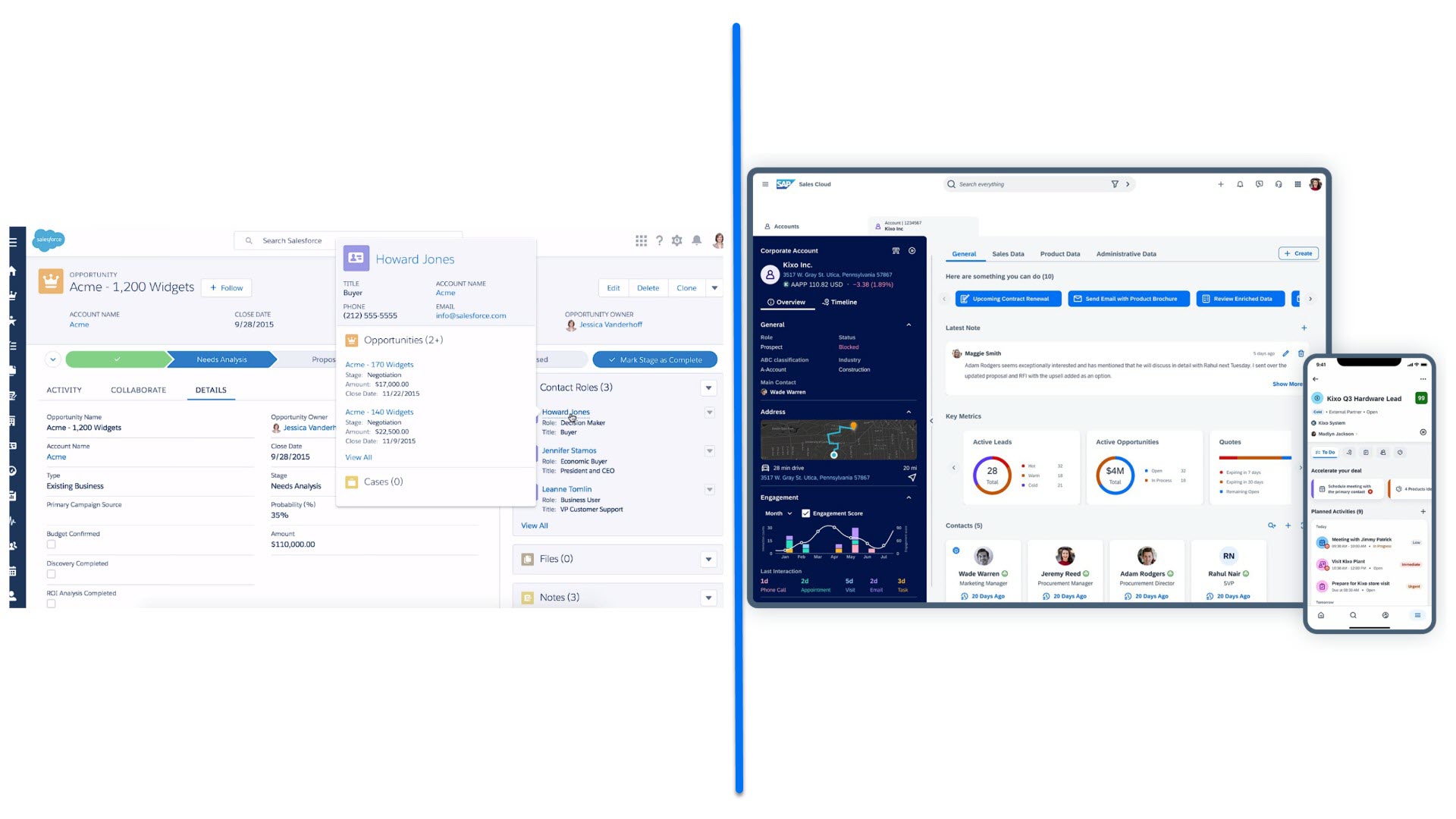
SAP Sales Cloud offers a modern enterprise CRM interface with a design tailored to today’s corporate sales processes. At the same time, despite its maturity and rich feature set, Salesforce Sales Cloud still uses an established interface structure focused on platform performance and scalability rather than a redesigned user interface.
While these systems may appear functionally comparable, in practice, they reflect different stages of UI modernization and architectural development.
SAP Sales Cloud
SAP Sales Cloud features a completely redesigned user interface built on the SAP Fiori design system. The core UX principle is the role-based enterprise workspace: the interface is structured around business roles and corporate processes, rather than individual user preferences. This ensures a consistent user experience across all SAP applications and reduces the complexity of training employees within the SAP landscape.
This is how the main page of SAP Sales Cloud looks like:
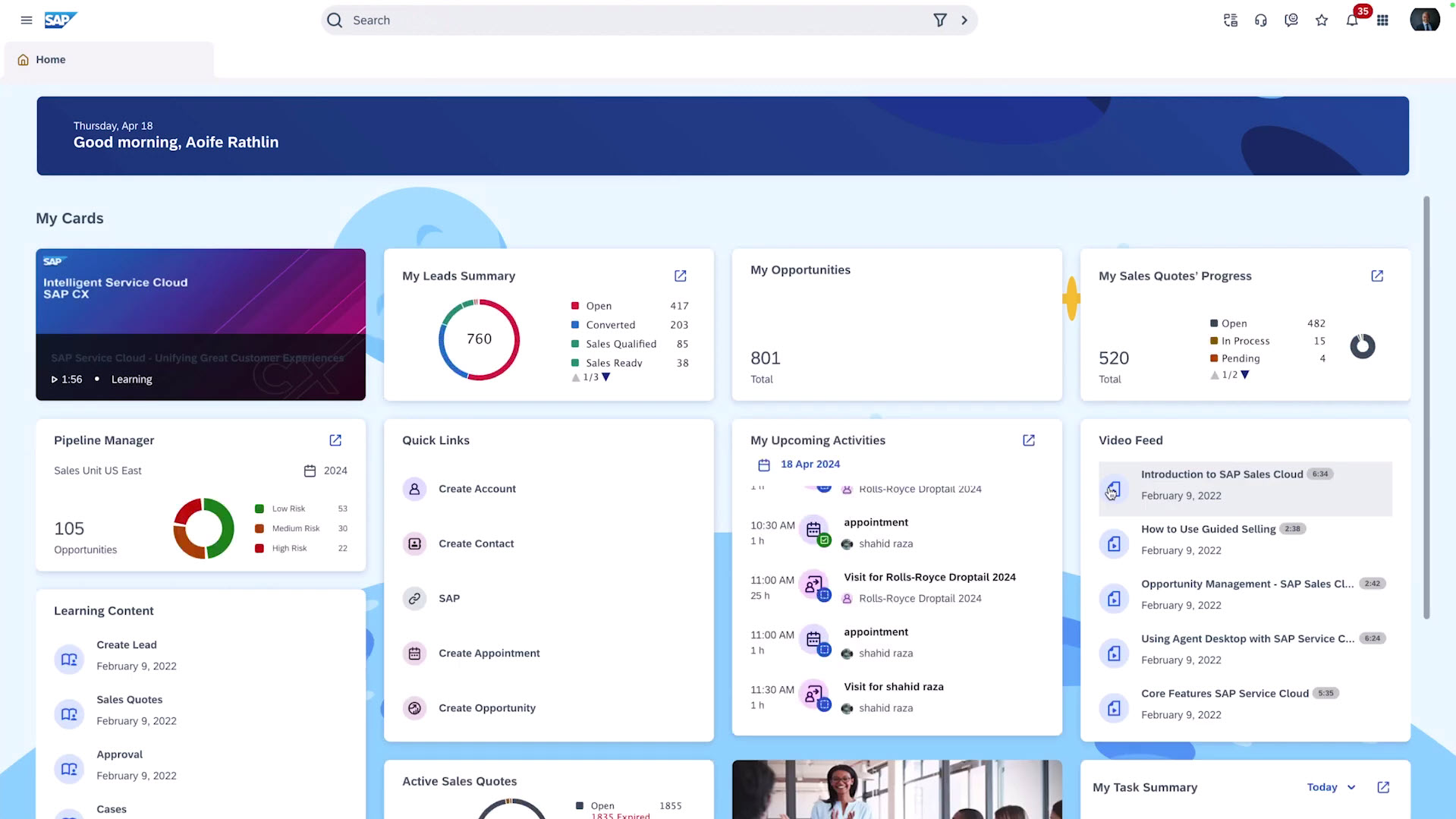
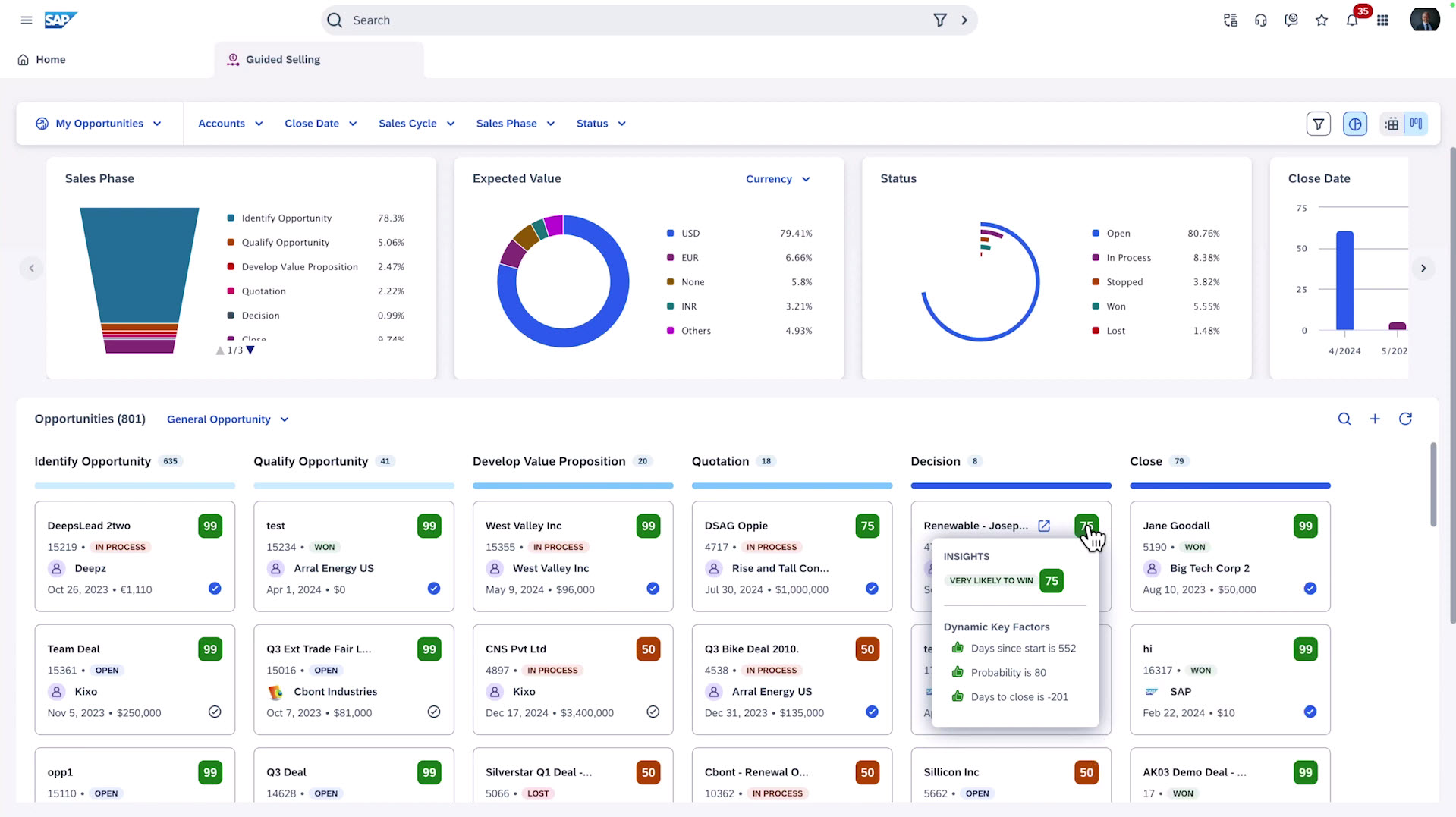
The SAP Sales Cloud interface is focused on closing sales, not just managing the pipeline. In deal workspaces, the user immediately sees the ERP context (if the system is integrated with ERP): prices, products, customer status, commercial documents, and follow-up activities. SAP officially positions this as “guided selling” as the interface systematically guides the user through the full sales cycle from lead to order fulfillment.
Architecturally, the UX is subordinate to the enterprise process: first, the business process is modelled, then the business objects and roles, and only then is the interface built. As a result, SAP Sales Cloud ensures high process manageability, strict governance, and natural integration with the S/4HANA environment.
For example, let’s explore the Guided selling process page, that visually leads the sales through the main opportunities and helps quickly analyse them:
Salesforce Sales Cloud
Salesforce Sales Cloud uses the Salesforce Lightning Experience interface. The UX is built around the user: the system adapts to the seller’s actions, displaying tasks, recommendations, and priority deals in a single workspace.
Lightning Experience implements a component-based platform UX. The interface is assembled from customizable components using low-code tools (App Builder, Dynamic Forms, workspace pages). This allows quick changes to screen layouts without altering the underlying data model and makes the interface an integral part of the Salesforce platform itself.
Salesforce’s main focus is on boosting individual productivity through dynamic pages, personalized dashboards, Einstein AI prompts, and flexible interface customization for sales teams. Unlike SAP, processes are more often built on top of the user workspace, rather than the other way around.
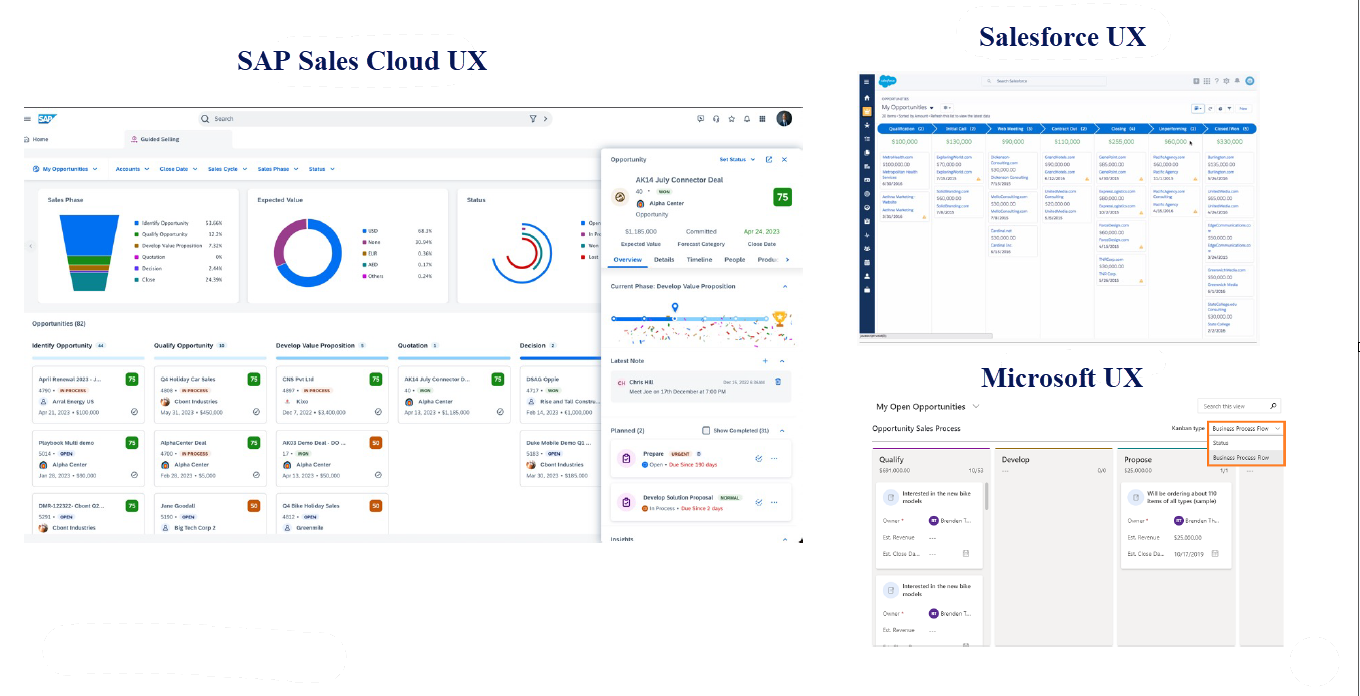
Here, let’s also explore the screen with selling opportunities and compare it to the same window in SAP Sales Cloud:
3. Native back-end integration: The key difference between architectures
Integration with ERP systems is becoming a key factor in choosing a CRM system. Let’s explore this aspect considering SAP ERP.
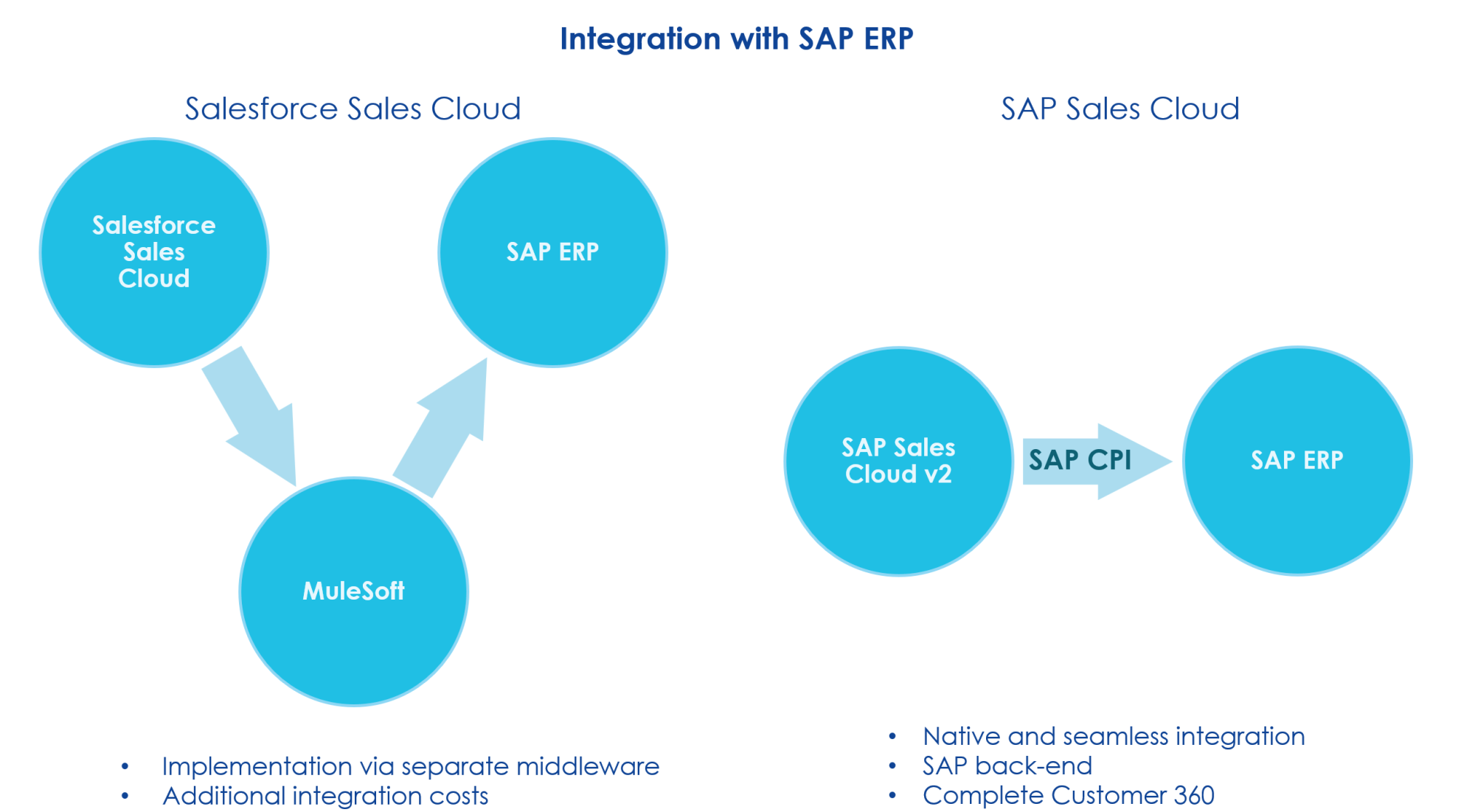
SAP Sales Cloud + SAP ERP
SAP provides prebuilt SAP-centric integration patterns. In other words, SAP Sales Cloud is optimized for organizations operating within the SAP ecosystem. It provides prebuilt integration content and standardized integration patterns via SAP CPI for SAP S/4HANA and other SAP applications, helping companies accelerate implementation and maintain process consistency across enterprise systems.
Moreover, SAP offers hundreds of preconfigured integration scenarios between CX and both SAP and non-SAP systems (Teams, Outlook, etc.)
In this case, the integration will closely follow a preconfigured standard. And the closer the implementation follows the standard, the lower the integration cost will be, since the necessary architecture is already built into the product.
Salesforce + SAP ERP
Salesforce, on the other hand, relies on integration-platform architecture that supports a broad range of enterprise applications and technologies. If you choose SAP ERP, integration is typically implemented using separate middleware (in our case, MuleSoft).
As a result, users gain high flexibility, the ability to connect any systems, and a vendor-neutral architecture. However, this also requires additional integration governance, data harmonization, introducing additional licenses and integration layers, and long-term integration management. In other words, integration becomes a separate project rather than a built-in feature of the solution.
4. Customer 360 in SAP Sales Cloud and Salesforce Sales Cloud
The architectural difference is particularly evident in the Customer 360 concept.
What is Customer 360?
Customer 360 is a CRM concept in which an organization creates a single customer view by consolidating data from all touchpoints: sales, service, marketing, e-commerce, support, finance, and ERP operations.
Customer 360 in SAP Sales Cloud
In SAP Sales Cloud, the customer view becomes operationally unified when integrated with ERP. This way, CRM captures the entire customer lifecycle.
SAP Sales Cloud follows the principle of intelligent CX that seamlessly integrates front-end and back-end systems providing unified and streamlined approach to managing customer interactions, that also incorporates SAP Business AI that allows teams to work smarter and faster.
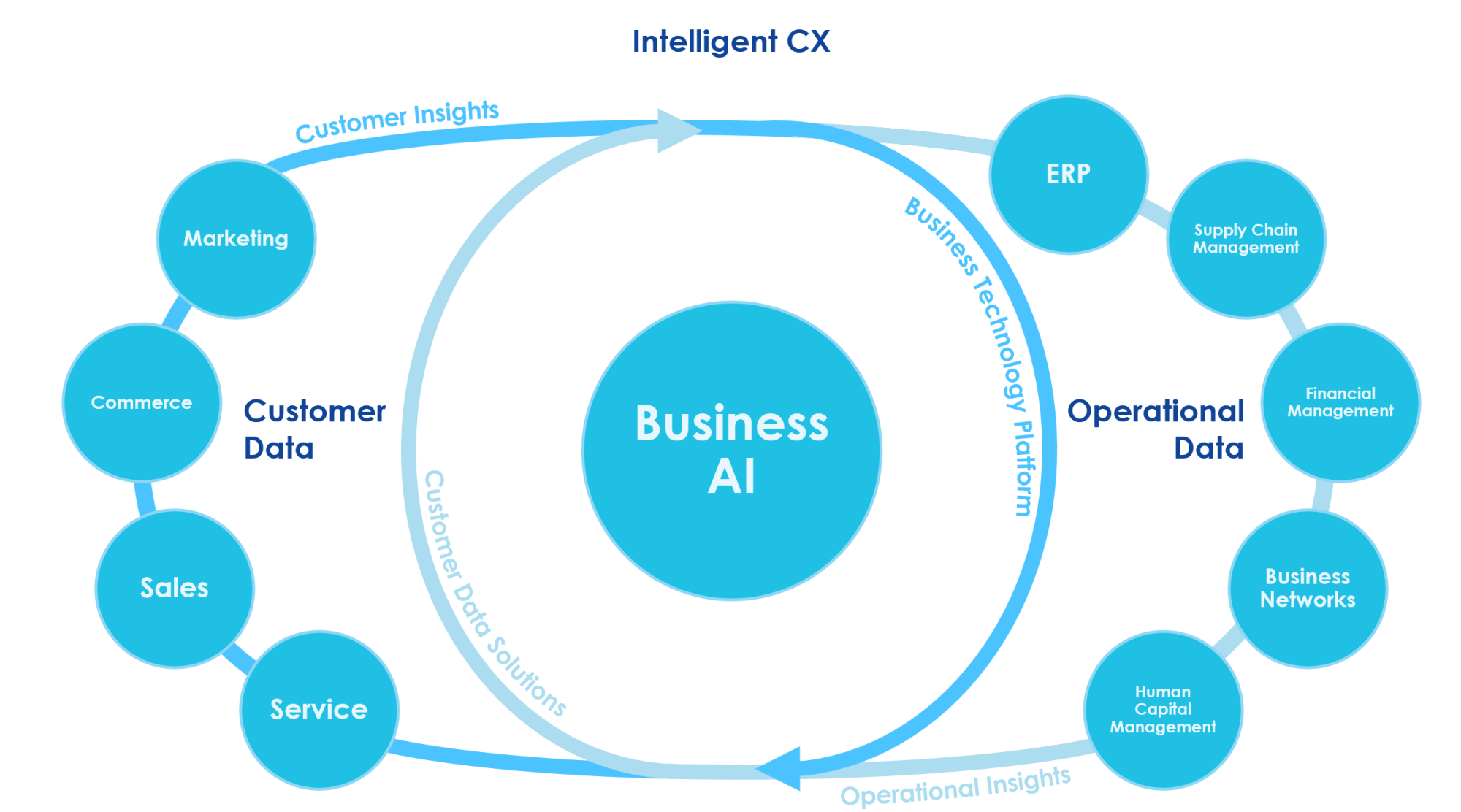
As a result, companies using the SAP landscape gain:
-
Consistent master data.
-
An end-to-end lead-to-cash process.
-
Access orders, contracts, prices, and deliveries directly from the CRM.
-
A comprehensive, 360° view of the customer based on real transactional data.
Customer 360 in Salesforce Sales Cloud
Salesforce forms Customer 360 by consolidating data from various systems through integrations and a data platform (Data Cloud). The customer view combines data from Sales Cloud, Service Cloud, Marketing Cloud, Commerce Cloud, external ERP systems, and legacy systems.
It is important to understand that, unlike SAP’s model, Salesforce Customer 360 establishes a unified customer view through combining data from various systems rather than through a single operational backend. Therefore, Customer 360 emerges from integration rather than being an inherent property of the system. This provides flexibility but simultaneously requires data governance, data model mapping, and additional data architecture.
5. AI strategy: SAP Sales Cloud vs Salesforce Sales Cloud
Brief AI comparison
|
AI Layer |
SAP Sales Cloud |
Salesforce Sales Cloud |
|
Core AI Strategy |
SAP Business AI |
Einstein AI + Agentforce |
|
AI Interface |
Joule Copilot |
Einstein Copilot |
|
Intelligence Model |
Guided selling intelligence |
Autonomous AI agents |
|
Data Foundation |
ERP-context recommendations |
Data Cloud customer graph |
|
Automation Style |
Decision support |
Action automation |
|
Strategic Objective |
Operational execution intelligence |
Revenue productivity intelligence |
We can therefore say that SAP embeds AI directly into business processes, while Salesforce places AI on top of its CRM system as an intelligent platform.
SAP Sales Cloud V2
SAP’s AI strategy is built around SAP Business AI. Artificial intelligence works directly with the company’s business processes, helping managers make decisions based on real operational data.
Core SAP AI stack:
-
Joule: A unified AI assistant for the entire SAP ecosystem (ERP, finance, supply chain, CRM, service, and procurement). Therefore, recommendations to sales representatives can take into account actual orders, contract terms, margins, product availability, production constraints, and financial indicators.
Joule also uses generative AI to help with marketing materials, reports, and for chatting with company data. -
Guided Selling Intelligence: an intelligent sales navigation tool capable of assessing deal probability based on business history, forecasting revenue based on order fulfillment, providing next-best-action recommendations, and identifying pipeline risks
The primary benefit of SAP AI lies in its ERP context. Here, AI leverages orders, invoices, pricing, installed base, financial metrics, and supply chain data. Therefore, the AI’s recommendations are explainable, verifiable, and compliant with governance requirements.
It is key that SAP focuses on augmented decision-making, enhancing the user’s role within managed processes rather than placing complete autonomy in AI agents.
Salesforce Sales Cloud
Here, AI becomes an active partner in the sales process, capable of initiating and executing actions within the CRM.
Core SalesForce AI stack:
-
Einstein Copilot: the main interface for user interaction with AI in Salesforce. Copilot lets you work with the CRM in a conversational format. You can generate emails, summarise accounts and deals, analyse the pipeline, and receive recommendations directly within the sales workspace.
-
Agentforce: a new phase in the development of AI at Salesforce. It features AI agents that can both recommend actions and execute them.
-
Data Cloud: This is the key part of Salesforce’s AI architecture. The platform puts data from CRM, marketing, service, customer digital behavior, and external systems together to create a single Customer 360 data graph. AI models use information from various sources to understand how people interact, engage, and transact, providing context for generative and predictive scenarios.
Salesforce also uses the Einstein Trust Layer, which secures data, manages access, and controls how generative AI is used within a business.
Consequently, Salesforce is moving towards an agent-based CRM model, where AI is gradually moving from helping users to carrying out tasks on its own and increasing sales productivity.
Summary
SAP and Salesforce use different approaches to implementing AI in their CRM systems.
SAP sees AI as a smart addition to business processes, a tool that helps companies make well-informed decisions and ensure that transactions get executed within a real-world business context.
Salesforce is developing AI as a digital assistant that will gradually become a digital executor, accelerating sales efforts, automating customer interactions, and boosting revenue growth.
6. Differences in out-of-the-box functionality
When choosing a CRM, a common question is: Which system offers the most features right after implementation? Let’s explore it in one table:
|
Capability area |
SAP Sales Cloud |
Salesforce Sales Cloud |
|
Core CRM (Accounts, leads, opportunities) |
Available out of the box |
Available out of the box |
|
Sales process execution |
Strong OOTB integration with ERP processes (quote-to-order) |
Focus on managing sales activities and pipeline |
|
Pricing & quoting |
Advanced pricing and quotation aligned with ERP included OOTB |
Basic quoting included; advanced pricing usually requires CPQ add-on |
|
Sales automation |
Basic workflow automation |
Advanced automation included OOTB |
|
Forecasting & pipeline management |
Standard forecasting |
Advanced forecasting capabilities OOTB |
|
Field sales & visit planning |
Native capability included |
Typically requires additional Field Service module |
|
Customer View (Customer 360) |
Process-driven customer view across enterprise processes |
Engagement-driven customer view centered on sales teams |
|
Analytics & dashboards |
Embedded analytics included + SAP Analytics Cloud’s ability to expand with any custom reports. |
Reporting and dashboards included |
|
Integration philosophy |
Designed to work natively with SAP ERP. The product is pre-configured to integrate with other Microsoft products, such as Teams and Outlook. It also supports API integration with all other third-party applications. |
Designed to integrate with many systems via APIs and middleware (Mulesoft) |
|
Extensibility |
Business configuration and SAP extensions |
Highly extensible CRM platform |
This comparison reveals a conceptual difference between the two systems.
SAP extends its traditional ERP architecture into the CRM domain, enabling end-to-end business processes. Most of the functionality is already included in the product, especially for complex B2B sales.
In contrast, Salesforce builds CRM as a digital platform for sales and customer engagement. It offers a core CRM platform and the ability to expand through its ecosystem. This provides flexibility, but some functionality becomes available only as the platform evolves and additional licenses are purchased.
We can conclude that SAP Sales Cloud provides more enterprise processes out of the box, while Salesforce is more focused on customization.
7. Total cost of ownership: SAP Sales Cloud V2 vs Salesforce pricing models
Here, the differences between SAP Sales Cloud and Salesforce Sales Cloud once again reflect architectural logic. SAP optimizes costs through process integration, while Salesforce does so through platform flexibility. Let’s explore the aspect.
SAP Sales Cloud
SAP Sales Cloud is originally designed as part of the unified SAP Customer Experience enterprise architecture and is tightly integrated with SAP S/4HANA. According to SAP’s official position, the key implementation principle is “fit-to-standard”: the company adapts its sales processes to the SAP standard model, reducing the number of custom integrations and simplifying long-term support.
The main costs in SAP are concentrated at the beginning of the project (licensing and business process implementation). A significant amount of functionality is already built in: order management, pricing, master data, and commercial documents are connected via standard SAP integration scenarios. In the SAP landscape, this reduces the need to create a separate integration layer and lowers subsequent integration support costs.
As a result, the TCO of SAP Sales Cloud is typically highly predictable: initial investments are higher, but operating costs stabilize due to standardized processes, centralized governance, and a unified enterprise data model.
Salesforce Sales Cloud
Salesforce Sales Cloud uses a platform-based implementation model, which Salesforce officially describes as a “land-and-expand” strategy. An organization starts with basic CRM functionality and gradually expands the system through new clouds, applications, and platform capabilities.
The initial implementation cost is often lower thanks to flexible licensing and low-code customization of the interface and processes. However, the TCO increases as the system evolves: functionality scales through add-ons, AppExchange solutions, integrations with external systems, and additional data and AI services.
Since Salesforce is designed for a heterogeneous IT landscape, Customer 360 is typically built through integrations and a data platform. This provides high flexibility and the ability to make rapid changes, but also makes the long-term TCO dependent on architectural decisions, the level of governance, and connected platform extensions.
Accordingly, TCO differences are primarily driven by architectural differences. For example, an enterprise that implements SAP Sales Cloud alongside existing SAP ERP systems can leverage native integration and standardized processes. This reduces ongoing integration and support costs, resulting in a more predictable TCO. Alternatively, an organization that chooses Salesforce Sales Cloud for a heterogeneous IT environment may initially benefit from lower entry costs due to flexible licensing, but could face rising TCO over time as additional integrations, platform extensions, and data services are added to meet evolving business needs.
Conclusion
Both SAP Sales Cloud and Salesforce Sales Cloud are modern CRM platforms for businesses, but they solve different architectural challenges.
SAP Sales Cloud is great for connecting sales processes with other key business operations, such as manufacturing, pricing, and fulfilling customer orders. Salesforce Sales Cloud, on the other hand, offers great flexibility for organizations operating in constantly changing digital environments, where it is critical to rapidly innovate, expand ecosystems, and adapt platforms.
The most successful CRM implementations are those in which the system’s features align with the company’s way of doing business.
FAQ
Is SAP Sales Cloud V2 better than Salesforce Sales Cloud?
There is no universal solution for all systems. SAP Sales Cloud V2 excels in environments where SAP ERP is used, and deep business-process integration is required. Meanwhile, Salesforce Sales Cloud is ideal for flexible, multi-system IT landscapes where rapid changes and platform scalability are essential.
How does SAP Sales Cloud V2 differ from the older SAP Cloud for Customer (C4C)?
SAP Sales Cloud V2 is the next generation of SAP’s CRM architecture. Compared to SAP Cloud for Customer (C4C), it offers an updated architecture, a modern UX based on SAP Fiori, enhanced performance and integration with SAP S/4HANA, and improved AI capabilities and scalability.
Can SAP Sales Cloud V2 integrate with non-SAP ERP systems?
Yes. Although SAP Sales Cloud V2 is optimised for SAP ERP and SAP S/4HANA, it supports integrations with non-SAP solutions via APIs, middleware and standard integration scenarios.
Can a business migrate from Salesforce Sales Cloud to SAP Sales Cloud V2?
Yes, companies can migrate from Salesforce Sales Cloud to SAP Sales Cloud V2 by undertaking CRM transformation projects that encompass data migration, process redesign, and integration.

Subscribe