

Anna Gercik, Senior SAP SF Consultant at ACBaltica
After clicking on it, you see the skills assigned to the position. You can mark some of them as primary and leave some as secondary.
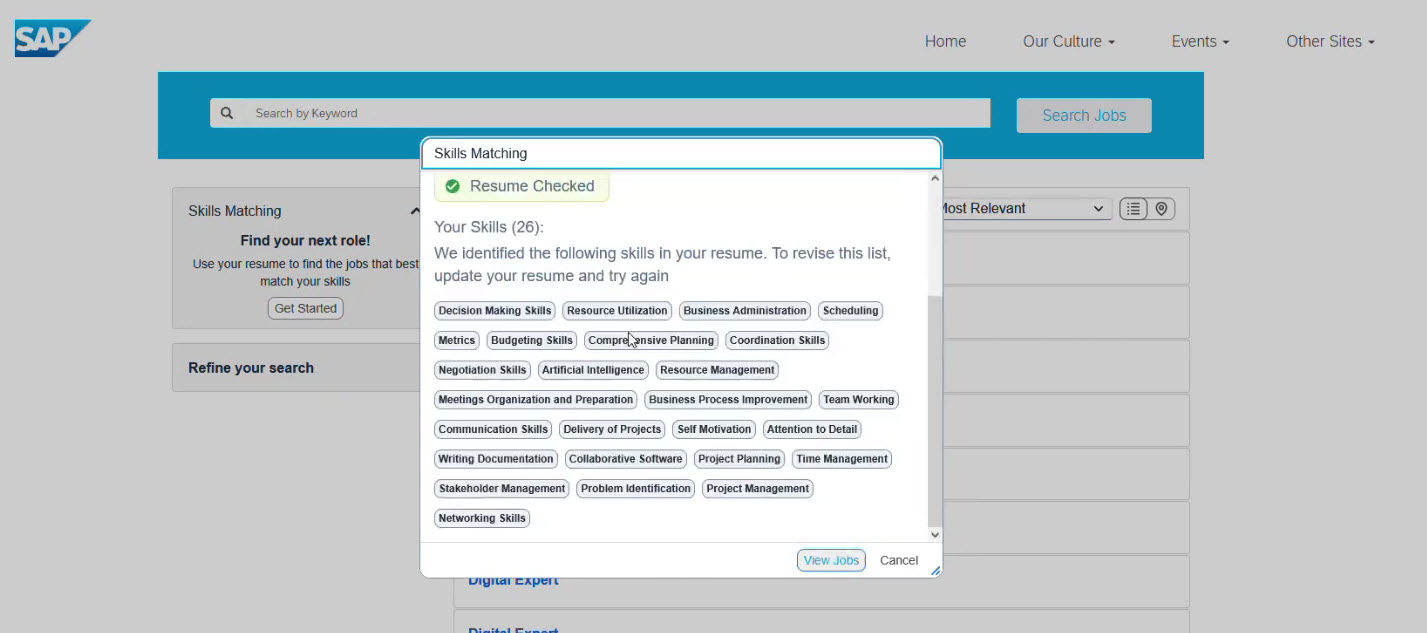
The system extracts skills from the resume to match candidates to open roles. For example, in picture, AI detected 26 skills.
By clicking on the result, you get a pop-up info for the selected candidate and can see the top matching skills (marked green), and the unmatched (marked grey).
This feature is integrated with both Microsoft Teams and SAP SuccessFactors.

SAP SuccessFactors offers a wide range of AI-powered capabilities for recruiting. However, there is always a difference between a feature's availability and its usefulness. It's important to know where the feature is located, how to enable it, and the scenarios in which it saves time.
This guide will lead you through the recruiter's journey in SAP SuccessFactors, from creating a job requisition to evaluating candidates and working with skills. We will show you, step by step, what these capabilities look like in the interface, and how to use them most effectively in your daily work.
Sap SuccessFactors recruiting AI features
Job Requisitions
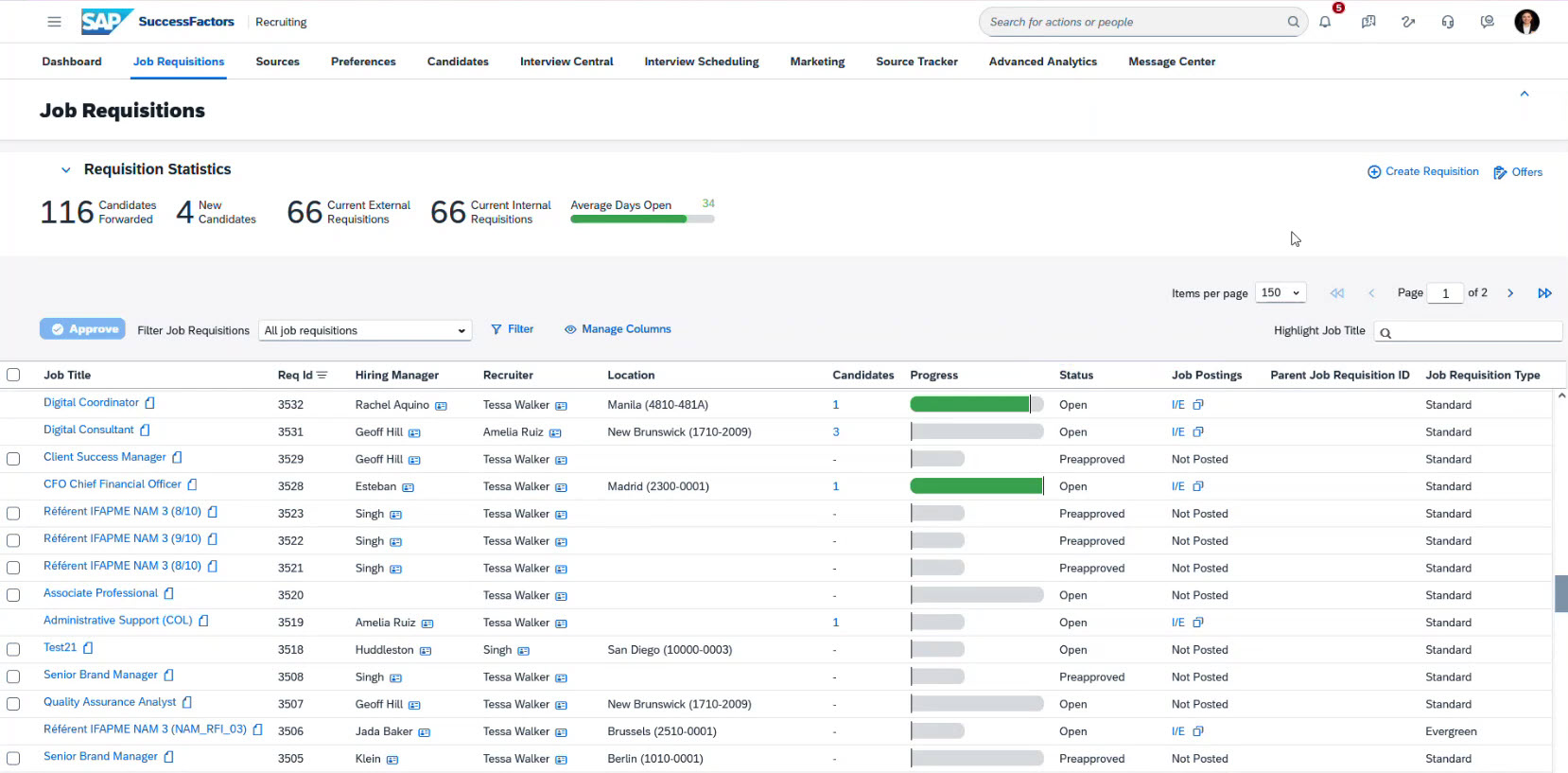
Let’s begin by observing the main SAP SuccessFactors Recruiting page with all Job Requisitions.
This section shows the number of current requisitions, how many candidates have been forwarded, the number of new candidates, participants in the recruitment process, organizational data, and the average days the requisitions have been open.
Generating job description
Let’s start the guide by creating a job description:
- Find the job requisition you want to work with.
-
Hower over to open the drop-down menu and choose “Manage Job Profile”.
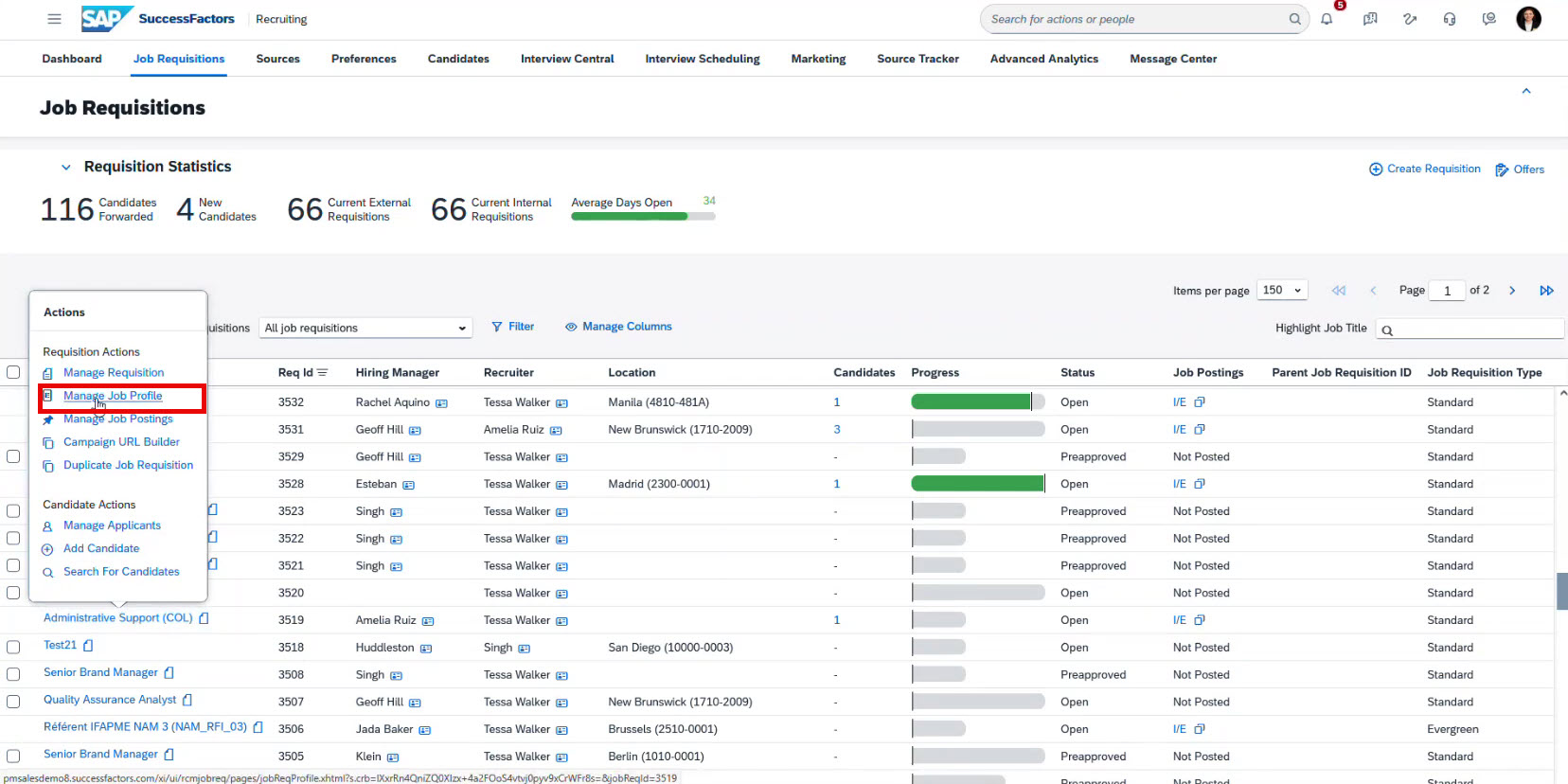
- This action opens the Job Profile
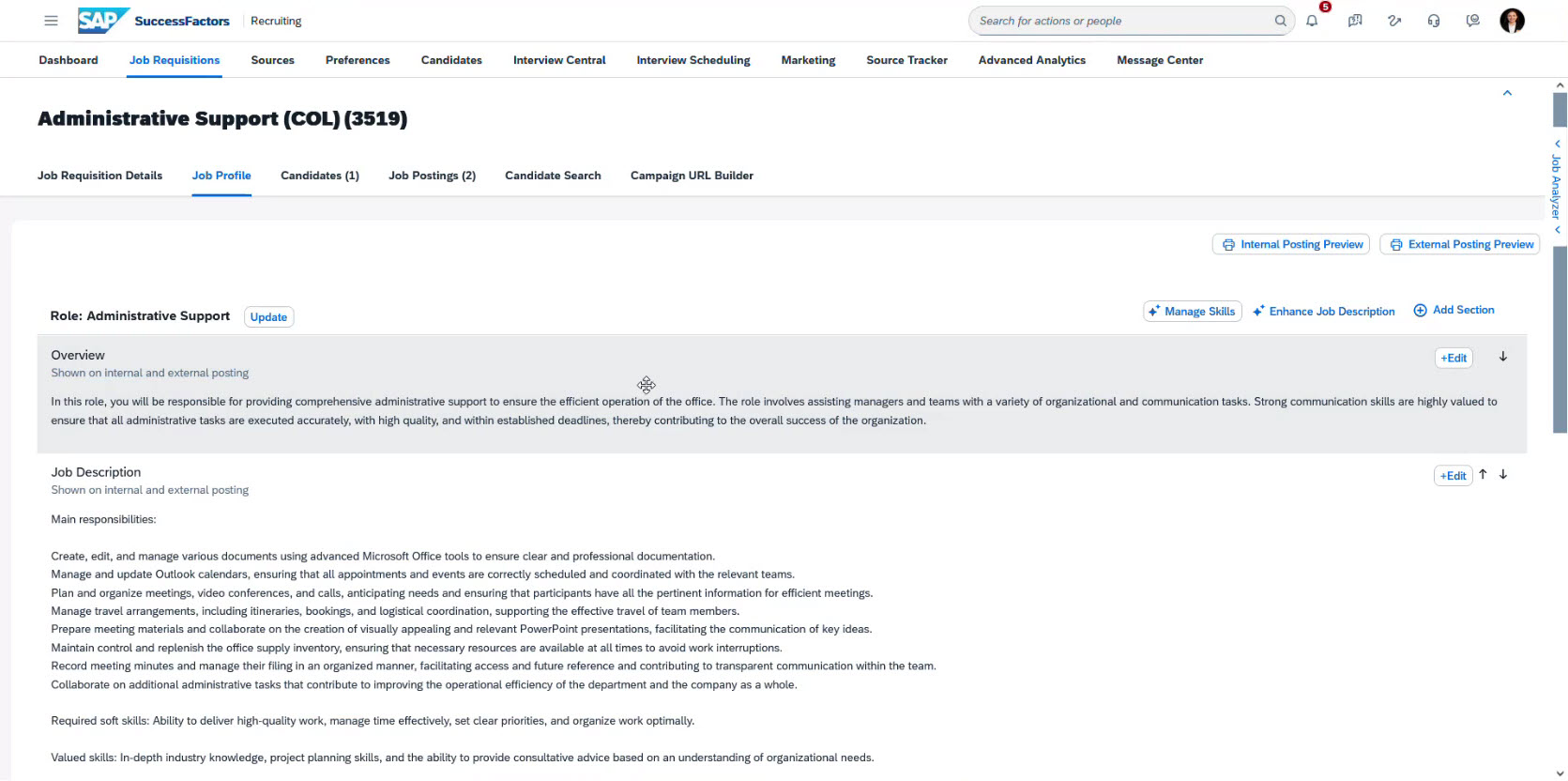
Here you can see all the information used for posting the job requisition or sharing it with a potential candidate. - Try enhancing the job description with embedded AI
In the upper right corner, you see the “Enhance Job Description” button, which starts AI analysis for all sections.
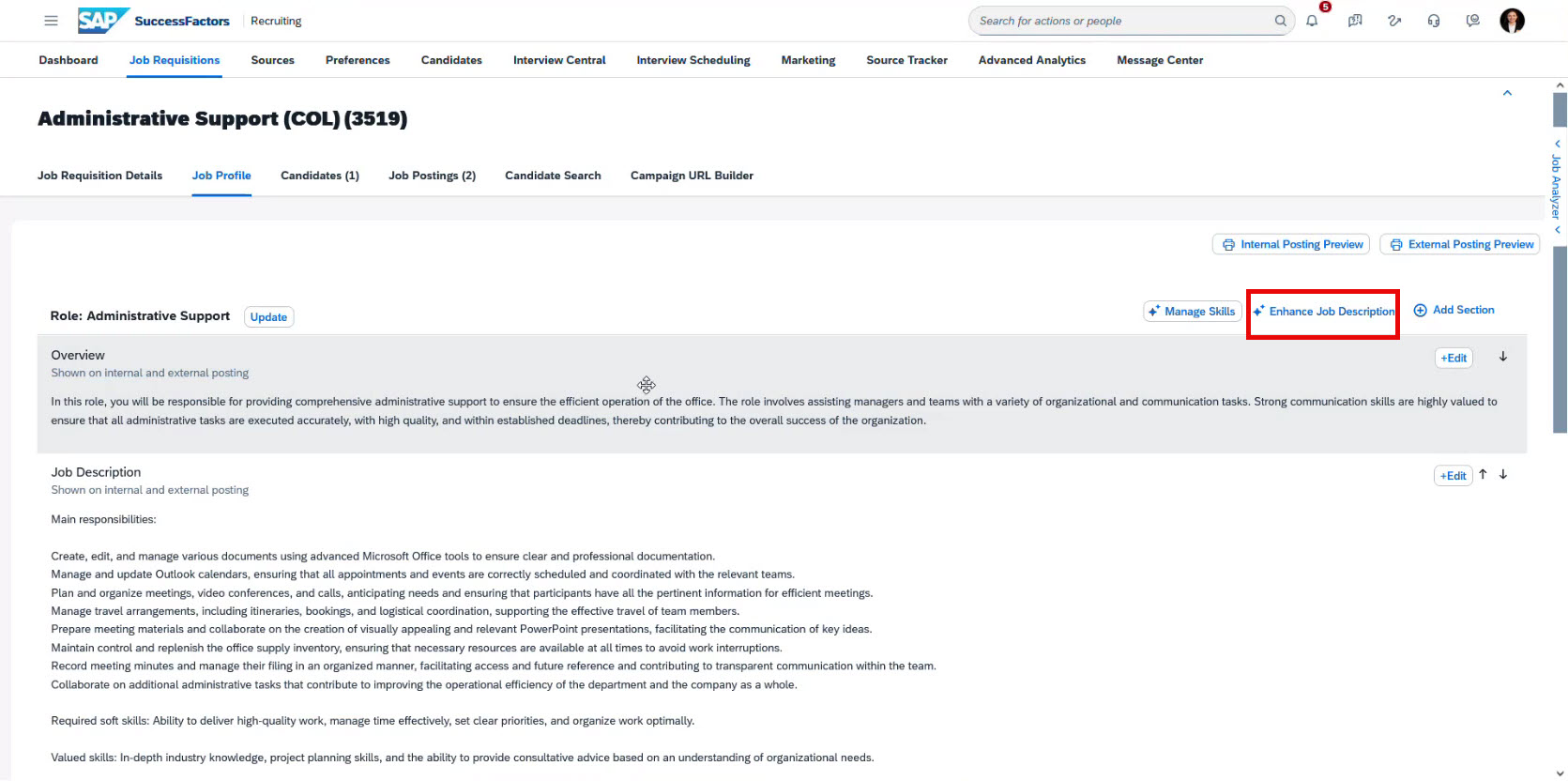
- The AI shows an improved version and gives you updated text for Overview and Job Description.
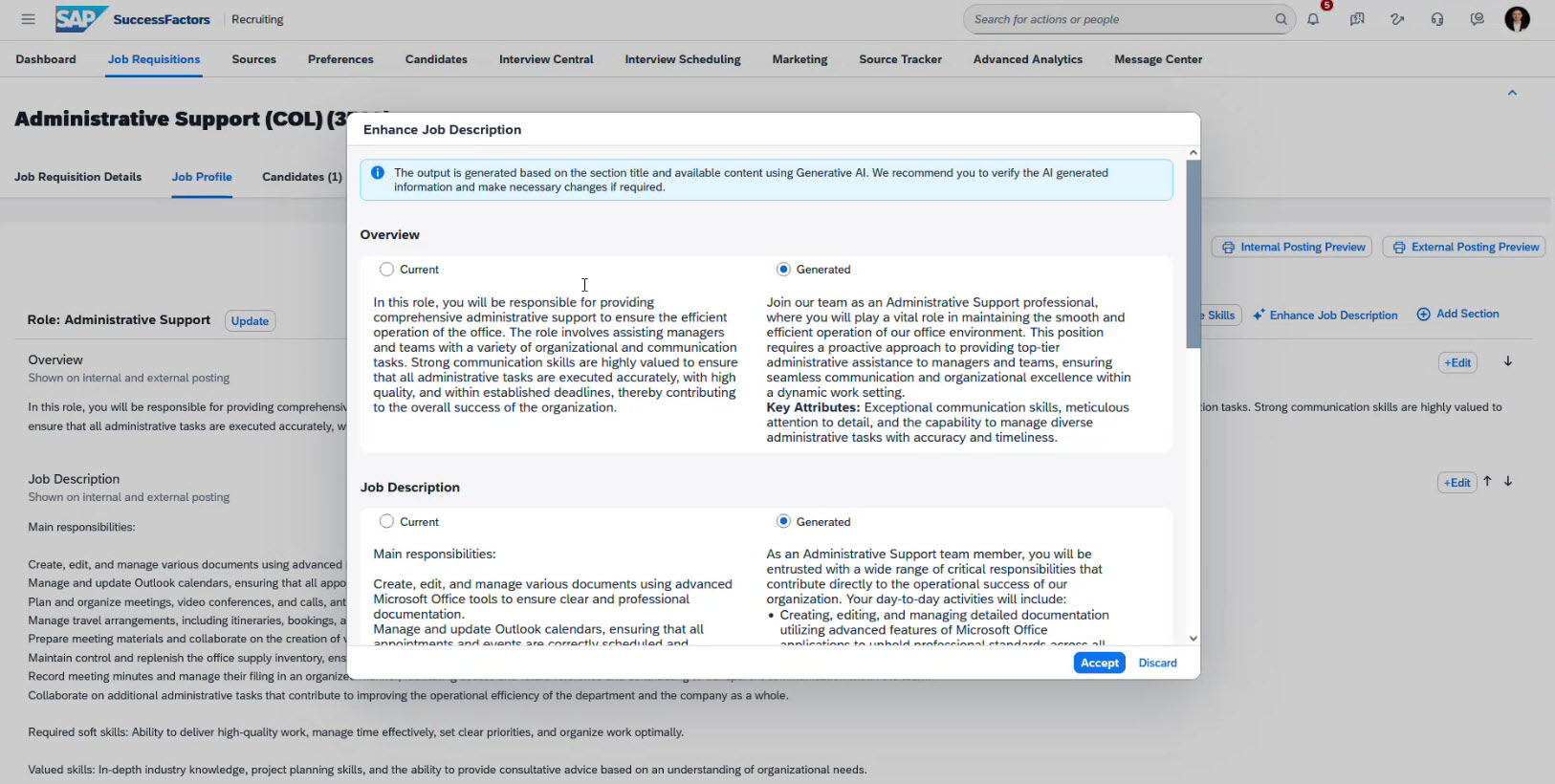
- You can accept or decline the changes.
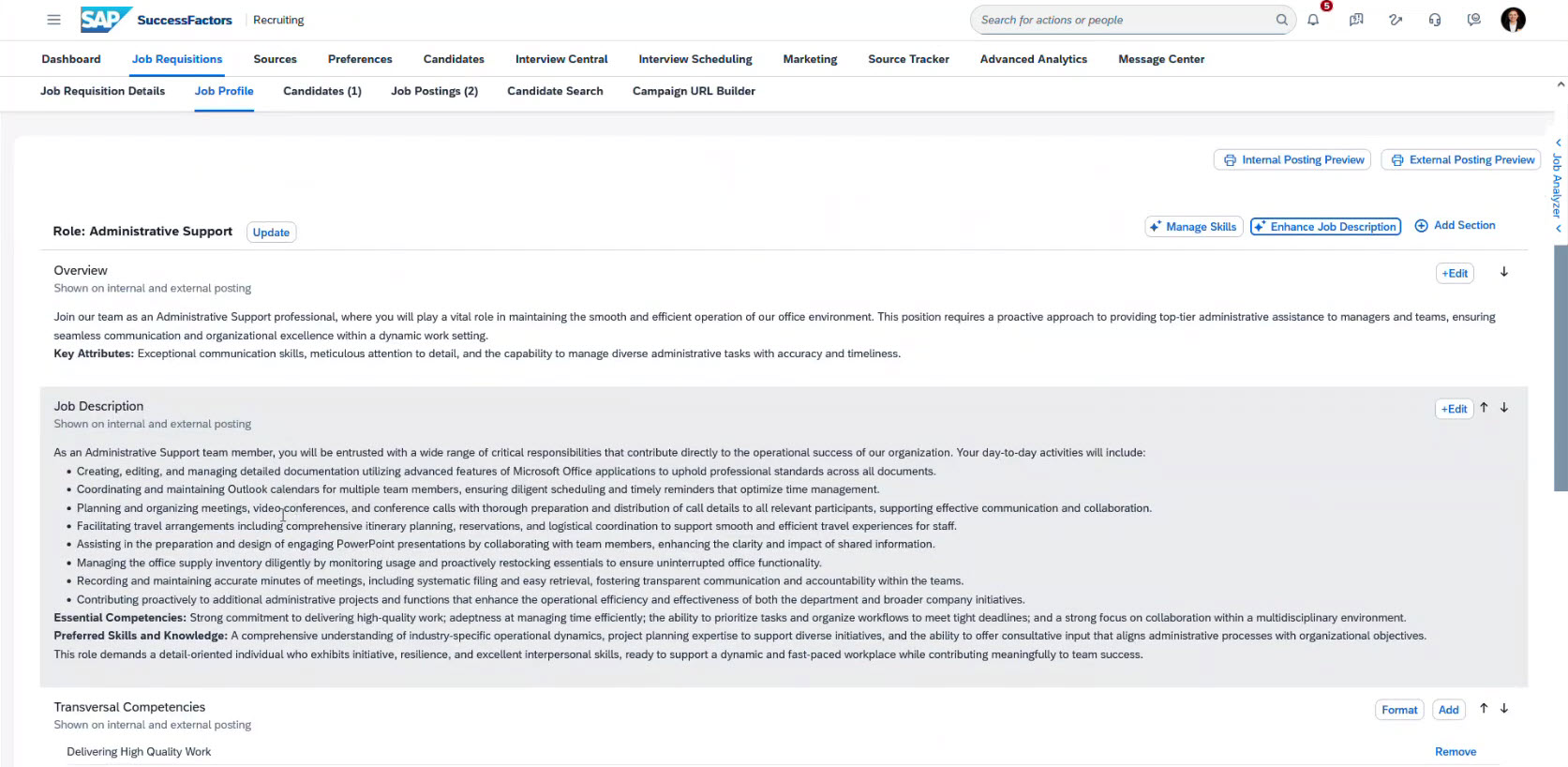
If you accept the changes, the main screen of the job profile will show the updates. If you decline, you keep the original version.
AI-assisted writing
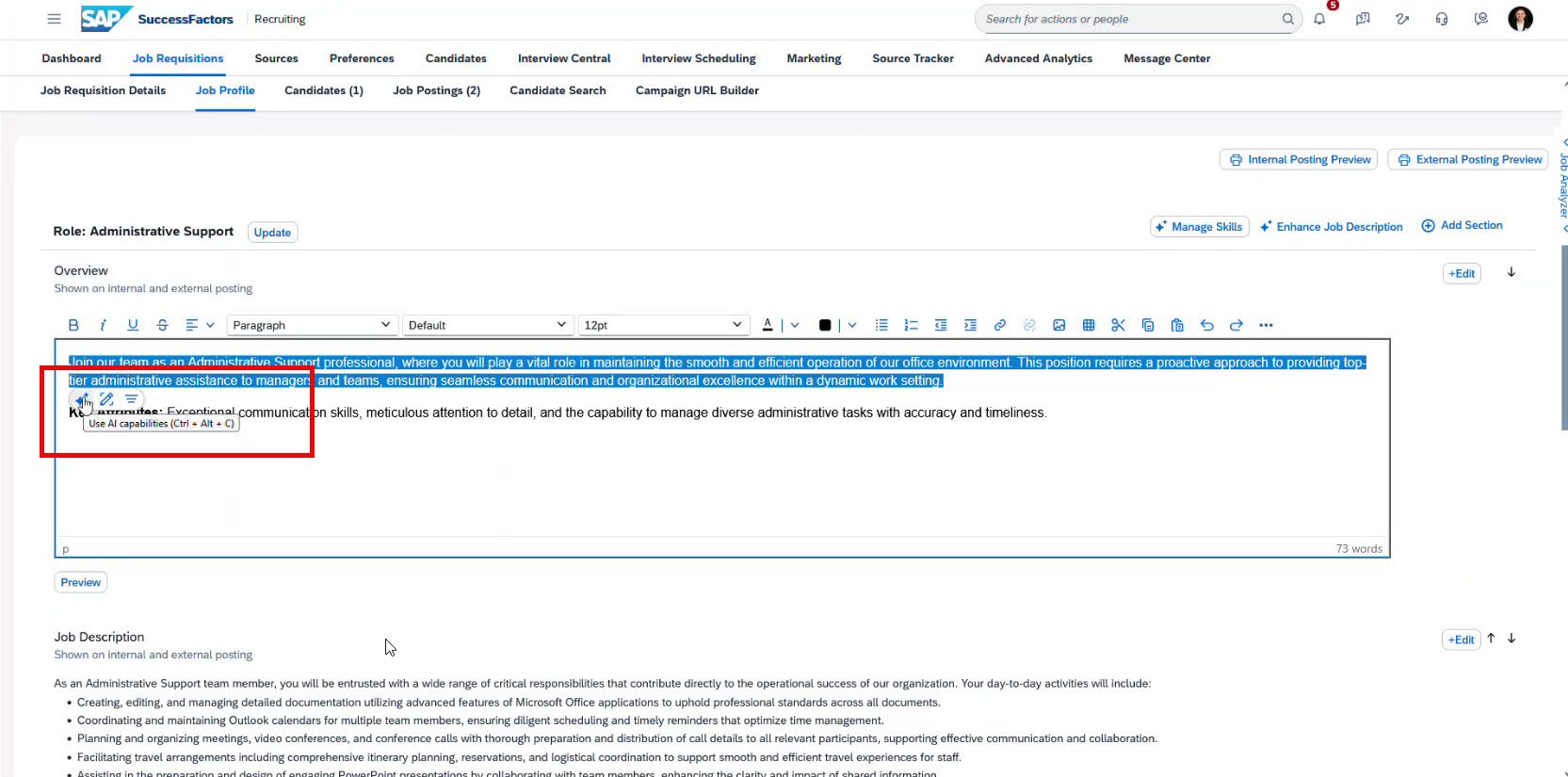
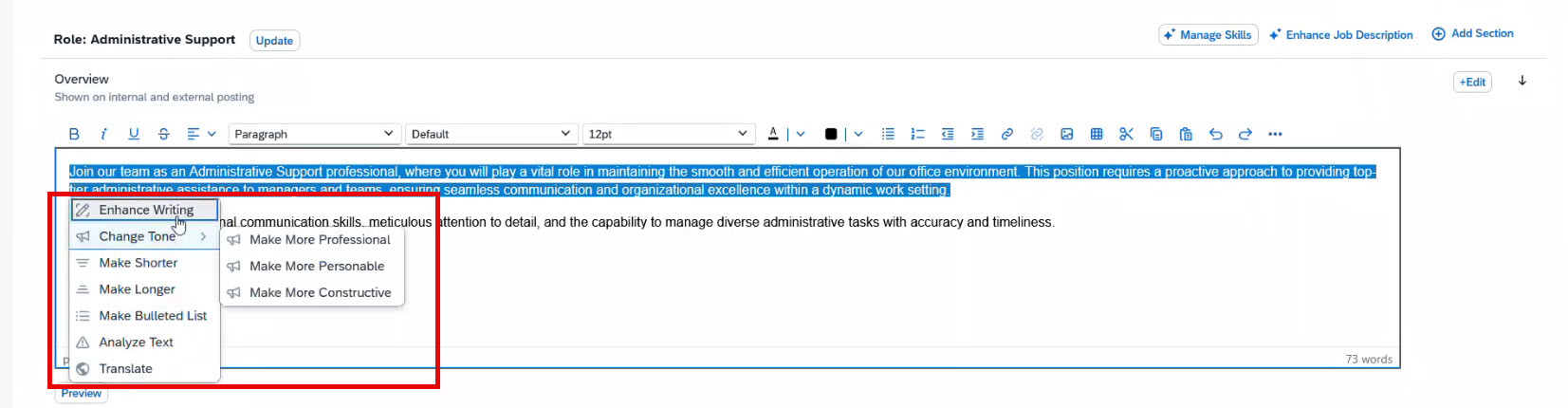
If you want to edit the text, select the fragment or your entire text and click “Use AI Capabilities”. This launches the AI-assisted writing tool, which provides various options for improving your text. For example, you can select a sentence in the job description, activate the AI tool, and choose the 'Make longer' function to expand on the content, enhancing its detail and clarity.
Features of Assisted Writing
|
Action |
Description |
|
Enhance Writing |
Improves grammar, wording, and clarity. |
|
Change Tone |
Adjusts tone (professional, personal, constructive). |
|
Make Shorter |
Condenses text to be more concise. |
|
Make Longer |
Expands text with more detail. |
|
Make Bulleted List |
Turns text into easy-to-read bullet points. |
|
Text Translation |
Translates text from American English into 46 supported languages. Offers full translation between English, German, French, Spanish, Portuguese, simplified Chinese, and Japanese. |
|
Text Analysis |
Checks for bias or harmful language and suggests safer wording. |
Assisted writing: Make longer
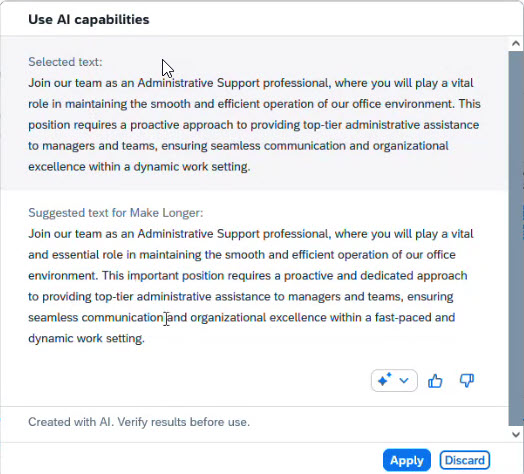
For example, if you use “Make longer” on your selected text, you will see such window:
If everything suits your purpose, you click “Apply.”
The text updates in the job profile, and you can see it in the section. You can edit the text multiple times to achieve the desired effect.
Manage skills with AI
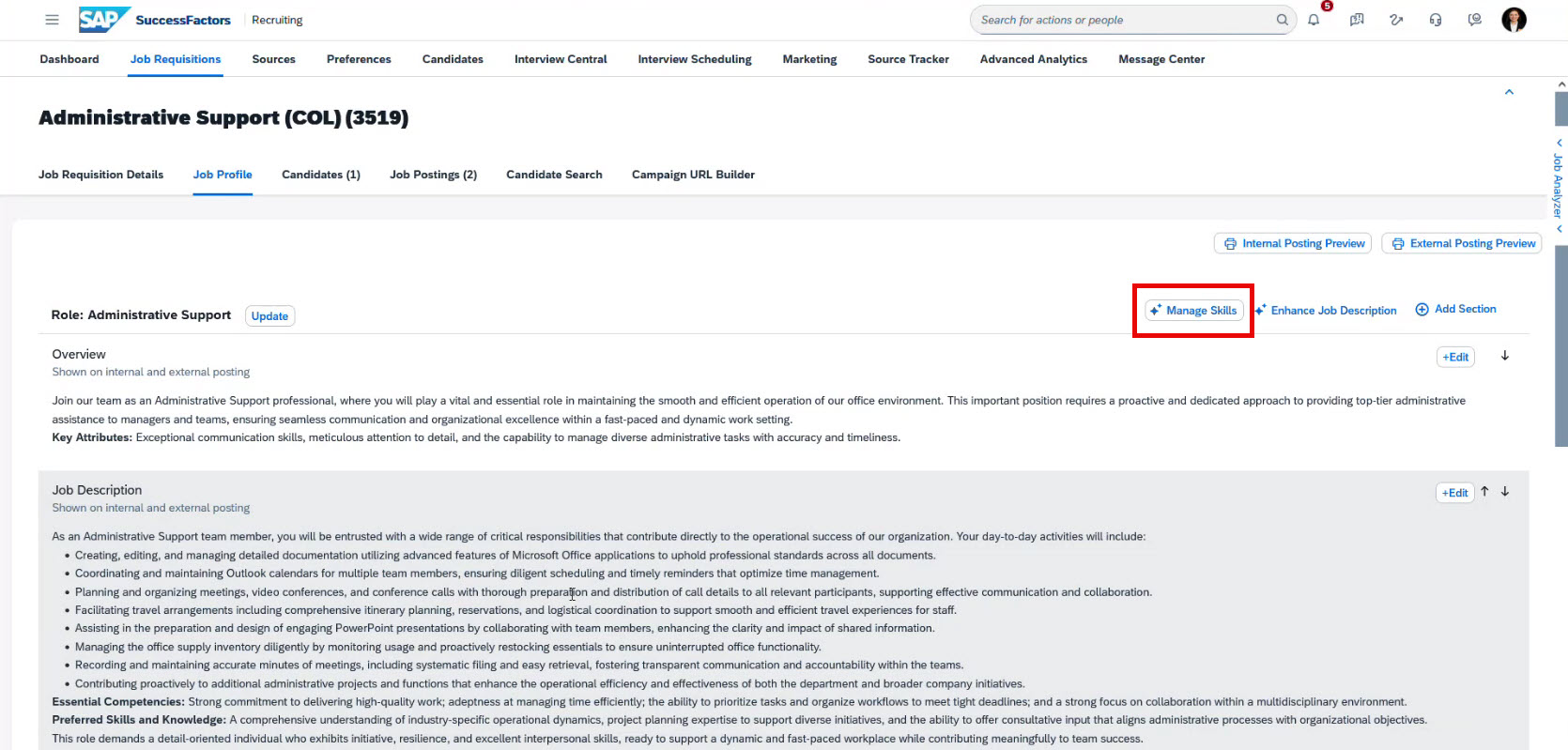
Let’s explore the next useful feature, “Manage Skills.” It is located near the “Enhance Job Description” button.
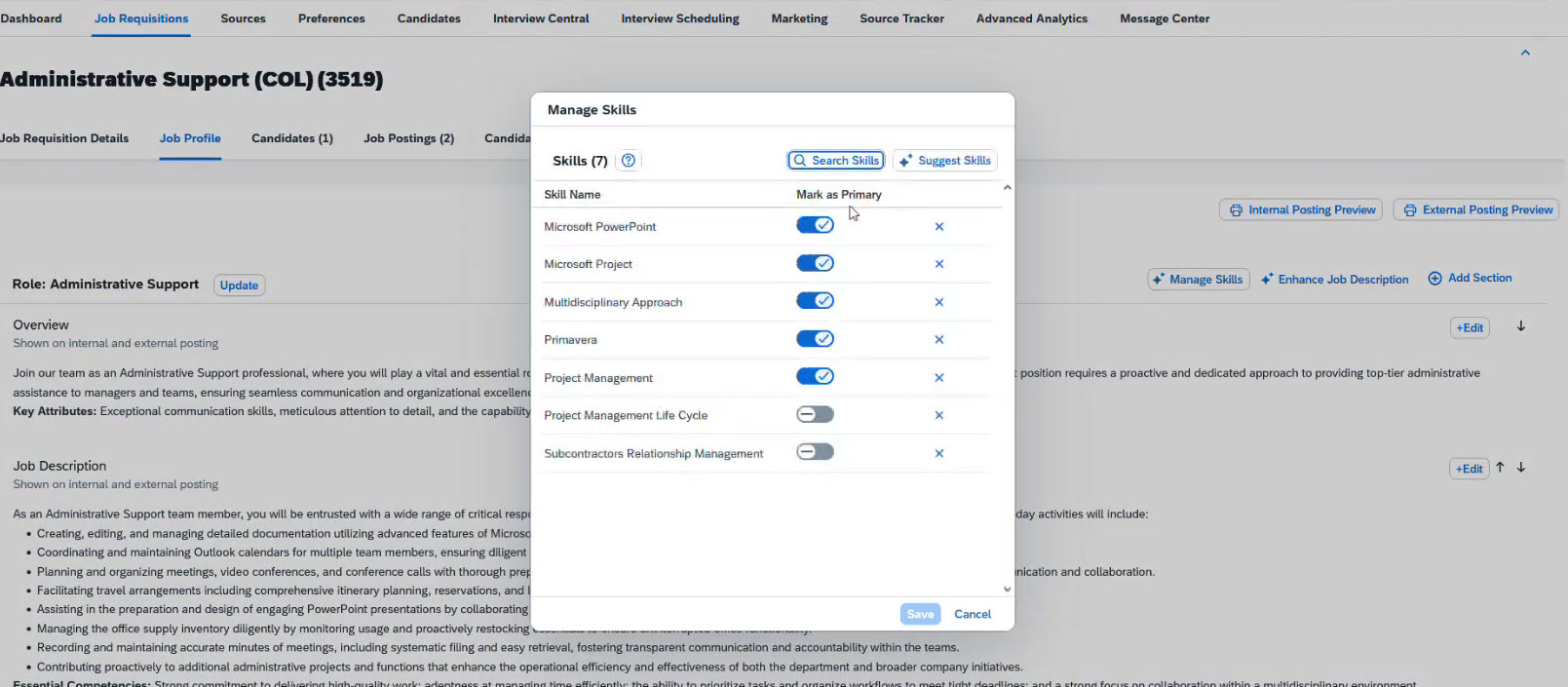
After clicking on it, you see the skills assigned to the position. You can mark some of them as primary and leave some as secondary.
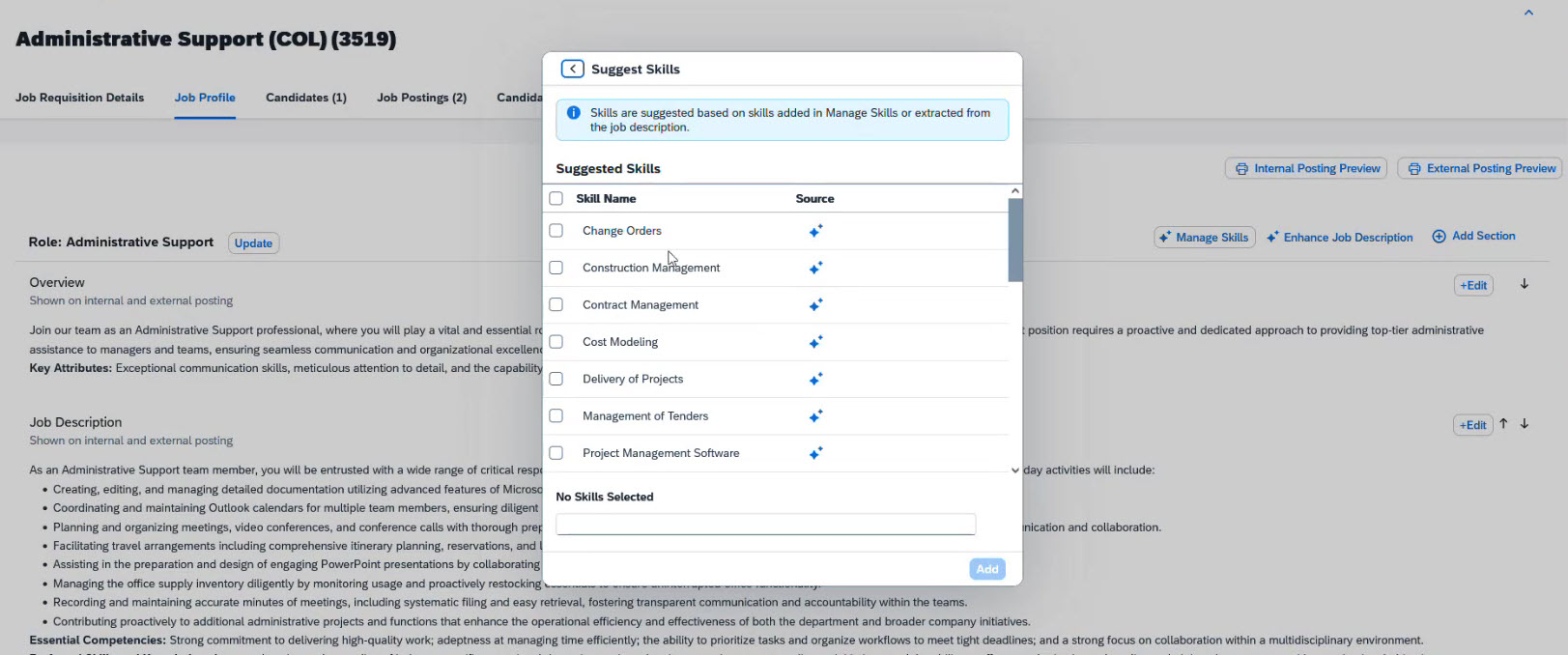
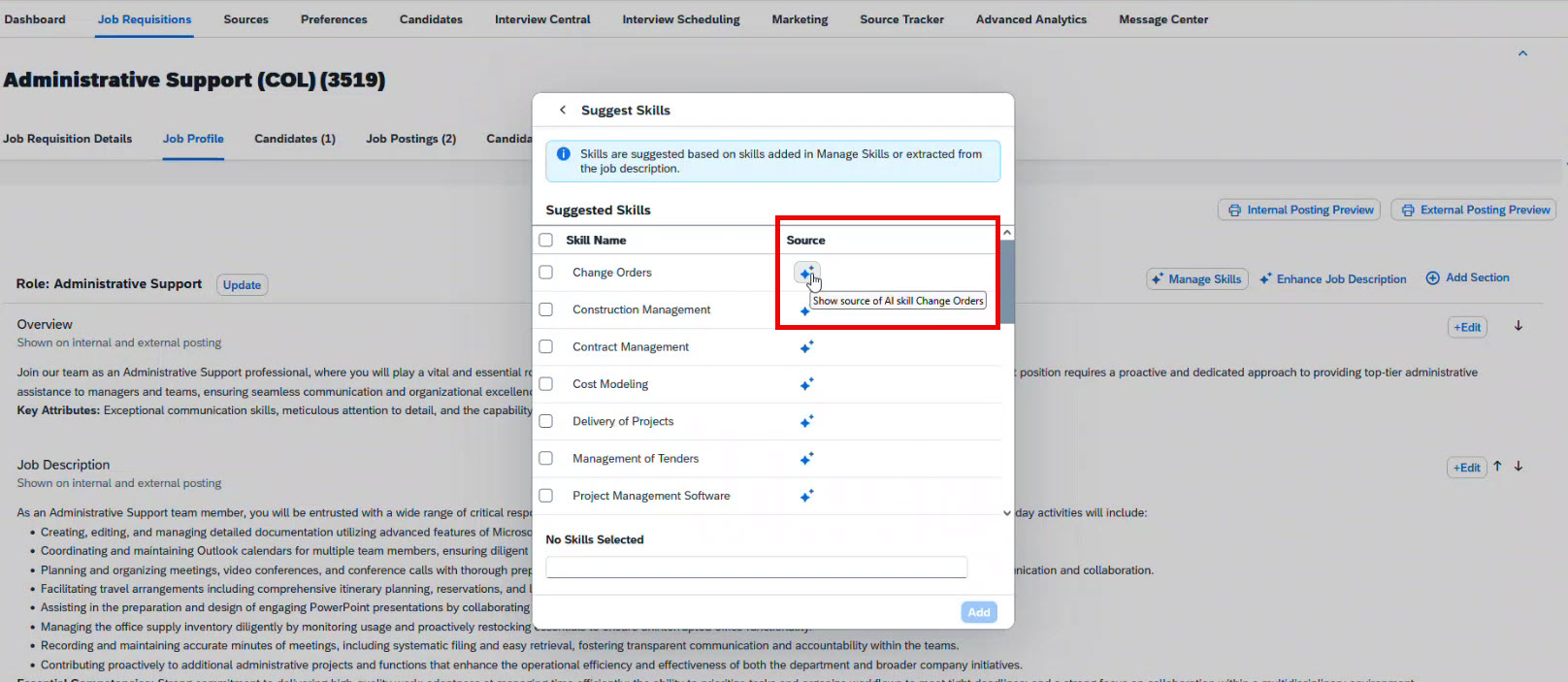
However, you can also ask AI to suggest skills for you. When you select the “Suggest Skills” button, AI begins analysing the job description and suggests new skills suitable for the chosen position.
Here you can see all the suggested options and the source of the suggestion:
- AI:
- Based on the text of job description:
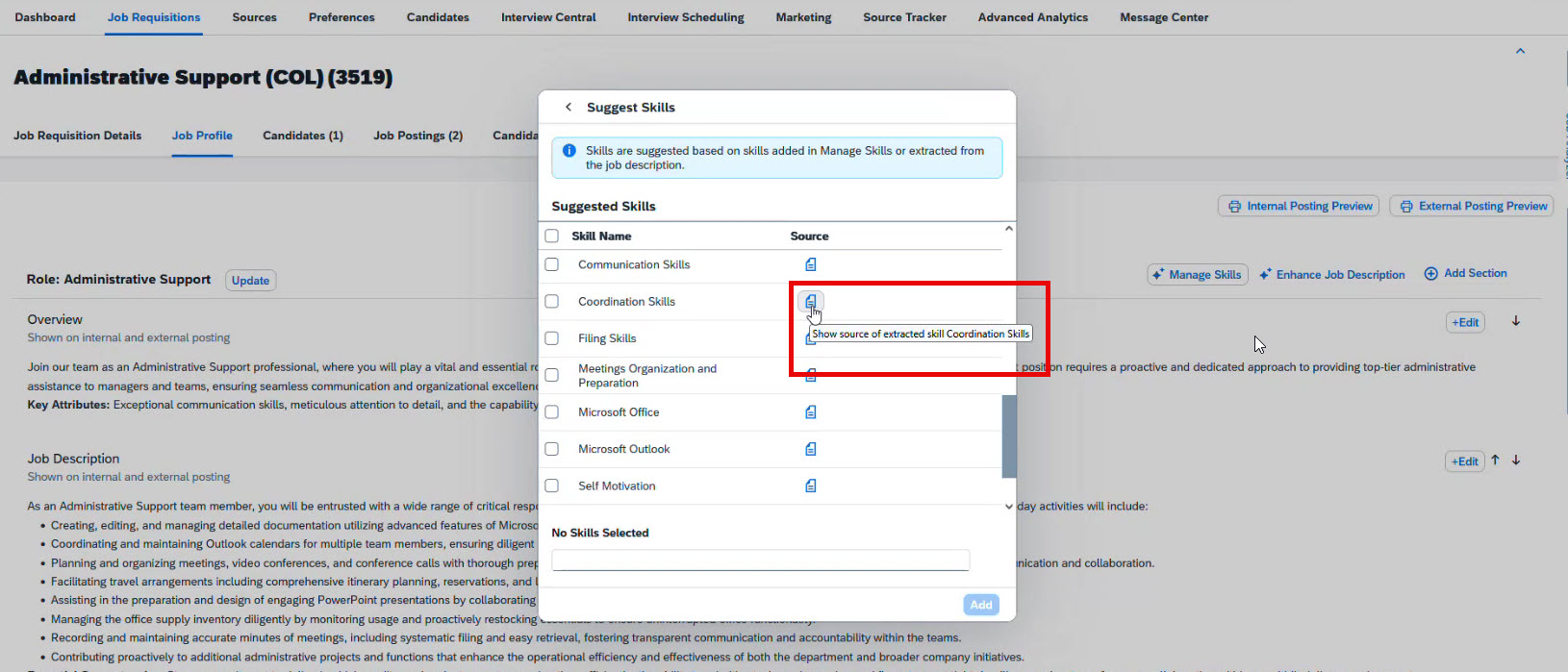
Next, select the most relevant skills and add them to your job profile.
Your job requisition is now ready to be posted!
AI Capabilities for candidates: Career site
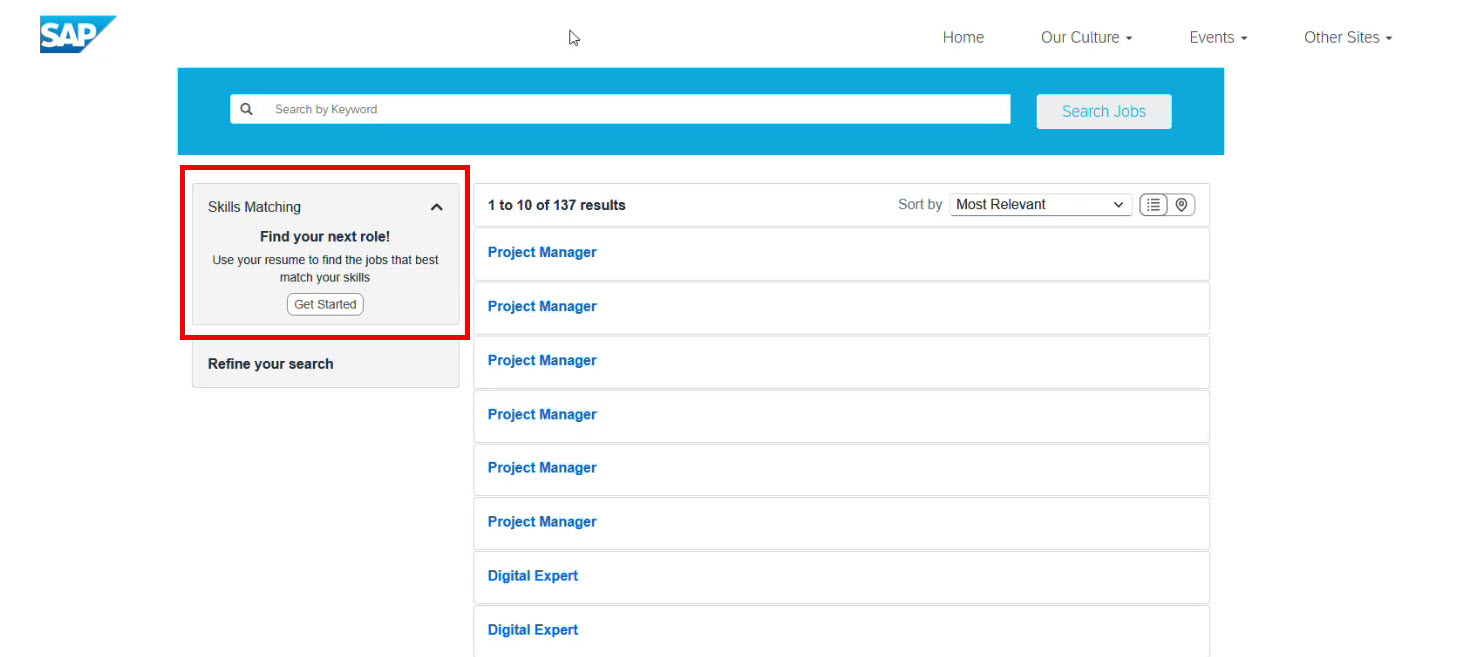
Now, let’s look at the candidate side, which is a dedicated career site powered by SAP SuccessFactors. This site also offers AI features for candidates.
Skills Matching
First, candidates can upload their resumes, and the system analyses them to match each person to the most suitable open jobs. It compares the skills on the resume with those in the job descriptions.
The system extracts skills from the resume to match candidates to open roles. For example, in picture, AI detected 26 skills.
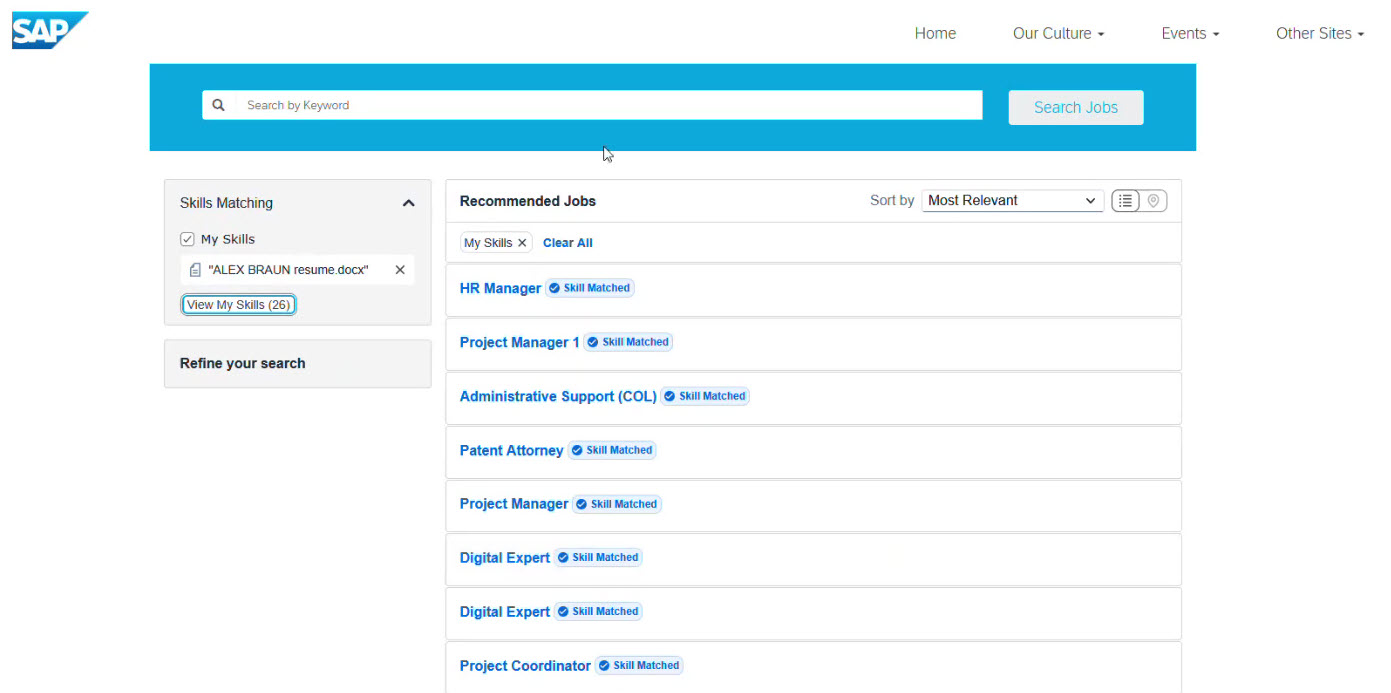
After clicking “View Jobs,” candidates see all recommended positions in one list.
This way, users can be sure their skills match the job description of selected open roles and choose among them, increasing their chances of being the right fit.
Users can also manage their skills directly in their profiles on the site.
What recruiters can do with the skills in SAP SuccessFactors?
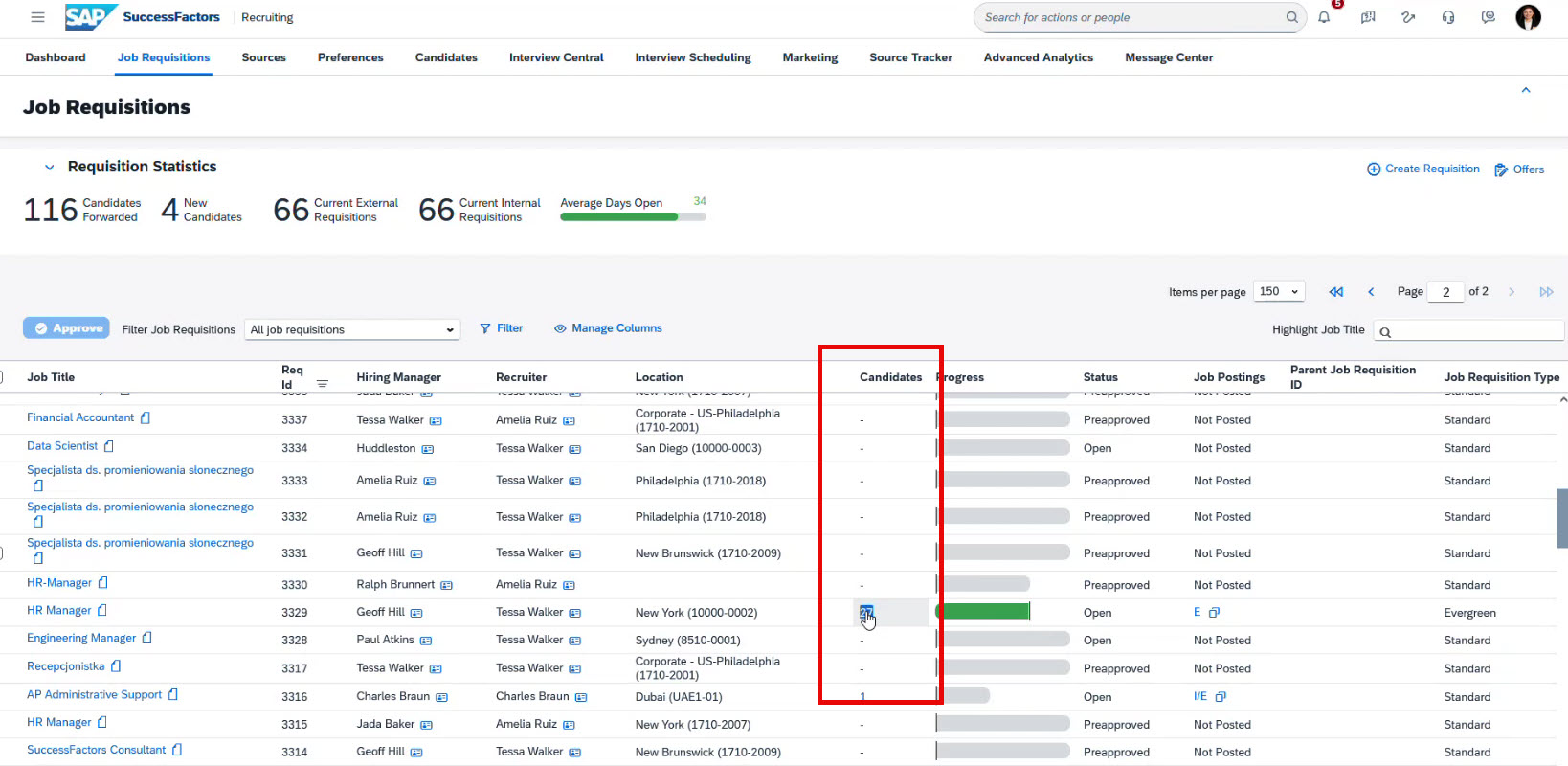
After candidates apply, the recruiter can check the job requisition list to see how many people have applied.
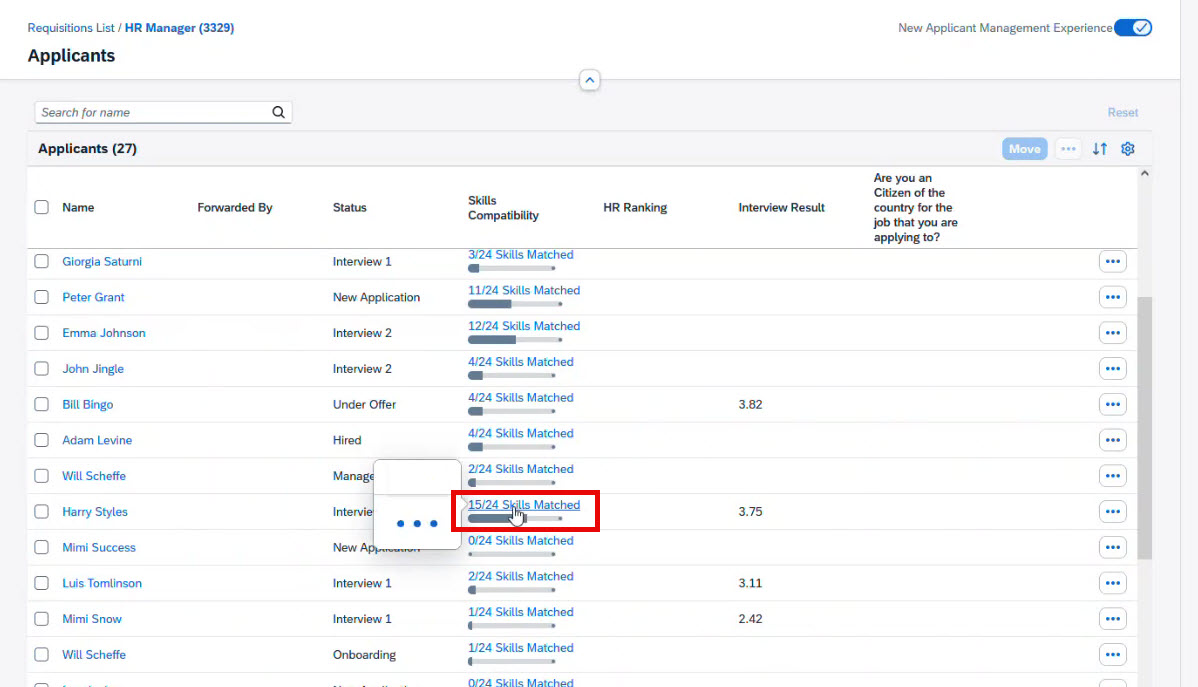
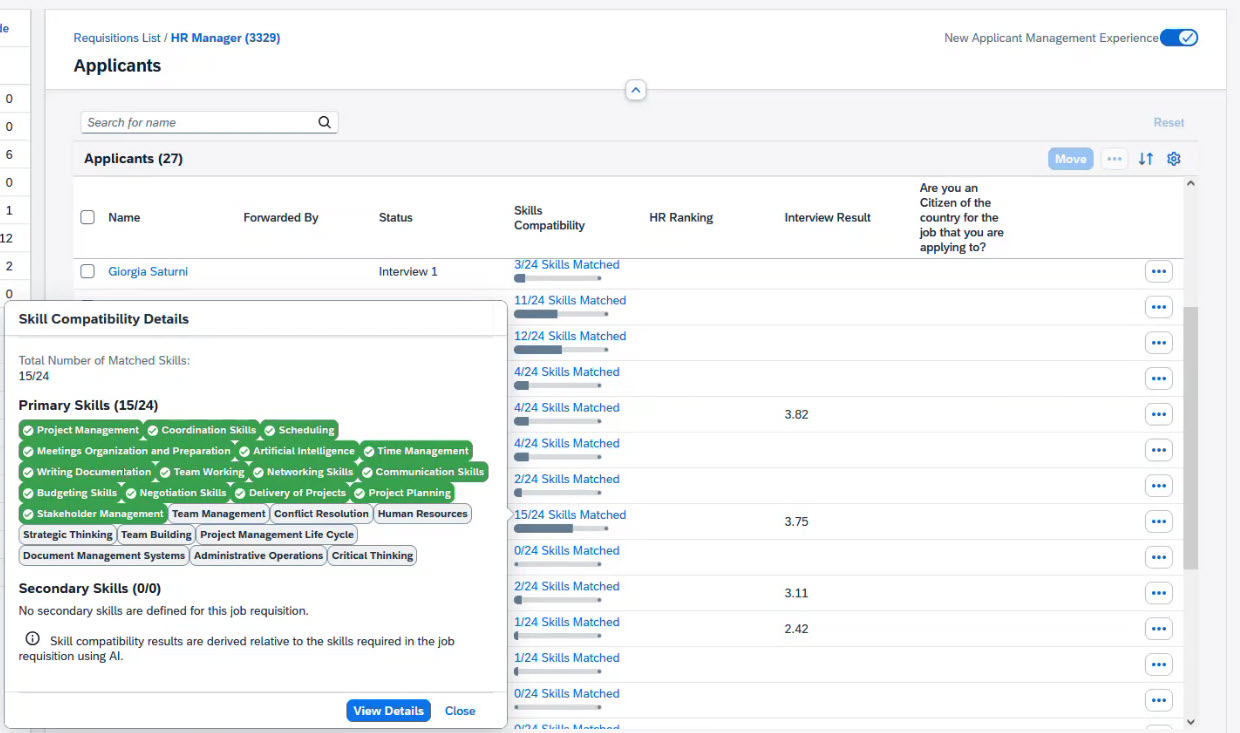
When a recruiter opens a Job Requisition, they can quickly spot the best candidates using the Skills Compatibility column. This column shows how the system matches the job description skills with those from each candidate.
By clicking on the result, you get a pop-up info for the selected candidate and can see the top matching skills (marked green), and the unmatched (marked grey).
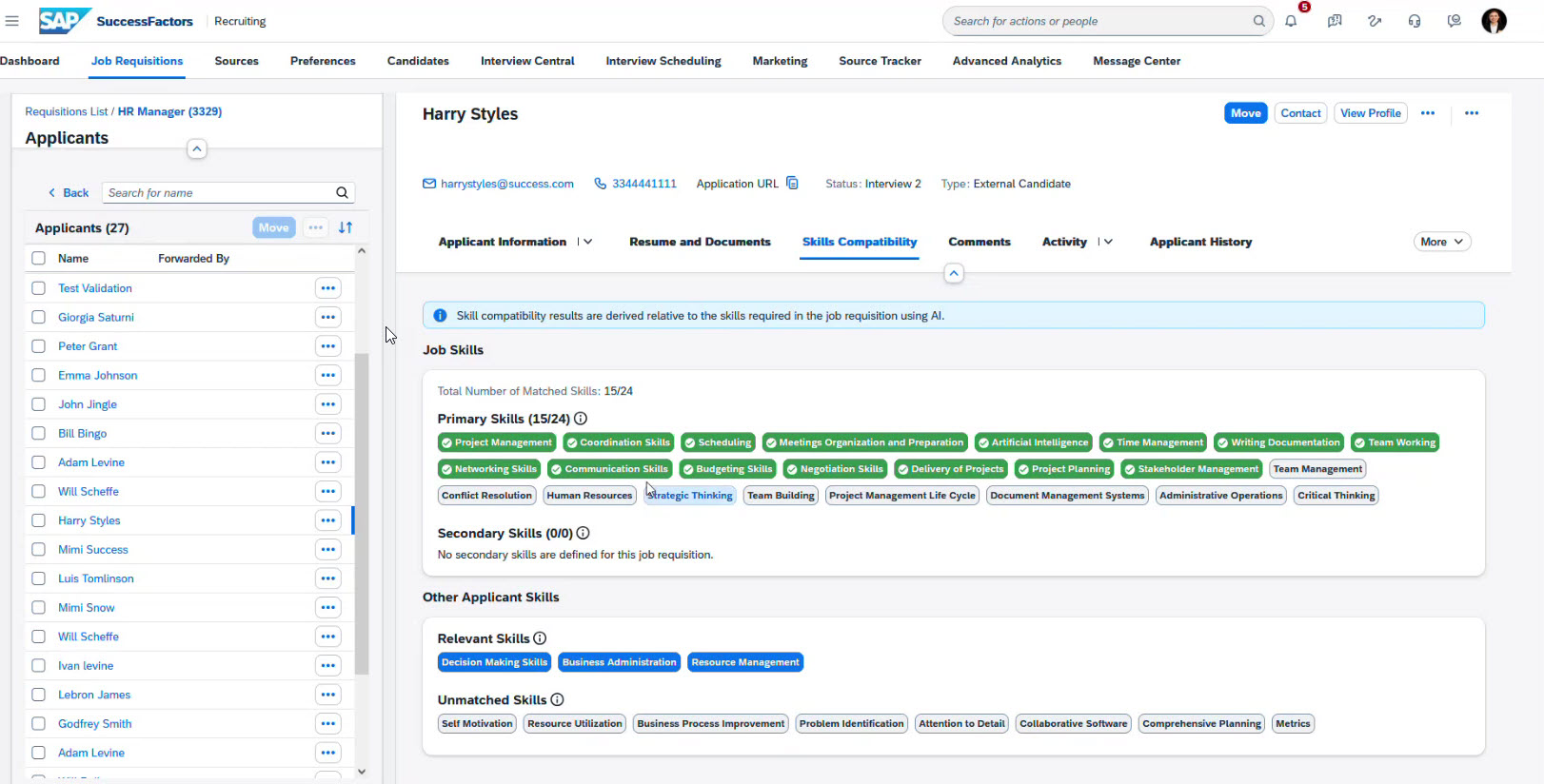
You can also view more details about a selected candidate by clicking “View Details” or the candidate’s name in the table view.
There is another section called “Other Applicant Skills.” These are skills not defined in the job description, but AI determined they are also good for the job and highlighted them in blue.
Below is the “Unmatched Skills” section.
Using the Skills Compatibility section, recruiters can process a large number of candidates and find top talent.
Recruiting interview questions generation
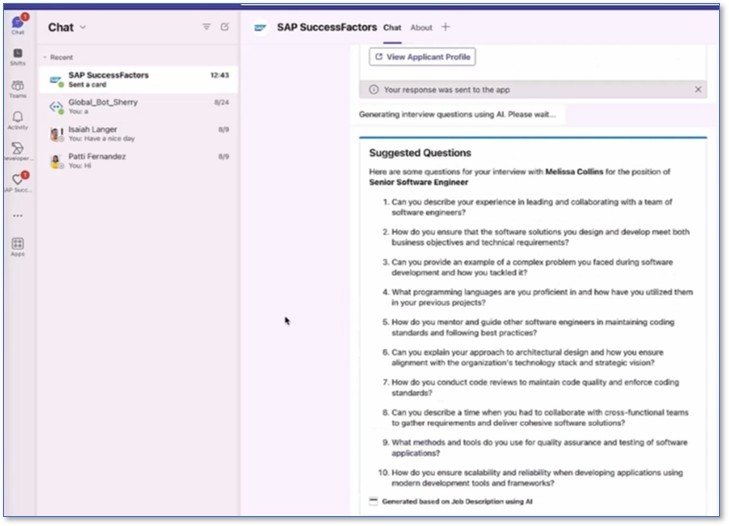
Before each interview, the system sends a reminder to the interviewer 24 hours in advance and offers AI support to generate relevant, role-specific questions. This feature is integrated in SAP SuccessFactors via MS Teams and looks like this:
AI-generated interview feedback
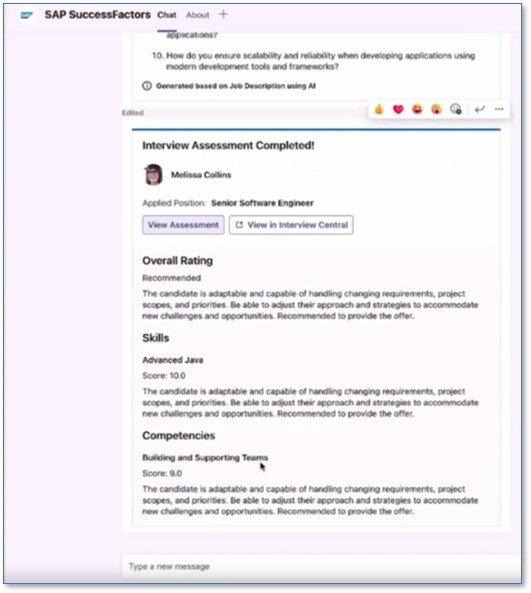
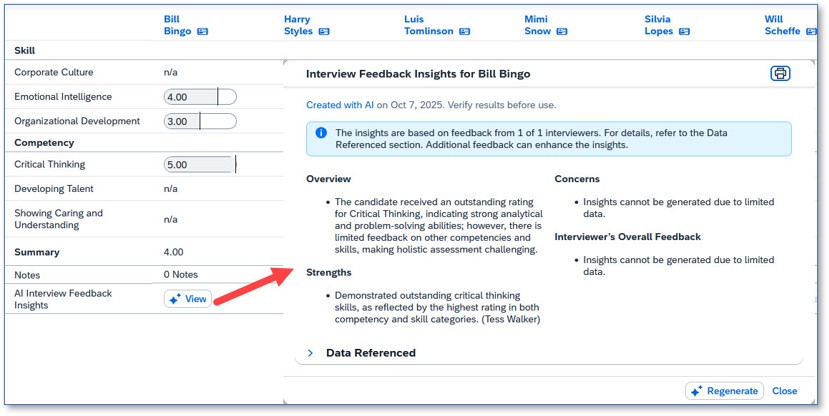
AI automatically analyses the candidate’s information and generates a summary of their key skills and competencies. This gives interviewers a clear starting point for evaluation and makes it easier to provide structured, consistent feedback.
This feature is integrated with both Microsoft Teams and SAP SuccessFactors.
Conclusion
We have walked you through the most common and widely used AI features for recruiting in SAP SuccessFactors. Smoothly integrated into recruiters' workflows, these features can be used in everyday work without complicated customizations. They reduce manual work, improve the quality of job requisitions, help you find relevant candidates faster, and support more informed, data-informed decision-making.
This practical guide is essential for companies that are planning to expand their use of SAP SuccessFactors, boost their recruitment processes, and develop a long-term plan for managing skills and talent.
If you are considering implementing or expanding AI capabilities in SAP SuccessFactors Recruiting, it is important to start with a clear understanding of the available features. If you have any questions, please do not hesitate to contact us. We are here to assist you.
If you’d like to explore SAP SuccessFactors Recruiting in more detail and see how the platform supports HR teams end to end, we’ve covered this topic in our dedicated overview article SAP SuccessFactors Recruiting: Overview for HR Teams.
FAQ
Are AI features in SAP SuccessFactors included in the standard license, or do they require additional licensing?
The basic SAP SuccessFactors license only includes a set of standard features. Advanced AI capabilities (such as job description generation, AI skill matching, AI interview support, and candidate analysis) require additional licensing through the purchase of SAP AI Units. The amount of AI usage depends on the number of AI Units purchased.
What languages are supported by SAP SuccessFactors AI features?
Translation from American English is available in 46 languages. Full bidirectional translation is supported for key languages (English, German, French, Spanish, Portuguese, Simplified Chinese, Japanese).
However, SAP is gradually expanding language support with each release.
Do recruiters have full control over AI-generated content in SAP SuccessFactors Recruiting?
Yes, the recruiter is the one who makes the final decision. Artificial intelligence can help create and improve job descriptions and suggest skills and recommendations. However, the recruiter can edit or rewrite the text, decide whether to publish the job posting or not, check and correct the suggested skills, make the final decision on the candidate, etc.
How accurate is AI skill matching in SAP SuccessFactors Recruiting?
AI skill matching can be highly accurate, but its precision depends on the quality and completeness of the data in job descriptions and resumes. Well-structured and detailed input leads to more reliable results.
The system uses machine learning to compare candidate skills with job requirements and identify direct, related, and transferable skills.
Subscribe