

Maksim Ablameiko, Senior BI & Analytics Consultant at ACBaltica
Imagine a global company with thousands of employees spread across continents. Each team relies on different systems, regional databases, and local processes to make decisions. Valuable information is everywhere, but nowhere in one place. Reporting is slow, analytics inconsistent, and reconciling numbers often take more time than acting on them.
For a business built on trust and precision, this fragmented approach to data simply isn’t sustainable. Businesses need a single, reliable source of truth — a foundation that unifies all data, upholds strict security and governance standards, and provides business leaders with confidence in every report and insight.
In this blog post, we’ll focus on how SAP Datashpere can help address these issues. But first, let's briefly explain what SAP Datasphere is and how it can help you.
What is SAP Datasphere?
SAP Datasphere is a cloud data warehouse. The solution helps you bring together information from SAP and non-SAP sources, so you can connect, organize, and analyze it without extra complexity. It also preserves your business context, including financial structures and supply chain links, so you can see the big picture and make informed decisions based on accurate, connected data. Thanks to the simple design of the solution, teams can start even with small projects and grow to manage all their data in one place.
SAP Datasphere as part of the SAP Business Data Cloud
Today, SAP Datasphere is included in the SAP Business Data Cloud license bundle, which also contains SAP Analytics Cloud (SAC), SAP BW/4HANA Private Cloud Edition, and SAP Databricks. This bundle provides a connected environment where data can move between transactional systems, planning tools, and analytics platforms without requiring separate integrations.
Core components of SAP Datasphere
Each part of SAP Datasphere has a specific job, and together they create a reliable data environment. Let’s examine the core components in greater detail:
Spaces
Spaces are isolated work environments where teams can work independently without interfering with each other. Users can connect to data sources, upload flat files, build prototypes, or run proofs of concept. Spaces follow the same security and management rules, so teams can work freely while staying safe and controlled.
Modeling options
With data modeling in SAP Datasphere, teams can prepare and structure their data for analysis. Models can be created using SQL or a Graphical View with filters, joins, and aggregations. Data can be stored locally or virtually. Analytic Models support reporting in SAP Analytics Cloud. Data Flows and Intelligent Lookup make it easy to combine and enrich data from multiple sources.
Business Layer
The Business Layer provides a unified semantic model that translates complex SAP structures, such as CDS views, hierarchies, and KPIs, into business-friendly definitions. Once created, these definitions can be reused across SAP Analytics Cloud, Power BI, SQL, or custom applications. This makes sure that all teams use the same metrics, which gets rid of duplicate logic and KPI drift.
BW Bridge
BW Bridge allows organizations with existing SAP BW systems to move their models and transformations to SAP Datasphere bit by bit. Current reports, data flows, and logic remain operational while new models are rebuilt in SAP Datasphere over time.
Data Catalog
The Data Catalog automatically captures metadata, data lineage, and ownership across all Spaces and sources. It makes data easier to find, understand, and trust.
Data Marketplace
The Data Marketplace allows to enrich data models with external data from SAP and trusted partners. This data can include market benchmarks, logistics, or sustainability metrics.
All these components work together to make data easier to find, use, and manage. But what's really important is how they help solve the everyday problems businesses face.
SAP Datasphere architecture
SAP Datasphere sits between source systems and analytics tools such as SAP Analytics Cloud and other external consumers. It’s architecture follows a clear, logical flow from raw data ingestion to analytics-ready consumption:
-
Data Sources & Open Data Ecosystem
Data originates from a variety of sources: SAP systems (S/4HANA, Ariba, Success Factors or others), or non-SAP systems, files, and Open Data Ecosystem partners. -
Connectivity & Ingestion
Connectivity in SAP Datasphere is built around the idea that you should work with data where it lives, not always move it. The platform provides a set of prebuilt connectors for SAP sources such as S/4HANA, BW/4HANA, SAP HANA Cloud, and SAP Business Suite, as well as JDBC-/ODBC-based access to many non-SAP databases and cloud warehouses. Technically, Datasphere supports two main patterns: federation and replication. With federation, data stays in the source system and is accessed in real time. With replication, data is physically loaded into Datasphere using configurable data flows. -
Central Data Layer & Data Lake
Ingested or federated data is organized in a centralized data area or data lake. This layer ensures that clean, harmonized, and reusable datasets are available for modeling and analytics. -
Space Management & Governance
All acquisition, preparation and modeling takes place inside Spaces - isolated work areas with their own connections, storage quotas, users and roles. This is where administration, security and data-access controls are enforced, so domain teams can work independently without losing central governance. -
Data & Business Modeling
Within a space, engineers (usually) and business users (less usually) use Data Builder and Business Builder to integrate, transform and semantically model data. Fact and dimension entities, data flows, replication flows and analytic models are created here, reusing semantic definitions from SAP applications where available. -
Catalog & Data Marketplace
All datasets, entities, and models are registered in the catalog, making them discoverable and reusable. Users can also access external datasets via the Data Marketplace, expanding the available data fabric. -
Analytic Models & Consumption
Fact and dimension entities are combined into analytic models, which can be used directly by SAP Analytics Cloud (SAC), external BI tools or other applications. This layer offers a ready-to-use, semantic representation of business data. -
End-to-End Governance & Security
SAP Datasphere provides strong governance, access control and auditability throughout the flow, ensuring trust and compliance across spaces, central datasets, and shared data.
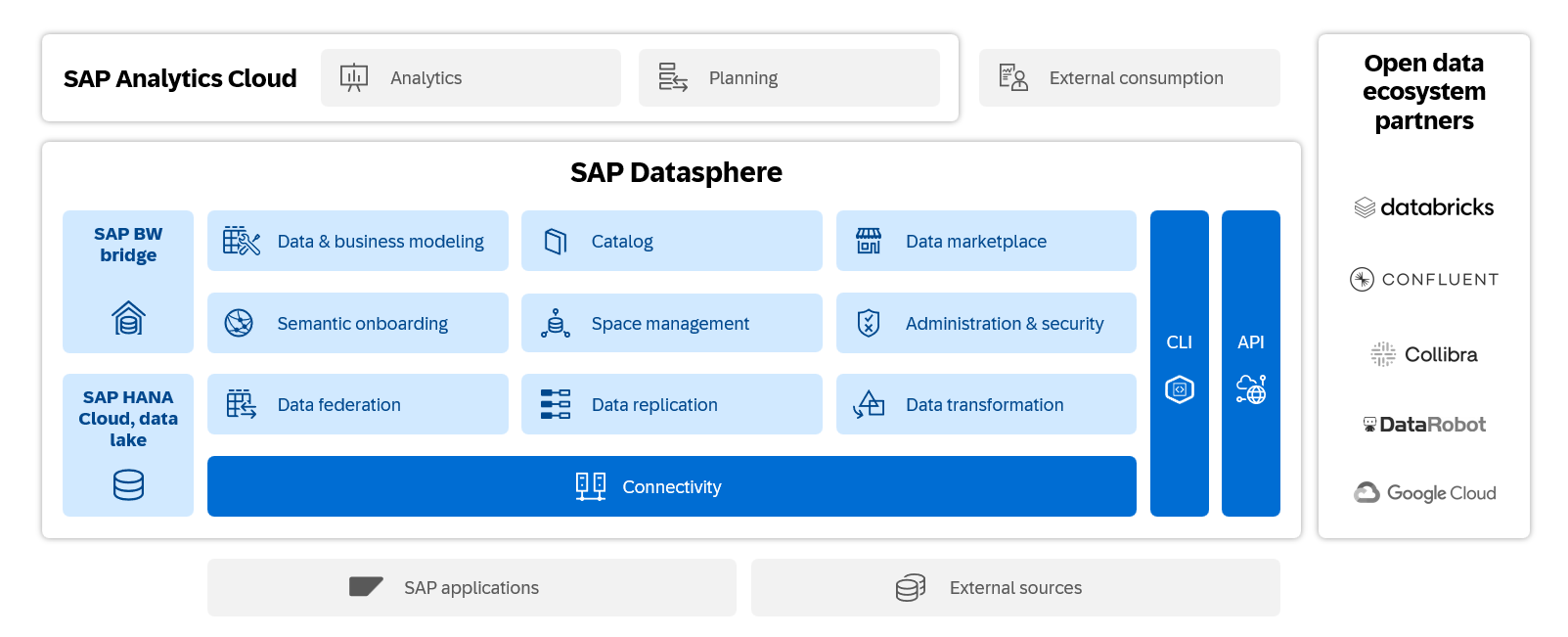
Business challenges SAP Datasphere helps solve
SAP Datasphere unifies your data in one trusted location, making reliable insights easier to access, analyze, and share across the business. It addresses common challenges that companies face today:
No centralized reporting
Companies struggle to consolidate data from S/4HANA and other systems, which slows reporting and leads to inconsistencies. SAP Datasphere provides a single access point for all data, speeding up report generation and ensuring reliable insights.
Inconsistent business metrics across departments
Each department, like finance, supply chain, HR, procurement, and sales, has its own way of doing things. This leads to different ways of measuring success, which causes confusion. SAP Datasphere provides a single, governed semantic layer outside S/4HANA. Here, dimensions, hierarchies, and calculations are defined once and reused across all BI and planning tools. This ensures consistent metrics companywide.
Dependence on IT for reporting and analysis
Business users often have to wait for IT to prepare reports or integrate data, which slows down decision-making and limits flexibility. With SAP Datasphere, you can access governed data models directly through SAP Analytics Cloud, Power BI, SQL/JDBC/ODBC, or custom applications. This enables self-service reporting and simulations while keeping data consistent and transparent.
What makes SAP Datasphere stand out
For years, many companies have opted for simpler cloud platforms like Microsoft, Google, Amazon, or Snowflake over SAP’s complex data tools. While these systems are fast and easy to use, they don’t fully understand SAP data. When information leaves SAP, the numbers remain, but the business logic and context disappear.
SAP Datasphere changes that. It maintains the simplicity of modern cloud platforms while preserving SAP’s built-in logic and meaning. Here’s what makes it stand out:
Native integration with SAP and non-SAP systems
SAP Datasphere connects directly to SAP S/4HANA and other SAP applications using built-in connectors and models. At the same time, it can integrate with non-SAP sources, including cloud data warehouses, databases, and flat files. This means data can flow into analytics tools without custom integration or complex setup, whether it comes from SAP or other systems.
Ready-to-use business models
SAP Datasphere offers prebuilt data structures for key areas such as finance, sales, and supply chain. These models include standard SAP logic like revenue recognition, cost center allocations, and material hierarchies. Teams can start reporting and analyzing immediately, without rebuilding these structures from scratch.
Data context preservation
SAP Datasphere keeps the relationships and meaning of SAP data intact — hierarchies, reference data, cost centers, materials, and customers remain consistent. This ensures reports and analytics reflect the same business logic that SAP users see, avoiding discrepancies or misinterpretation.
Consistent metrics across tools
In SAP Datasphere, you define hierarchies, KPIs, and calculations just once. You can use these definitions in SAP Analytics Cloud, Power BI, SQL queries, or custom applications. This makes sure that all teams are using the same numbers, prevents double calculations, and ensures that KPIs are consistent.
Cloud-native architecture
SAP Datasphere is designed for the cloud, which makes it easy to scale as your data volumes grow. Companies don’t need to invest in additional hardware or complex infrastructure, and IT teams can focus on insights rather than maintenance.
User-friendly interface
SAP Datasphere provides a modern, intuitive interface that simplifies daily tasks for both business and IT users.
Typical scenarios for SAP Datasphere implementation
Lightweight integration layer
Use Datasphere as a central integration point between SAP and non-SAP systems. It gives business users and BI tools (such as SAP Analytics Cloud, Power BI, or Tableau) virtual access to data from S/4HANA, ECC, or BW without complex replication. You can start small and later persist selected models when needed for performance or historical data.
Best for: organizations looking for quick reporting results, operating with limited budgets, or managing multiple BI tools but wanting a single, trusted data source.
Greenfield with SAP S/4HANA
For companies implementing S/4HANA from scratch, Datasphere can serve as the foundation for a modern data warehouse. It lets teams use real-time data from S/4HANA for current insights and also copies important sets of data when they need better performance. Built-in business models and connectors help launch reporting much faster without requiring users to start from zero.
Best for: organizations that want to build a new analytics landscape aligned with S/4HANA.
Hybrid approach with BW Bridge
Companies that already use SAP BW can move their existing data models and transformations to the cloud using BW Bridge. This setup keeps their current BW reports, logic, and data flows running as before, while teams can gradually create new modern models directly in SAP Datasphere.
Best for: organizations that want to modernize their SAP BW landscape without losing previous development work or disrupting business reporting.
Replacing a legacy Data Warehouse
Organizations can retire outdated, expensive on-prem data warehouses and move to SAP Datasphere as their standardized semantic layer. It simplifies reporting, reduces maintenance costs, and ensures consistent KPIs and definitions across the enterprise.
Best for: companies with SAP-centric roadmaps that want to unify fragmented reporting and cut infrastructure costs.
Offloading complex S/4HANA calculations
Organizations can move complex data preparation and calculation workloads from S/4HANA embedded analytics to SAP Datasphere. This creates a scalable, governed, and centralized layer for your data, freeing up S/4HANA resources and improving overall system performance.
Best for: companies using extensive embedded analytics in S/4HANA that need more performance, flexibility, and a single source of truth for business data.
Business results that matter
- Faster reporting cycles and shorter time to close
- More accurate planning by integrating financial, operational, and workforce data
- A simplified system landscape that reduces cost and IT effort
- Agility to react to market changes with predictive analytics and scenario modeling
- Reusable, governed data models across SAC, Power BI, SQL, and custom apps
- Smooth migration from legacy on-premises BW systems to the cloud while protecting past investments in data models, ETL processes, reports, and business logic
- Native reuse of SAP semantics, security, and prebuilt business content
Real-life example: Unifying operations with SAP Datasphere for real-time insight
Let’s see the real case of Datasphere implementation:
The San Jose Sharks, an NHL team and operator of the SAP Center arena, needed to move from slow, post-event reporting to real-time game-day insights. Their goal was to understand ticket sales, attendance patterns, and operational efficiency while events were still happening (not days later).
The company used SAP Datasphere to connect different systems, including ticketing, parking, retail, food, and vendor operations. Datasphere provided a single source of truth, ensuring that all operational teams were working with the same reliable data in real time.
When used together with SAP Analytics Cloud, this system lets employees see and study combined data from all areas of the venue. Instead of manually reporting issues, they use automated dashboards. This helps staff detect and respond to issues faster during live events.
By combining SAP Datasphere and SAP Analytics Cloud, the team achieved a 12-hour reduction in reporting turnaround and began integrating five external vendor data sources directly into their analytics landscape.
The result is faster insights, greater visibility across departments, and more proactive decision-making on game days, all of which are powered by a single, governed data foundation.
Conclusion
SAP Datasphere helps organizations manage their data. It connects SAP and non-SAP sources within one controlled environment, reducing fragmentation and ensuring everyone works with the same, reliable information. This means fewer manual processes, faster access to insights, and more confidence in the numbers behind every decision.
For companies looking to adopt a modern data strategy, SAP Datasphere offers a balanced approach. It supports existing SAP investments while also providing flexibility and self-service analytics through the cloud. The result is a unified data foundation that simplifies operations, strengthens governance, and makes data work better for the entire business.

Subscribe