

Pavel Ramanouski, Head of SAP BI and EPM practice at ACBaltica
This is where the complexity of workforce planning comes into play. It’s not exclusively about calculating headcount. It involves forecasting turnover, estimating future employee costs, and assessing the impact on departmental budgets and the company’s overall financial results. When HR and finance use different tools and data versions, the organization loses speed in decision-making and transparency in calculations.
This article explains how SAP Analytics Cloud brings analytics and planning together in one place. We’ll look at its architecture, how reporting and planning connect, the built-in modelling and forecasting tools, integration with HR and finance systems, and a ready-to-use Workforce Planning scenario.

Picture a large company where HR plans next year’s hiring, finance prepares the budget, and department heads ask for more funds. HR keeps personnel data in one system, finance uses another for calculations, and managers rely on Excel. Over time, the numbers don’t match, and multiple versions appear. Every change means manual recalculations. This raises a key question: What will it really cost to hire, freeze hiring, or restructure? Can we see the financial impact right away?
This is where the complexity of workforce planning comes into play. It’s not exclusively about calculating headcount. It involves forecasting turnover, estimating future employee costs, and assessing the impact on departmental budgets and the company’s overall financial results. When HR and finance use different tools and data versions, the organization loses speed in decision-making and transparency in calculations.
This article explains how SAP Analytics Cloud brings analytics and planning together in one place. We’ll look at its architecture, how reporting and planning connect, the built-in modelling and forecasting tools, integration with HR and finance systems, and a ready-to-use Workforce Planning scenario.
Challenges of workforce planning without integrated systems
First, let’s explore the challenges organizations usually face when HR and financial processes are not integrated:
-
No single source of truth: Personnel data, financial metrics, and operational information are kept in separate systems and Excel files, so there is no central database. This leads to inconsistent headcount numbers, frequent manual checks, delayed reports, and limited visibility into the real workforce situation.
-
Lack of connection between HR decisions and financial results: Companies cannot accurately anticipate the financial impact of new hires, hiring freezes, or potential risks, etc.
-
Heavy reliance on Excel and manual processes: This leads to problems with version control, more errors, longer approval times, repeated work, and wasted employee time.
-
Limited forecasting capability: Without integrated tools and a single source of truth, organizations struggle to perform comprehensive predictive workforce planning.
Without an integrated system, planning is done manually. Allowances for different categories are determined manually, as are tax rates and rates for various deductions (social security contributions, insurance, etc.). This process is time-consuming and often relies on data from policies, which requires manual verification of the current status, as well as the planners’ knowledge.
And you can avoid such challenges using SAP Analytics Cloud, which unifies analytics, planning, and forecasting into a single platform. The integrated system enables data-driven workforce planning by generating a plan based on data from your HR and cost accounting systems.
SAP Analytics Cloud architecture
SAP Analytics Cloud is built on two main features: Reporting (Business Intelligence) and Collaborative Enterprise Planning. Both use the same architecture and share a common data model.
Reporting (Business Intelligence)
Reporting (BI) uses your current data to help the business understand performance and make better decisions. It can work on its own but is even more useful when combined with planning.
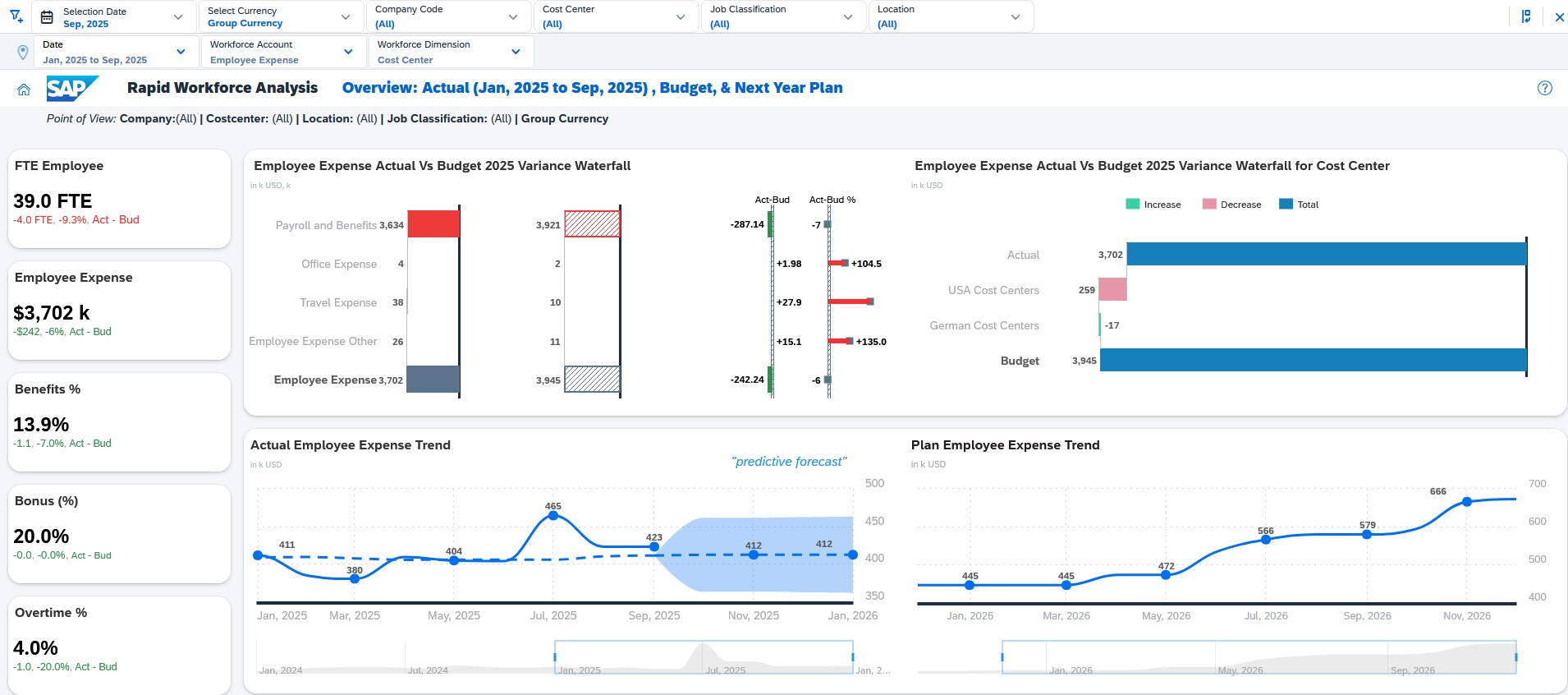
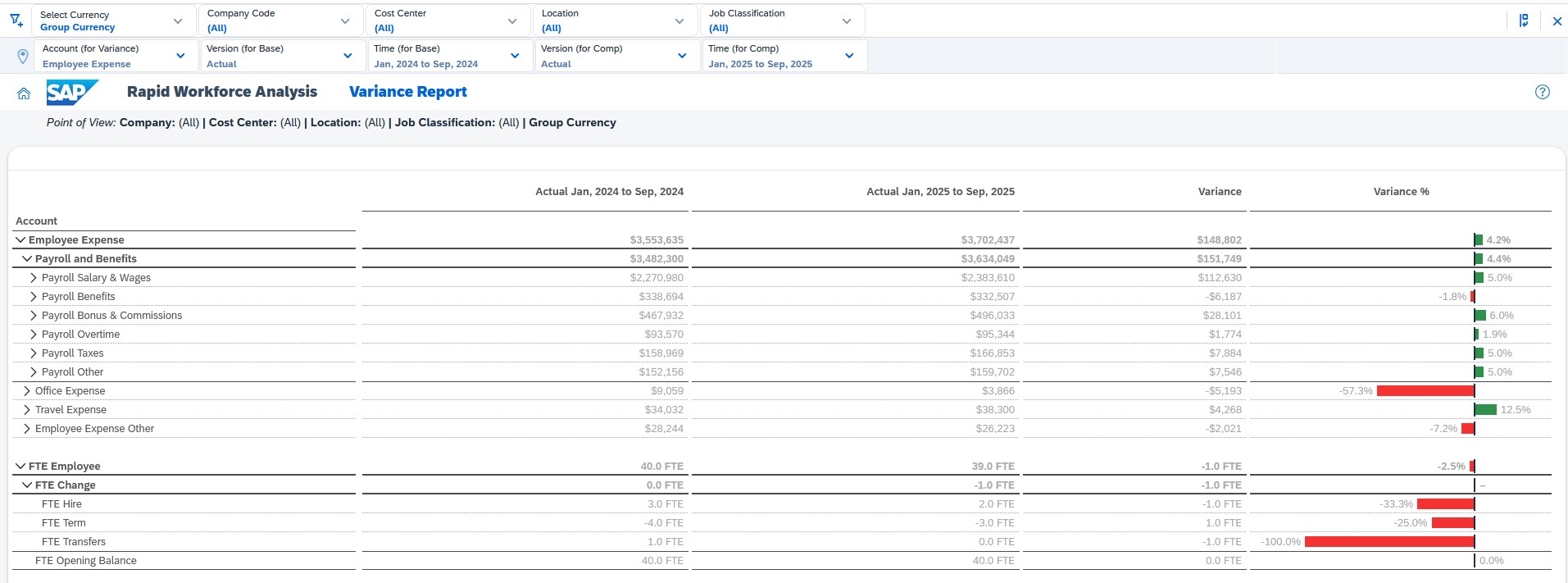
With Reporting, you can analyse actual results, explore details, compare actuals to budgets, use calculated measures, and run time-series analysis.
This tool uses Stories (Optimized Design Experience) for building interactive dashboards and management reports, Data Analyzer for flexible ad-hoc data exploration, and both Live and Import data models to connect either in real time to source systems(e.g., SAP S/4HANA, SAP BW) or to store data directly in SAP Analytics Cloud for extended planning and calculations.
Reporting capabilities in SAC
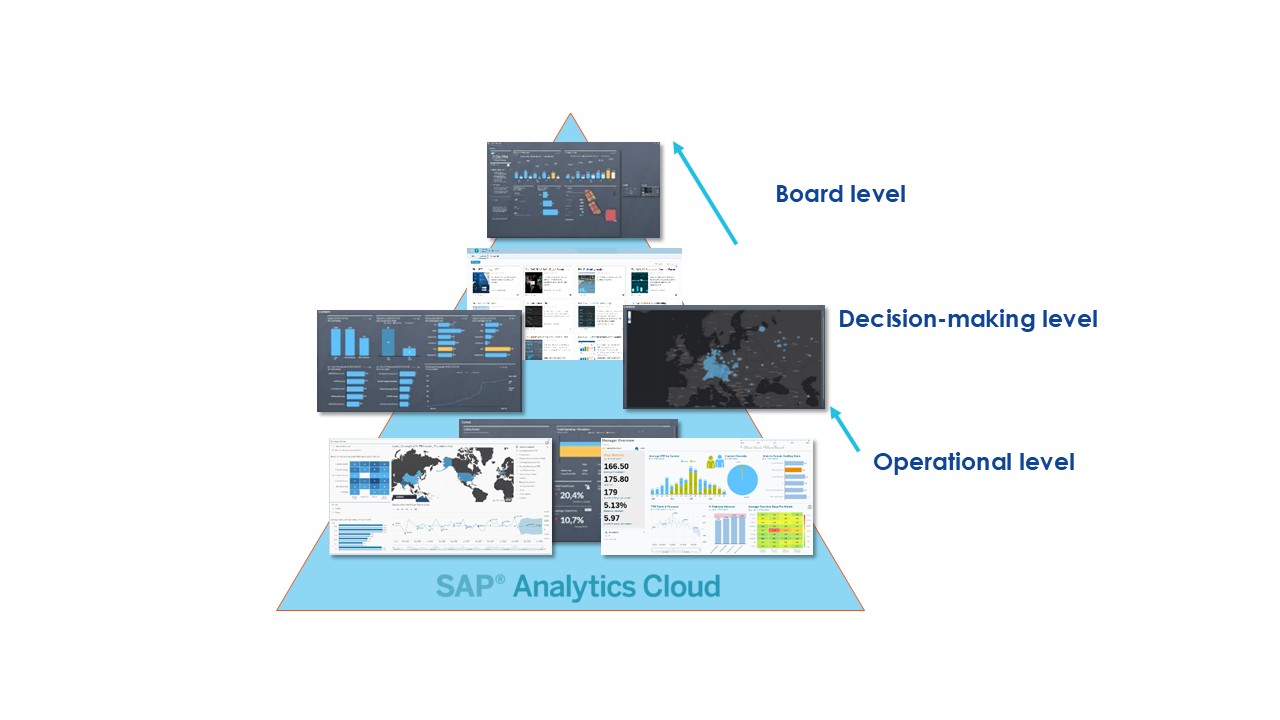
In SAP Analytics Cloud, Reporting works at three levels: operational, decision-making, and board.
Operational level
This level is for analysts and specialists in departments who need detailed analysis and data exploration.
Main tools:
-
Data Analyzer;
-
Grid / Responsive Tables;
-
Drill-down и Drill-through;
-
Variance Analysis;
-
Linked Analysis;
-
Filtering by metrics.
At this level, you can use hierarchies, measurement attributes, calculated indicators, and compare actuals to budgets. Here, it’s important to examine every detail.
Decision-making level
This level is for department heads and middle managers who use management dashboards. The main tools at this level are Stories (Optimized Design Experience) and Analytic Applications.
At this stage, the focus turns from details to:
-
KPI monitoring;
-
Consolidation of data from multiple models (Data Blending);
-
Time-series analysis;
-
Filter management via Input Controls.
Unlike the operational level, here data is organized around management questions, not just measurements. You can compare different plan versions, such as forecast, budget, and plan, use interactive filters, and switch between scenarios.
This level focuses on control and management decisions.
Board level
At the board level, SAP Analytics Cloud offers the SAP Digital Boardroom. This tool is made for executive meetings, letting users show strategic KPIs, use multi-screen displays, run interactive sessions, and move from summary indicators to detailed data in presentation mode.
Technically, Digital Boardroom uses the same Stories and data models but is set up for strategic displays.
At this level, users understand whether company goals are being met and how the business is changing overall.
Collaborative Enterprise Planning
Collaborative Enterprise Planning generates new data through allocations, calculations, and predictive AI models. It depends on strong connections to HR, finance, and operational systems.
Planning in SAP Analytics Cloud uses a planning model that adds features such as private and public versions, write-back, data actions, advanced formulas, allocations, currency conversion, and predictive forecast integration.
Planning supports so-called version-based planning where the user:
-
Creates a Private Version,
-
Changes planned values,
-
Runs calculations,
-
Publishes the result in the Public Version.
Predictive functions are integrated directly into the planning model.
You can run a Time Series Forecast directly in the planning table, save the forecast to the plan version, and use historical data. The forecast becomes part of the plan and is included in future calculations.
SAC supports planning in multiple currencies, currency translation, and intercompany eliminations. This keeps things consistent across countries, entities, and business units.
Key planning capabilities in SAC
-
Act quickly: With SAP Analytics Cloud, you get analysis, planning, forecasting, and reporting in one place. You can see results right away and make fast decisions based on real data.
-
Continuous interaction: With SAC planning tools, you can create and share private plan versions and discuss what-if scenarios before publishing. Once approved, versions can be merged or published as official plans.
-
Task distribution: SAC uses a Planning Calendar to manage the planning process. You can assign tasks, set approval stages, track progress, set deadlines, and use Data Locks. Because SAC is cloud-based, users can work from anywhere without installing software.
Typical steps in the planning cycle
SAP Analytics Cloud for Planning supports you and your team through every stage of the planning cycle, from conception to publication. The classic planning cycle in SAC for Planning consists of the following steps:
-
Prepare: Create/adjust planning model, set drivers & parameters, import master & actual data;
-
Schedule: Setup planning calendar, start processing & tasks, inform planners & reviewers;
-
Predict: Automated classification forecast, automated time series forecast, create planning proposition;
-
Plan: Plan input/adjustment, distribution & spreading, advanced formulas & allocations;
-
Visualize: Review data, Strategic vs Operational plan comparison, ACT vs. BUD comparison;
-
Finalize: Submit data, set data locks, forward data;
During the cycle, team members can work together by sharing stories, discussing ideas, and adding comments.
Closed loop: How Reporting and Planning integrate in SAC
SAC implements the closed-loop planning concept, where:
-
The user analyses actual data (Reporting).
-
Switches to Private Version (Planning).
-
Makes changes.
-
Launches Data Action or Predictive Forecast.
-
Immediately sees the result in the same Story.
SAC offers a full planning and analytics solution, enhanced with AI. Reporting and Planning share the same data model, so you don’t need to export to Excel, re-import data, or duplicate calculations.
SAC Planning is built into Reporting at every level. This lets analysts adjust data directly in tables, managers change scenarios in dashboards, and the board review different forecast versions. All changes are saved and instantly shown in reports. Insights from dashboards can trigger planning changes through data actions or simulations, creating a continuous loop from insight to action.
Instead of using scattered spreadsheets, organizations can work with shared master data, standardized dimensions, and centralized planning assumptions.
Ready-to-use workforce planning
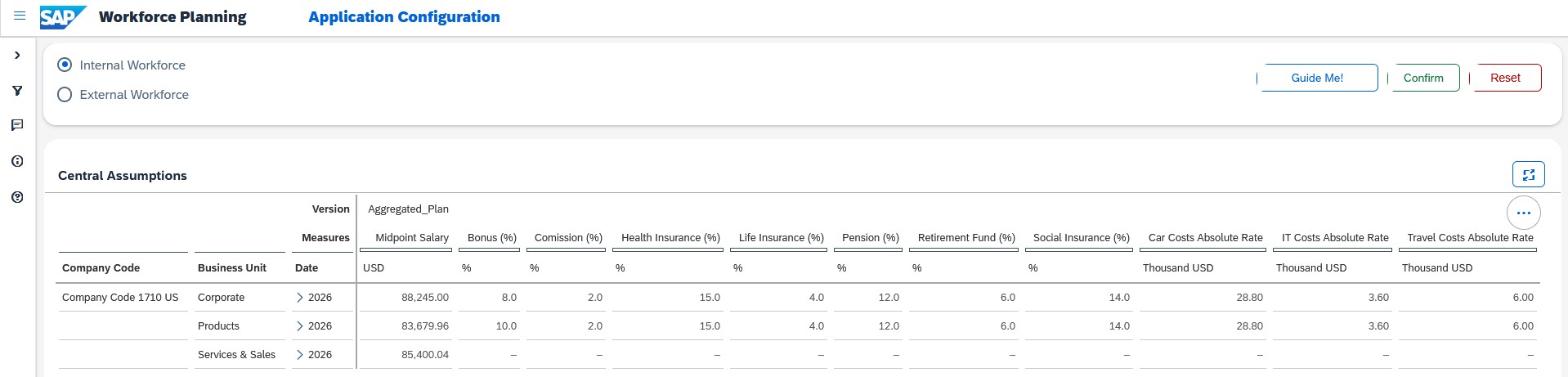
For Workforce Planning, SAP Analytics Cloud offers a prebuilt planning model that connects directly with SAP SuccessFactors and SAP S/4HANA.
This means you do not need to build a workforce planning model from scratch. The solution already understands:
This means you do not need to build a workforce planning model from scratch. The solution already understands:
-
Organizational structures;
-
Positions and employees;
-
Compensation components;
-
Cost centers and financial dimensions.
Because HR and Finance data are connected at the system level, headcount, salaries, bonuses, and employee-related expenses remain consistent across both domains.
Any workforce change, such as a new hire, promotion, transfer, or attrition, automatically updates the financial impact. Individual employee costs are added to cost centers, and cost center budgets match up with financial planning.
As a result:
-
HR and Finance work with the same data foundation;
-
No manual reconciliation between systems is required;
-
Planning cycles are faster;
-
Forecasts are more accurate.
Headcount planning
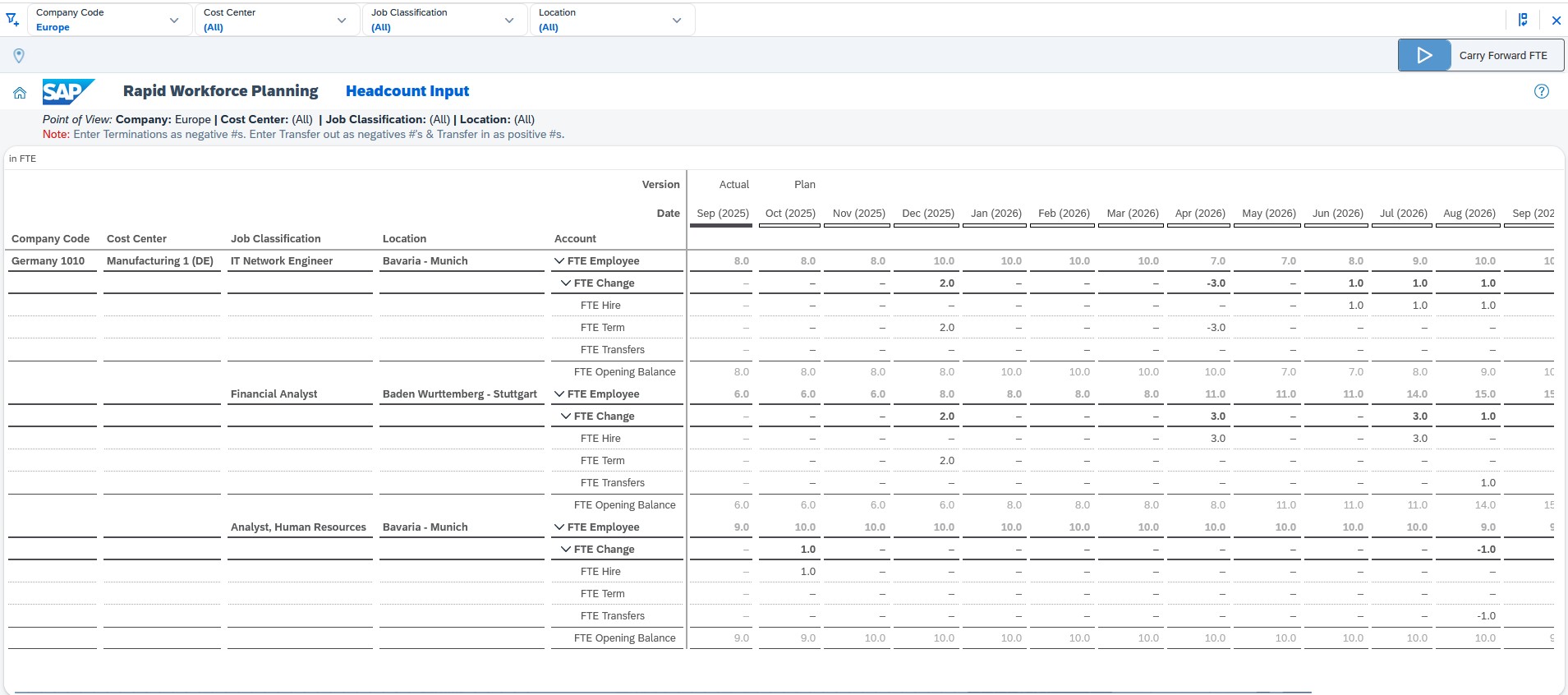
In SAP Analytics Cloud, workforce planning goes beyond counting employees. It helps you model how your workforce might change in the future. The plan is based on actual personnel events and management decisions.
The system allows you to:
-
Use ready-made templates for planning;
-
Automatically calculate FTE and total headcount;
-
Plan by position (specific roles);
-
Plan by FTE (staff capacity);
-
Take into account hires, transfers, and resignations;
-
Set assumptions (e.g., team growth or turnover rate);
If you change the number of hires or the turnover rate, the system automatically recalculates the total headcount. Headcount planning lets you see how management decisions will shape your future workforce.
Employee-related costs
Workforce planning in SAC covers not only salaries, but also includes bonuses, benefits, employer taxes, travel costs, office expenses, and training costs.
You can calculate the cost impact of different response scenarios. For example, hiring, restructuring, or cost-saving measures. And once the costs are calculated, they’re already prepared for financial planning. No manual rework needed. Instead of guessing, the planning here is based on historical data, so assumptions are grounded in reality.
For a detailed step-by-step walkthrough of the strategic workforce planning cockpit, see our full guide to workforce planning in SAP Analytics Cloud.
Predictive analytics in workforce planning
In SAP Analytics Cloud, forecasting tools are built right into the planning model. Forecasts aren’t created separately; they’re saved in the plan version and included in calculations right away.
SAC uses built-in machine learning algorithms. You don’t need to write code or know technical details. You set things up through the interface, and the system automatically analyses historical data. In workforce planning, this allows you to forecast staffing needs, assess future turnover, predict employee absences, and calculate the impact of personnel changes on costs.
Key forecasting methods
-
Classification: Determines the probability of an event occurring. For example, the probability of an employee being fired or a budget being exceeded.
-
Regression: Predicts numerical values and shows the factors that influence them. For example, which drivers have the strongest impact on the growth of personnel costs.
-
Time series forecast: Builds a forecast based on historical indicator dynamics. For example, an automatic forecast of headcount or payroll for future periods.
How to forecast in SAC
You can run the forecast directly in the planning table, and the result is recorded in the selected plan version.
After that, you can:
-
Adjust assumptions;
-
Run Data Action;
-
Compare scenarios;
-
Use the Simulate button to assess the impact of changes.
For example, if you change health insurance costs or the hiring plan, the system instantly shows the impact on payroll and operating profit. This helps you model the future and make data-informed decisions.
Benefits of SAP Analytics Cloud for workforce planning
-
Plan faster with less manual effort. Cut down weeks of spreadsheet work using automated calculations, built-in drivers, and ready-to-use workforce planning models.
-
Align Finance and HR with one set of numbers. Use a single, shared workforce plan instead of juggling disconnected files and assumptions across teams.
-
Test scenarios and see results right away. Compare hiring, downsizing, or restructuring options and instantly see how each one affects costs and forecasts.
-
Understand the full cost of workforce decisions. See the real impact of hires, salary changes, bonuses, benefits, country-specific allowances, and other factors before making final decisions.
-
Make confident decisions using real data. Build workforce plans on actual HR, planning, and financial data, so leadership has clear visibility and can trust the numbers.
Conclusion
Workforce planning is one of the most complex and interconnected processes in a company, as it directly impacts both operational activities and financial performance. In this context, SAP Analytics Cloud addresses this challenge through a unified architecture in which analytics, planning, and forecasting operate on a shared data model. This system enables users to not only analyse actual metrics but also to immediately model scenarios, assess the financial impact of changes, and make informed decisions.
FAQ
How does SAP Analytics Cloud connect HR and finance for workforce planning?
SAP Analytics Cloud integrates HR and finance through a unified data model and direct integrations with SAP enterprise systems.
The system integrates with SAP SuccessFactors (the source of HR data) and SAP S/4HANA (the source of financial metrics, budgets, and cost centers). Consequently, HR changes are automatically reflected in the financial plan, and headcount, salary, and bonus data are synchronized without manual review or data export. SAC serves as a unified Enterprise Planning platform.
What is closed-loop planning in SAP Analytics Cloud?
Closed-loop planning is a management cycle in which analysis and planning occur in the same place and at the same time.
In SAP Analytics Cloud, the process goes like this: first, the user analyzes the actual data (Reporting/BI), then switches to the Private Version of the plan, makes changes, runs calculations or a predictive forecast, and instantly sees the result in the same report.
How does SAP Analytics Cloud calculate workforce costs?
SAP Analytics Cloud automatically calculates personnel costs based on HR data and built-in financial drivers.
The system considers base salary, bonuses, employer taxes, benefits, training, travel expenses, and office expenses. In the event of a change in the employee’s status, such as a new hire, promotion, transfer, or termination, SAC automatically recalculates the employee’s cost, allocates the expenses to the appropriate cost center, and updates the financial plan. Calculations are performed using standard SAP Enterprise Planning mechanisms, including planning models, data actions, allocations, and predictive forecasting.
Can SAP Analytics Cloud handle both reporting and planning?
Yes. That is one of the key features of SAP Analytics Cloud.
How does SAP Analytics Cloud eliminate data silos in workforce planning?
Data silos emerge when different departments, such as HR, Finance, and business units, use different systems and data versions.
SAP Analytics Cloud eliminates this issue by providing a unified, cloud-based planning repository, a common master data model, direct integrations with SAP HR and ERP systems, and collaborative work among users within a single environment.
Subscribe